
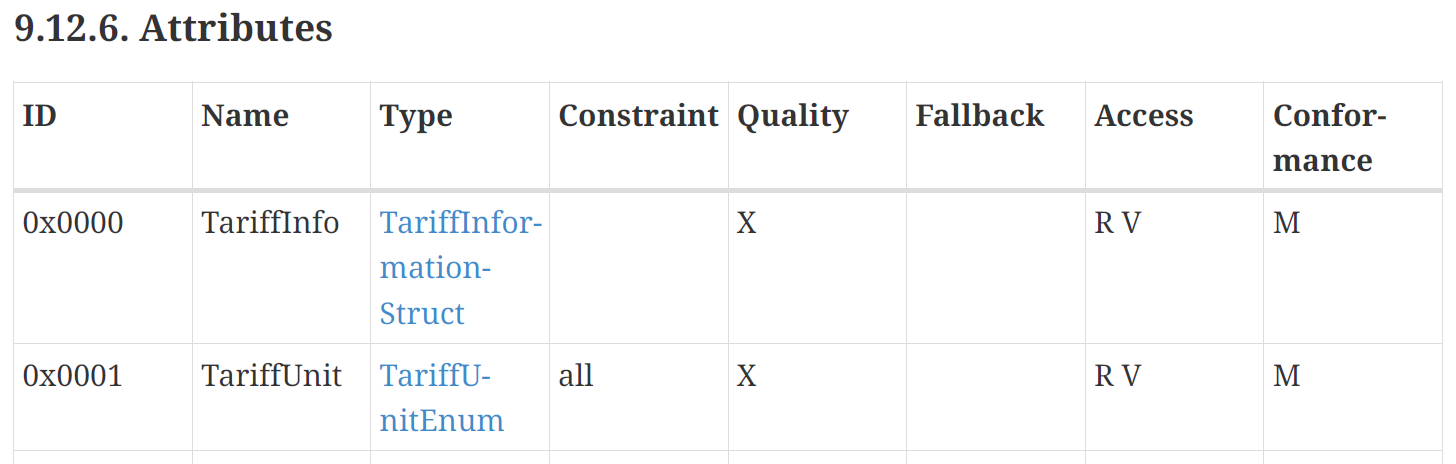
With the release of Matter 1.5, it added a new Cluster called the Commodity Tariff cluster (9.12)
This cluster exposes tariff information through a predicable structure. This information could then be used by your Dishwasher, your EV charger, your Home Energy Management system etc. The options are endless.
As Matter 1.5 has just been released (and most devices are still on 1.3) and there is no commercial support, I decided to have a go at implementing my own.
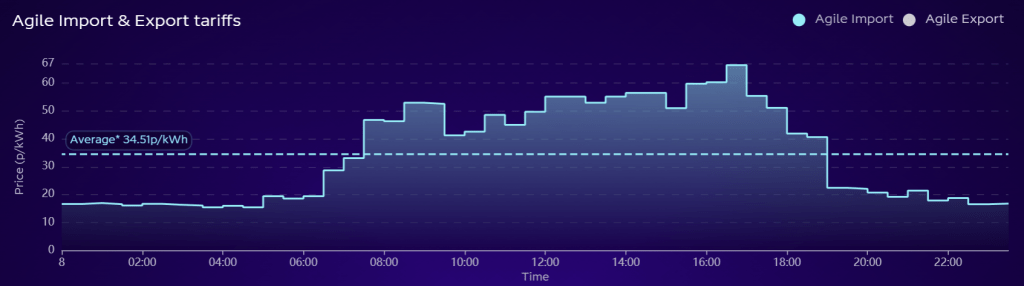
For this project, I opted to use the Octopus Energy Agile tariff. This is a special tariff based on wholesale prices. It changes from day to day and gives different prices throughout the day. Something like this is perfect for an automated system.
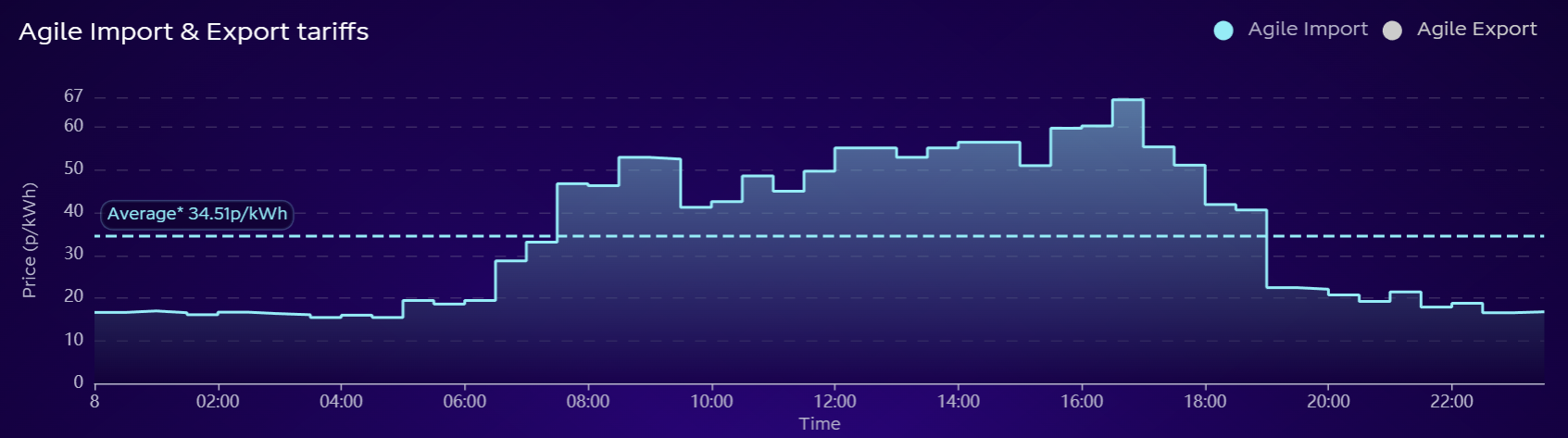
To give you an example, here is a screenshot from https://agile.octopushome.net/historical-data. It shows the import and export prices in 30 minute slots.

Wholesale electricity prices are published every day around 4pm UK time. Each time this happens, new Agile prices are made available. For my experimenting, I’ll be using the fixed date.
Hopefully, you can imagine how a Home Energy Management system might make use of this data. By knowing when the prices are lowest, it can change how your appliances/EV/solar/battery behave to keep costs down. In this demo video, I show how a Matter Device Energy Manager changes the start time of an appliance automatically.
In this Demo, I was using hard-coded tariff pricing.
If I can use the new Commodity Tariff cluster, I could use actual tariff data!
Hardware
For this project, I’m using an ESP32-C6 DevKit from Waveshare. All my code is written on the ESP-IDF and ESP-Matter SDKs.
Getting data from Octopus
The first step is actually getting the pricing data from Octopus. Thankfully, they make all this data available, without authentication.
Step 1, finding the right product:
https://api.octopus.energy/v1/products/This returns a list of their current production. I picked Agile Octopus October 2024 v1 as it was at the top of the list. This list also includes a details endpoint for each tariff, in this case
https://api.octopus.energy/v1/products/AGILE-24-10-01/GET’ing this returns more information about the individual tariff, along with the URLs for unit rates and standing charges! I’m only interested in unit pricing and the URL looked like this
https://api.octopus.energy/v1/products/AGILE-24-10-01/electricity-tariffs/E-1R-AGILE-24-10-01-A/standard-unit-rates/I did a GET from this and it yielded a pile of pricing
{
    "count": 21744,
    "next": "https://api.octopus.energy/v1/products/AGILE-24-10-01/electricity-tariffs/E-1R-AGILE-24-10-01-A/standard-unit-rates/?page=2",
    "previous": null,
    "results": [
        {
            "value_exc_vat": 15.06,
            "value_inc_vat": 15.813,
            "valid_from": "2025-12-12T22:30:00Z",
            "valid_to": "2025-12-12T23:00:00Z",
            "payment_method": null
        },
        {
            "value_exc_vat": 16.1,
            "value_inc_vat": 16.905,
            "valid_from": "2025-12-12T22:00:00Z",
            "valid_to": "2025-12-12T22:30:00Z",
            "payment_method": null
        },
        {
            "value_exc_vat": 15.96,
            "value_inc_vat": 16.758,
            "valid_from": "2025-12-12T21:30:00Z",
            "valid_to": "2025-12-12T22:00:00Z",
            "payment_method": null
        },
As you can see, these correspond to the 30-minute slots we saw in the screenshot above.
Making a HTTP request
The next step was figuring out how to perform a HTTP request from an ESP32. I’d setup a few HTTP Servers on ESP32, but never a client.
To get me started, I decided to just ignore the Matter side of things and just fetch the data. This involved connecting to WiFi and then executing a GET request. I started with WiFi
ESP_ERROR_CHECK(esp_netif_init());
ESP_ERROR_CHECK(esp_event_loop_create_default());

wifi_init_config_t cfg = WIFI_INIT_CONFIG_DEFAULT();
ESP_ERROR_CHECK(esp_wifi_init(&cfg));

esp_netif_inherent_config_t esp_netif_config = ESP_NETIF_INHERENT_DEFAULT_WIFI_STA();
esp_netif_create_wifi(WIFI_IF_STA, &esp_netif_config);
esp_wifi_set_default_wifi_sta_handlers();

ESP_ERROR_CHECK(esp_wifi_set_storage(WIFI_STORAGE_RAM));
ESP_ERROR_CHECK(esp_wifi_set_mode(WIFI_MODE_STA));
ESP_ERROR_CHECK(esp_wifi_start());

wifi_config_t wifi_config = {
    .sta = {
        .ssid = CONFIG_EXAMPLE_WIFI_SSID,
        .password = CONFIG_EXAMPLE_WIFI_PASSWORD,
    }
};

ESP_ERROR_CHECK(esp_event_handler_register(IP_EVENT, IP_EVENT_STA_GOT_IP, &on_sta_got_ip, NULL));
ESP_ERROR_CHECK(esp_event_handler_register(IP_EVENT, IP_EVENT_GOT_IP6, &on_sta_got_ipv6, NULL));

ESP_LOGI(TAG, "Connecting to %s...", wifi_config.sta.ssid);
ESP_ERROR_CHECK(esp_wifi_set_config(WIFI_IF_STA, &wifi_config));
esp_err_t ret = esp_wifi_connect();
if (ret != ESP_OK)
{
    ESP_LOGE(TAG, "WiFi connect failed! ret:%x", ret);
}
There is a lot of setup required for WiFi!
Next, I butchered the esp_http_client example to implement the HTTP GET. This example lives here:
esp-idf/examples/protocols/esp_http_clientThis essentially involved defining a large buffer and kicking off a HTTP GET. I use a malloc to ensure the buffer is on the heap.
char *local_response_buffer = (char *)malloc(MAX_HTTP_OUTPUT_BUFFER + 1);

esp_http_client_config_t config = {
    .url = "https://api.octopus.energy/v1/products/AGILE-24-10-01/electricity-tariffs/E-1R-AGILE-24-10-01-A/standard-unit-rates/",
    .event_handler = _http_event_handler,
    .user_data = local_response_buffer,
    .crt_bundle_attach = esp_crt_bundle_attach,
};

esp_http_client_handle_t client = esp_http_client_init(&config);
esp_err_t err = esp_http_client_perform(client);
The _http_event_handler I copied almost directly from the sample.
If the esp_http_client_perform method resulted in an ESP_OK, I then parsed the local_response_buffer into JSON.
cJSON *root = cJSON_Parse(local_response_buffer);

if (root == NULL)
{
    ESP_LOGE(TAG, "Failed to parse JSON");
    return;
}
To check I had some data, I grabbed two of the values and logged them out.
const cJSON *countJSON = cJSON_GetObjectItemCaseSensitive(root, "count");
ESP_LOGI(TAG, "Count: %d", countJSON->valuedouble);

const cJSON *nextJSON = cJSON_GetObjectItemCaseSensitive(root, "next");
ESP_LOGI(TAG, "Next: %s", nextJSON->valuestring);
Amazingly, this worked!

The count I got back didn’t match the value I got in Postman, because I was using %d. (I didn’t realise this at the time)

The Commodity Tariff Cluster
To expose Tariff data to the Matter network, I needed to implement the new Commodity Tariff Cluster.

This cluster is huge! It has 18 attributes, all of which are mandatory. This is easily the most complicated cluster I’ve encountered so far.
Under this section of the specification, there are examples of tariffs. I decided I would start with the Flat Rate, rather than jumping to something crazy!

I’m not 100% sure how to read this, but I think it goes something like this:
We use the CalendarPeriods to determine which DayPattern applies. We only have one CalendarPeriod, so that applies from now.
The DayPattern will then tell us what DayEntry to use. Our Pattern covers every day of the week, so it doesn’t matter. Our DayEntry starts at midnight, so that doesn’t matter either.
Using the DayEntry, we can find the TariffPeriod we are in and from that, we can load the TariffComponent. This yields a simple Price.
Implementing in code
To start, I defined my own type, inheriting from the CommodityTariff::Delegate type.
namespace Clusters
{
    namespace CommodityTariff
    {
        class SimpleTariffDelegate : public Delegate
        {
        public:
            SimpleTariffDelegate();
            ~SimpleTariffDelegate() = default;
        };
    }
}
I then created an instance of the cluster. I also enabled the PRICING feature as the cluster requires one feature.
static SimpleTariffDelegate commodity_tariff_delegate;

esp_matter::cluster::commodity_tariff::config_t commodity_tariff_config;
commodity_tariff_config.delegate = &commodity_tariff_delegate;
commodity_tariff_config.feature_flags = esp_matter::cluster::commodity_tariff::feature::pricing::get_id();

cluster_t *cluster = esp_matter::cluster::commodity_tariff::create(endpoint, &commodity_tariff_config, CLUSTER_FLAG_SERVER);

ABORT_APP_ON_FAILURE(cluster != nullptr, ESP_LOGE(TAG, "Failed to create commodity_tariff cluster"));
With my delegate wired up, I then moved to setting some data on the cluster. To do this, I added some code to my SimpleTariffDelegate‘s constructor.
SimpleTariffDelegate::SimpleTariffDelegate()
{
  ESP_LOGI(TAG, "SimpleTariffDelegate");

  // Tariff Info
  auto& tariffInfo = GetTariffInfo();

  Structs::TariffInformationStruct::Type info;
  info.tariffLabel = DataModel::MakeNullable(CharSpan::fromCharString("Simple Tariff"));
  info.providerName = DataModel::MakeNullable(CharSpan::fromCharString("Watt's Up Power Co"));

  Globals::Structs::CurrencyStruct::Type currency;
  currency.currency = 826;
  currency.decimalPoints = 2;

  info.currency = MakeOptional(DataModel::MakeNullable(currency));
  info.blockMode = DataModel::MakeNullable(BlockModeEnum::kNoBlock);
  tariffInfo.SetNonNull(info);

  // Tariff Unit
  auto& tariffUnit = GetTariffUnit();
  tariffUnit.SetNonNull(TariffUnitEnum::kKWh);
}
Let’s walk through this. I’m dealing with the first two attributes defined on this cluster.
Tariff Info
This attribute contains helpful info about the tariff, like its name and currency. I use “Simple Tariff” as the name and “Watt’s Up Power Co” as the provider. What’s life without a little whimsy 🙂
Next, I set the currency. This is the ISO code, which I got from Wikipedia.

Finally, there is BlockMode. I’ve no clue what this means, so I set it to NoBlock. I’ll revisit this.
Tariff Unit
I think is the unit that you’re billed against. I used kWh as that’s standard here in the UK.
First Test
To perform my initial test, I used the chip-tool to read the tariff info
chip-tool commoditytariff read tariff-info 0x02 0x01I got back a nice data structure!
[1767854106.118] [4036039:4036069] [TOO]   TariffInfo: {
[1767854106.119] [4036039:4036069] [TOO]     TariffLabel: Simple Tariff
[1767854106.119] [4036039:4036069] [TOO]     ProviderName: Watt's Up Power Co
[1767854106.119] [4036039:4036069] [TOO]     Currency: {
[1767854106.119] [4036039:4036069] [TOO]       Currency: 826
[1767854106.119] [4036039:4036069] [TOO]       DecimalPoints: 2
[1767854106.119] [4036039:4036069] [TOO]      }
[1767854106.119] [4036039:4036069] [TOO]     BlockMode: 0
[1767854106.165] [4036039:4036069] [TOO]    }
Building the Simple Tariff
With some basic clusters up and running, I worked through the Flat Rate example.
Start Date
I set this to the beginning of January.
auto &startDateAttr = GetStartDate();
startDateAttr.SetNonNull(1767225600); // 1/1/2026
DayEntries
This Attribute is a List, but only one entry is required for the Flat Rate

 auto &dayEntriesAttr = GetDayEntries();

static CommodityTariff::Structs::DayEntryStruct::Type dayEntries[1];
dayEntries[0].dayEntryID = 0x19;
dayEntries[0].startTime = 0;
    dayEntriesAttr.SetNonNull(DataModel::List<CommodityTariff::Structs::DayEntryStruct::Type>(dayEntries, 1));
DayPatterns
Again, a single entry, pointing to the DayEntryID
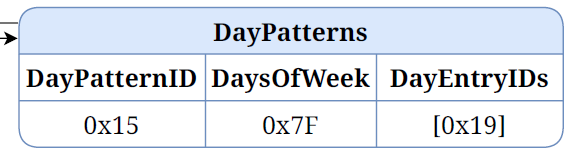
auto &dayPatternsAttr = GetDayPatterns();

static CommodityTariff::Structs::DayPatternStruct::Type dayPatterns[1];
dayPatterns[0].dayPatternID = 0x15;
dayPatterns[0].daysOfWeek = static_cast<chip::BitMask<CommodityTariff::DayPatternDayOfWeekBitmap>>(0x7F);

auto *dayEntryIDs = static_cast<uint32_t *>(Platform::MemoryCalloc(1, sizeof(uint32_t)));
dayEntryIDs[0] = 0x19;

dayPatterns[0].dayEntryIDs = DataModel::List<uint32_t>(dayEntryIDs, 1);
    dayPatternsAttr.SetNonNull(DataModel::List<CommodityTariff::Structs::DayPatternStruct::Type>(dayPatterns, 1));
CalendarPeriods
Again, a single entry, pointing to the DayPatternID
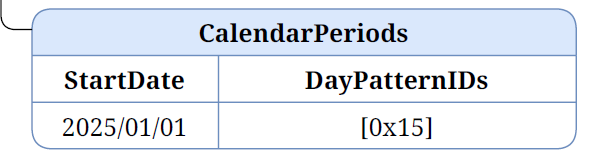
// Calendar Periods
auto &calendarPeriodsAttr = GetCalendarPeriods();

static CommodityTariff::Structs::CalendarPeriodStruct::Type calendarPeriods[1];
calendarPeriods[0].startDate = 1767225600; // 1/1/2026

auto *dayPatternIDs = static_cast<uint32_t *>(Platform::MemoryCalloc(1, sizeof(uint32_t)));
dayPatternIDs[0] = 0x15;

calendarPeriods[0].dayPatternIDs = DataModel::List<uint32_t>(dayPatternIDs, 1);
    calendarPeriodsAttr.SetNonNull(DataModel::List<CommodityTariff::Structs::CalendarPeriodStruct::Type>(calendarPeriods, 1));
TariffComponents
A little more complicated, with a price element.

auto &tariffComponentsAttr = GetTariffComponents();

static CommodityTariff::Structs::TariffComponentStruct::Type tariffComponents[1];
tariffComponents[0].tariffComponentID = 0x29;

CommodityTariff::Structs::TariffPriceStruct::Type price;
price.priceType = Globals::TariffPriceTypeEnum::kStandard;
price.price = MakeOptional(1000);

tariffComponents[0].price = MakeOptional(DataModel::MakeNullable(price));
tariffComponents[0].threshold = 0;
    tariffComponentsAttr.SetNonNull(DataModel::List<CommodityTariff::Structs::TariffComponentStruct::Type>(tariffComponents, 1));
TariffPeriods
This attribute tied everything together.
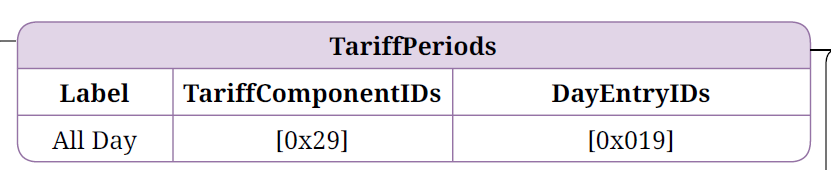
 auto &tariffPeriodsAttr = GetTariffPeriods();

static CommodityTariff::Structs::TariffPeriodStruct::Type tariffPeriods[1];
tariffPeriods[0].label  = DataModel::MakeNullable(CharSpan::fromCharString("All Day"));

dayEntryIDs = static_cast<uint32_t *>(Platform::MemoryCalloc(1, sizeof(uint32_t)));
dayEntryIDs[0] = 0x19;

tariffPeriods[0].dayEntryIDs = DataModel::List<uint32_t>(dayEntryIDs, 1);

auto *tariffComponentIDs = static_cast<uint32_t *>(Platform::MemoryCalloc(1, sizeof(uint32_t)));
tariffComponentIDs[0] = 0x29;

tariffPeriods[0].tariffComponentIDs = DataModel::List<uint32_t>(tariffComponentIDs, 1);
    tariffPeriodsAttr.SetNonNull(DataModel::List<CommodityTariff::Structs::TariffPeriodStruct::Type>(tariffPeriods, 1));
Modeling the Octopus Agile Tariff
With the simple tariff out of the way, I decided to move onto the more complex Agile Tariff.
My initial reaction was *geez Rick, this is going to complicated*, but as started, I had a change of heart! It was more straight forward that I thought.
Fundamentally, the tariff represents the prices over a single 24-hour timeframe, which is broken into 48 30-minute periods.
The 30-minute periods never change. The 30-minute periods are always the same, regardless of the day of the week. The only thing that changes is the price of each of those periods. That means we can define the structure *once* and update the prices each day.
DayEntries
We need 48 DayEntry values, one for each 30-minute slot. I numbered them from 100 to 147.
auto &dayEntriesAttr = GetDayEntries();

// There are 48 30-minute slots in a 24 hour period day.
static CommodityTariff::Structs::DayEntryStruct::Type dayEntries[48];

for (uint32_t i = 0; i < 48; i++)
{
    dayEntries[i].dayEntryID =  100 + i;
    dayEntries[i].startTime = i * 30;
}

dayEntriesAttr.SetNonNull(DataModel::List<CommodityTariff::Structs::DayEntryStruct::Type>(dayEntries, 48));
DayPatterns
Each day as the same pattern – it’s broken into 48 30-minutes slots. This means we only need *one* DayPattern. This DayPattern will include the 48 DayEntry records.
auto &dayPatternsAttr = GetDayPatterns();

static CommodityTariff::Structs::DayPatternStruct::Type dayPatterns[1];
dayPatterns[0].dayPatternID = 0x01;
dayPatterns[0].daysOfWeek = static_cast<chip::BitMask<CommodityTariff::DayPatternDayOfWeekBitmap>>(0x7F);

auto *dayEntryIDs = static_cast<uint32_t *>(Platform::MemoryCalloc(48, sizeof(uint32_t)));

for (uint32_t i = 0; i < 48; i++)
{
    dayEntryIDs[i] = 100 + i;
}

dayPatterns[0].dayEntryIDs = DataModel::List<uint32_t>(dayEntryIDs, 48);
    dayPatternsAttr.SetNonNull(DataModel::List<CommodityTariff::Structs::DayPatternStruct::Type>(dayPatterns, 1));
CalendarPeriods
We’re only covering today, so we just have one CalendarPeriod, which points to the single DayPattern. At this point, I’m not sure how the startDate of this period is relevant.
TariffComponents
This holds the price, so we need one of these for each half hour period. I number from them 200 to 247. I’m also using a price of 0 to start me off.
auto &tariffComponentsAttr = GetTariffComponents();

static CommodityTariff::Structs::TariffComponentStruct::Type tariffComponents[48];

CommodityTariff::Structs::TariffPriceStruct::Type price;
price.priceType = Globals::TariffPriceTypeEnum::kStandard;
price.price = MakeOptional(0);

for (uint32_t i = 0; i < 48; i++)
{
    tariffComponents[i].tariffComponentID = 200 + i;
    tariffComponents[i].price = MakeOptional(DataModel::MakeNullable(price));
    tariffComponents[i].threshold = 0;
}
    tariffComponentsAttr.SetNonNull(DataModel::List<CommodityTariff::Structs::TariffComponentStruct::Type>(tariffComponents, 48));
TariffPeriods
Finally, we need to link each DayEntry with the corresponding price.
auto &tariffPeriodsAttr = GetTariffPeriods();

static CommodityTariff::Structs::TariffPeriodStruct::Type tariffPeriods[48];
tariffPeriods[0].label = DataModel::MakeNullable(CharSpan::fromCharString("Octopus Agile"));

// Connect each dayEntry with the corresponding tariff component.
//
for (uint8_t i = 0; i < 48; i++)
{
     dayEntryIDs = static_cast<uint32_t *>(Platform::MemoryCalloc(1, sizeof(uint32_t)));
    dayEntryIDs[0] = 100 + i;

    tariffPeriods[i].dayEntryIDs = DataModel::List<uint32_t>(dayEntryIDs, 1);

    auto *tariffComponentIDs = static_cast<uint32_t *>(Platform::MemoryCalloc(1, sizeof(uint32_t)));
    tariffComponentIDs[0] = 200 + i;

    tariffPeriods[i].tariffComponentIDs = DataModel::List<uint32_t>(tariffComponentIDs, 1);
}

tariffPeriodsAttr.SetNonNull(DataModel::List<CommodityTariff::Structs::TariffPeriodStruct::Type>(tariffPeriods, 48));
This links DayEntry 100 to TariffComponent 200 and so on.
We have 48 of these, one for each half hour slot.
Adding Prices!
With our Tariff defined, the next step was using the *actual* prices from the call to Octopus.
To reduce the amount of noise, I added a time constraint to the prices URL.
?period_from=2026-01-02T00:00Z&period_to=2026-01-03T00:00ZThis yielded the expected 48 prices
{
    "count": 48,
    "next": null,
    "previous": null,
    "results": [
        {
            "value_exc_vat": 16.17,
            "value_inc_vat": 16.9785,
            "valid_from": "2026-01-02T23:30:00Z",
            "valid_to": "2026-01-03T00:00:00Z",
            "payment_method": null
        },
        {
            "value_exc_vat": 18.22,
            "value_inc_vat": 19.131,
            "valid_from": "2026-01-02T23:00:00Z",
            "valid_to": "2026-01-02T23:30:00Z",
            "payment_method": null
        },
        ...46 more here...
}
I now just needed to work out which price went to which DayEntry. Once I had the appropriate index, I could update the corresponding price.
To perform this, I first needed to turn the *time* into an Epoch.
strptime(validFromJSON->valuestring, "%Y-%m-%dT%H:%M:%SZ", &ts);This parsed the strings like 2026-01-02T23:30:00Z into something better understood.
I then converted the (hour and minute) into a total number of minutes, which would match the startTime.
uint16_t startTime = (ts.tm_hour * 60) + ts.tm_min;I then looped through the dayEntries to find the one with the same startTime. Once I knew the index of the matching startTime, I had the index of the corresponding tariffComponent.
for (int i = 0; i < dayEntriesAttr.Value().size(); i++)
{
  if (dayEntriesAttr.Value()[i].startTime == startTime)
  {
    ESP_LOGI(TAG, "Updating price at %d", i);
    tariffComponentsAttr.Value()[i].price.Value().Value().price = MakeOptional(valueIncVatJSON->valueint);
    break;
  }
}
I then update the price!
Triggering the call to Octopus
The agile tariff should be loaded once a day when the new wholesale prices are released. For this first pass, I didn’t bother.
Instead, I added a shell command.
ESP_LOGI(TAG,"Enabling CHIP SHELL");

static const esp_matter::console::command_t tariff_command = {
    .name = "tariffs",
    .description = "Tariff commands. Usage: matter esp tariff <tariff_command>.",
    .handler = tariff_dispatch,
};

static const esp_matter::console::command_t tariff_commands[] = {
    {
        .name = "fetch",
        .description = "Fetches the Octopus Agile prices.",
        .handler = fetch_prices_trigger,
    }};

tariff_console.register_commands(tariff_commands, sizeof(tariff_commands) / sizeof(esp_matter::console::command_t));

esp_matter::console::add_commands(&tariff_command, 1);

esp_matter::console::init();
This meant I could execute the load from the console by using this command
matter esp tariff fetchNot perfect, but enough to get me started.
Testing it out
There are no commercial devices that use this cluster at present. I could use chip-tool to query the attributes, but this just returned walls of text!
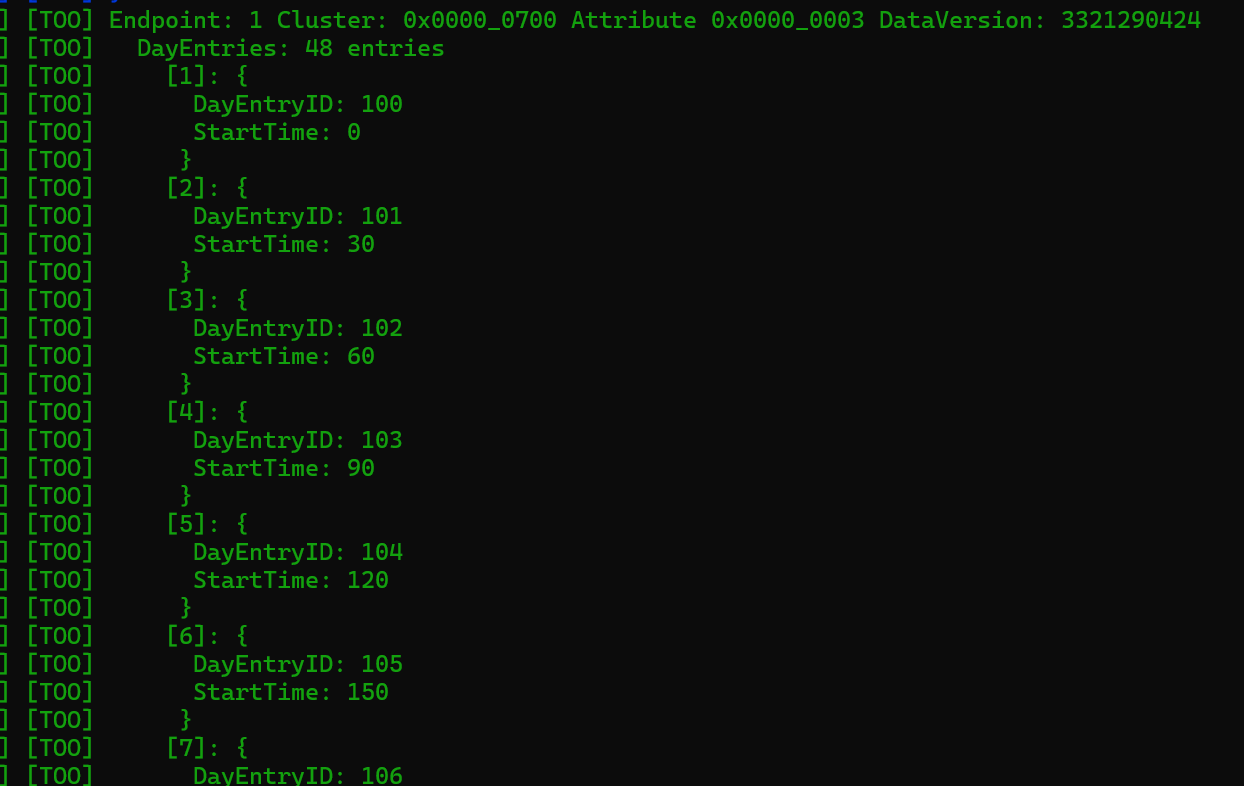
To visualize the pricing, I made some changes to my existing Javascript powered Home Energy Manager. I had to implement crude support for the CommodityTariff cluster myself as matter-js as it doesn’t support Matter 1.5 (I’m using version 0.15.6)

Whilst not as pretty as the Octopus Graph, it matches up!
What’s missing?
It’s amazing to see this working end to end, but it’s far from complete.
Firstly, I’m fetched data from Octopus for a fixed date. I’m also not automatically refreshing for the *next* day. This would require the addition of a CalendarPeriod to hold tomorrow.
Secondly, I’m triggering the data fetch manually and for a fixed date. In reality, this should happen on a schedule for the current & following day. The API will only return what it has.
Lastly, the tariff I’m using is fixed to Agile, but Octopus offer dozens of tariffs. There is no reason a different tariff couldn’t be used here. For me, I use Octopus Go, which can also be handled.
It’s also worth pointing out, that the standard examples for this Cluster show a Begin Update/End Update pattern. I’m missing that completely from my example.
Code
The code for the gateway side of this project is available at Github
https://github.com/tomasmcguinness/matter-esp32-octopus-energy-gateway
For the Energy Manager, you’ll find it here (you may need to use the custom-commodity-tariff-cluster branch)
tomasmcguinness/matter-js-energy-manager
Summary
This post covered quite a lot.
I showed how to get tariff pricing from Octopus via their rest API.
I then demonstrated how to populate the Commodity Tariff Cluster with the Flat Rate tariff example. After that, I showed how to put the full Agile tariff information into the cluster.
I have a little more work to do on the Energy Manager side. Once I do, I will making a YouTube video to demonstrate all this.
Did you like reading this post?
If you found this blog post useful and want to say thanks, you’re welcome to buy me a coffee. Better yet, why not subscribe to my Patreon so I can continue making tinkering and sharing.
Be sure to check out my YouTube Channel too – https://youtube.com/tomasmcguinness
Thanks, Tom!
 @tomasmcguinness
Leave a comment