

Whilst I wait to take delivery of the PCBs for my Zigbee F.A.R.T. sensor project, I returned my attention to my Matter switch project.
I had great success reducing the power consumption of my Zigbee sensor. I now wanted to see what I what was possible with the ESP32-C6.
Sleep Modes
Like the Nordic nRF62840, there C6 has different sleep modes. From the Seeed website, their XIAO ESP32-C6 give some expected currents.

As I’m hoping for 6 to 12 months on a battery, consumption needs to be no more than ~220µA. That rules out Modem-sleep and Light-sleep! Deep sleep’s consumption is tiny and leaves lots of head room for the capacitive button’s quiescent current (of which I’m expecting a lot!)
Quiescent is a fancy word for the power it will use it’s not doing anything.
I already had some working code, so I fired that up and measured the power consumption using my PPK2. The average was 63mA with peaks of 650mA. The profile of the power consumption didn’t look like something that was asleep! Maybe a Bluetooth beacon broadcasting? Either way, consumption was far too high!
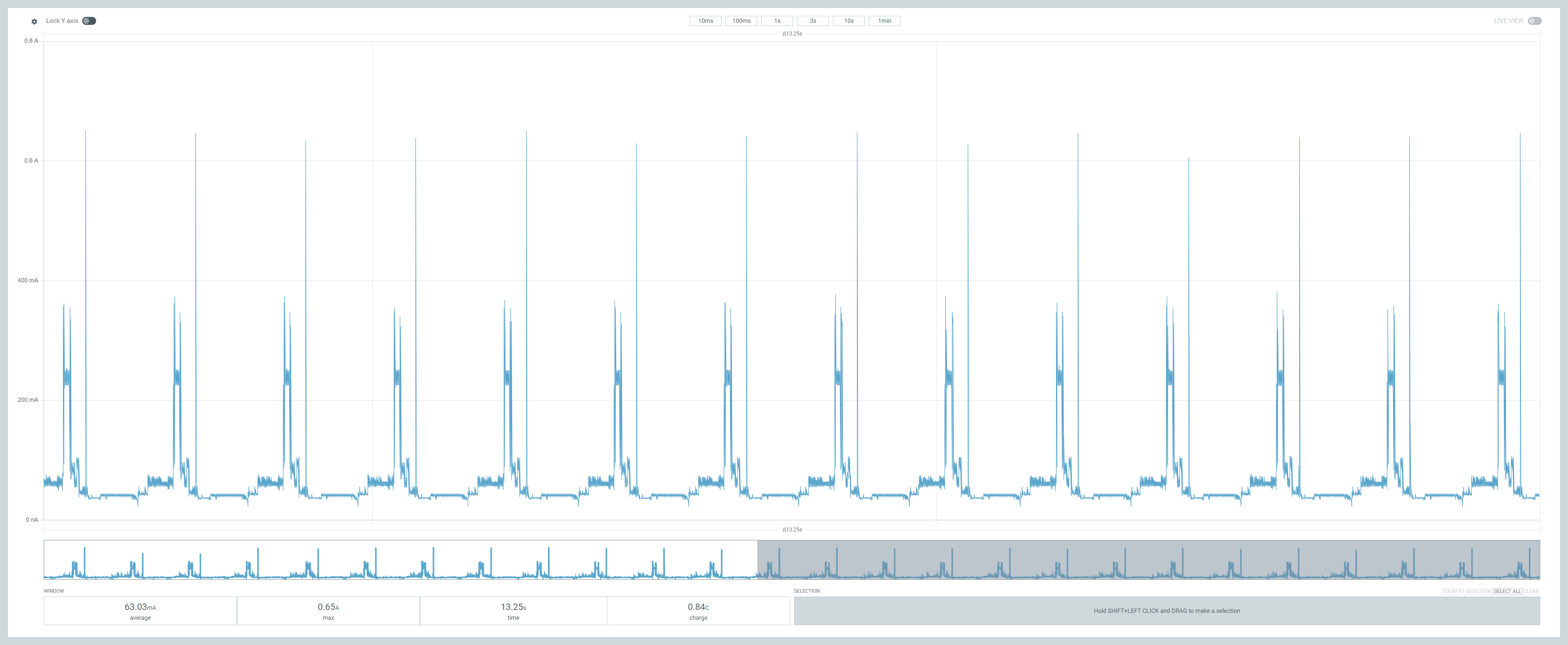
I decided to follow the same pattern as I did with the 52840 and start with a simple example.
ESP offer an example for an intermittent connected device (ICD) which is Matter’s low power version. It’s called icd_app. I decided to flash that onto the chip and take some measurements.
The consumption pattern was exactly the same. This is contrary to the expectation set by the sample code itself. Which made me think, perhaps the XIAO board needs more setup, just like the nRF52840 did?
Going even simpler!
I decided to try an even simpler sample – the ESP-IDF deep_sleep one. This should put the chip into a deep sleep, waking it every 20 seconds through the use of a timer.
Thankfully, this is what appears to happen, but the consumption was still *very* high.

During the periods when the CPU should be asleep, the power consumption was still over 300µA. That’s 20 times more than the expect consumption of 15µA.

Another user reported this very high consumption during deep sleep, so I wasn’t alone:
https://github.com/espressif/esp-idf/issues/11858
I followed some of the same configuration changes, but nothing moved the needle. Other forum posts I found showed a tiny draw should be possible:
https://forum.seeedstudio.com/t/15ua-with-xiao-esp32c6-with-ppk2-while-sleeping-basic-example/276412
My configuration was clearly missing something!!
Testing with Arduino
Using esp-idf wasn’t getting me anywhere, so I decided to jump over to Arduino and use the example in the forum post.
It yielded the same result!

During the deep sleep the consumption was 299µA. 20 times higher than the 15µA recorded in the forum post!

The Arduino clearly wasn’t doing anything magical, so there was that.
I posted a question to the Seeed forum thread and got a quick response from user @msfujino. They suggested a more basic sample, which literally just puts the chip into deep sleep straight away.
// Board Library : esp32 by Espressif 3.0.7
// Board Select  : XIAO_ESP32C6, XIAO_ESP32S3, XIAO_ESP32C3
// ArduinoIDE compile options left at default
// Vbat = 3.8V

void setup() {
  esp_deep_sleep_start();
}

void loop() {
}
I flashed this on and … exactly the same 300µA. WTF??
I went to make myself a cup of coffee and when I came back to my desk, I spotted something. In the header of the sketch it mentioned Vbat being equal to 3.8V. My PPK2 was supplying 3.3V. I upped the supply voltage.

And holy crap on a cracker! The sleep current dropped like a stone!!!!

I replied on the forum and @msfujino indicated that the voltage regulator, an SGM6029, might be to blame. The higher input voltage appeared to put it into a more efficient mode. I didn’t understand what was happening, but the power consumption was where I needed it to be!
I re-flashed the deep_sleep example, where I started, and saw the same result. With 3.8V, the sleep current was *tiny* using only ~37µA. A far cry from the 300µA I measured the first time around.


Going back to Matter
I was now satisfied that the C6 would operate in double digit µA whilst in deep sleep. I now had renewed hope that my Matter device could do the same!
I loaded the icd_app example, as before, and *amazingly* this time the sleep current was tiny!!

In this trace above, you can see the chip is using lots of power to start with. Then it drops to nothing. That was when I finished commissioning the device with my iPhone. I then switched on the “light”. This is the second set of peaks. It then goes back to sleep!
During the sleep periods the consumption averaged only 50µA!

I adapted my own code to better match the icd_app example as that now supported the latest espressif/button. After a little wrangling with my own code, I got it commissioned via my iPhone.
When I hooked it up to the PPK2, I was rewarded with this

Setting GPIO 00 to high would wake the chip and send the momentary button press to my iPhone. The chip would then go back to sleep.
When the chip was asleep, the draw was a lovely 50µA! Relatively high, but more than acceptable for a button device that won’t be used very often. To test the draw when nothing was pressed, I let it run without interacting for about a minute.

There were significant spikes every 15 seconds or so. I don’t know what they are, but I expect it is Thread polling or something. I need to understand more about how this works. The spikes pull the average consumption up to 231µA, which isn’t bad. It’s almost a year on a 2000mAh battery.
It’s worth remembering that I haven’t included the power consumption for the capacitive button. That’s sure to add another load of µA to the mix and reduce battery life even further. I need to investigate that on its own.
Summary
Whilst I didn’t meet my 200µA target, I got pretty close. The key consideration was ensuring the supply voltage was higher than 3.3V!
Most LiPO batteries operate around 3.7V, so my testing with 3.3V wasn’t realistic. I’d like to know more about the voltage regulator as it would be helpful for future projects.
I also want to see if I can’t reduce those spikes whilst the device idle. Perhaps I can increase the polling or power the radio power a little?
Hopefully the capacitive button won’t push my consumption too high. I’d like to remain north of one year’s battery life once I deploy this unit into the wild.
Or I move to Zigbee on a nRF52840 as I know that’s only 25µA 🙂


Leave a reply to Matter – low power on an ESP32-H2 – @tomasmcguinness Cancel reply