

I’m trying to build a Matter Controller using .Net. I’m writing these posts as I go, figuring the stuff out and blogging how and what I’m doing.
With some success generating a shared key using the PASE flow, my .Net Controller project moves to the next step. Using the shared key to fetch some basic information from the Matter device.
As difficult as PASE was, I think this is going to be an order of magnitude more complicated!
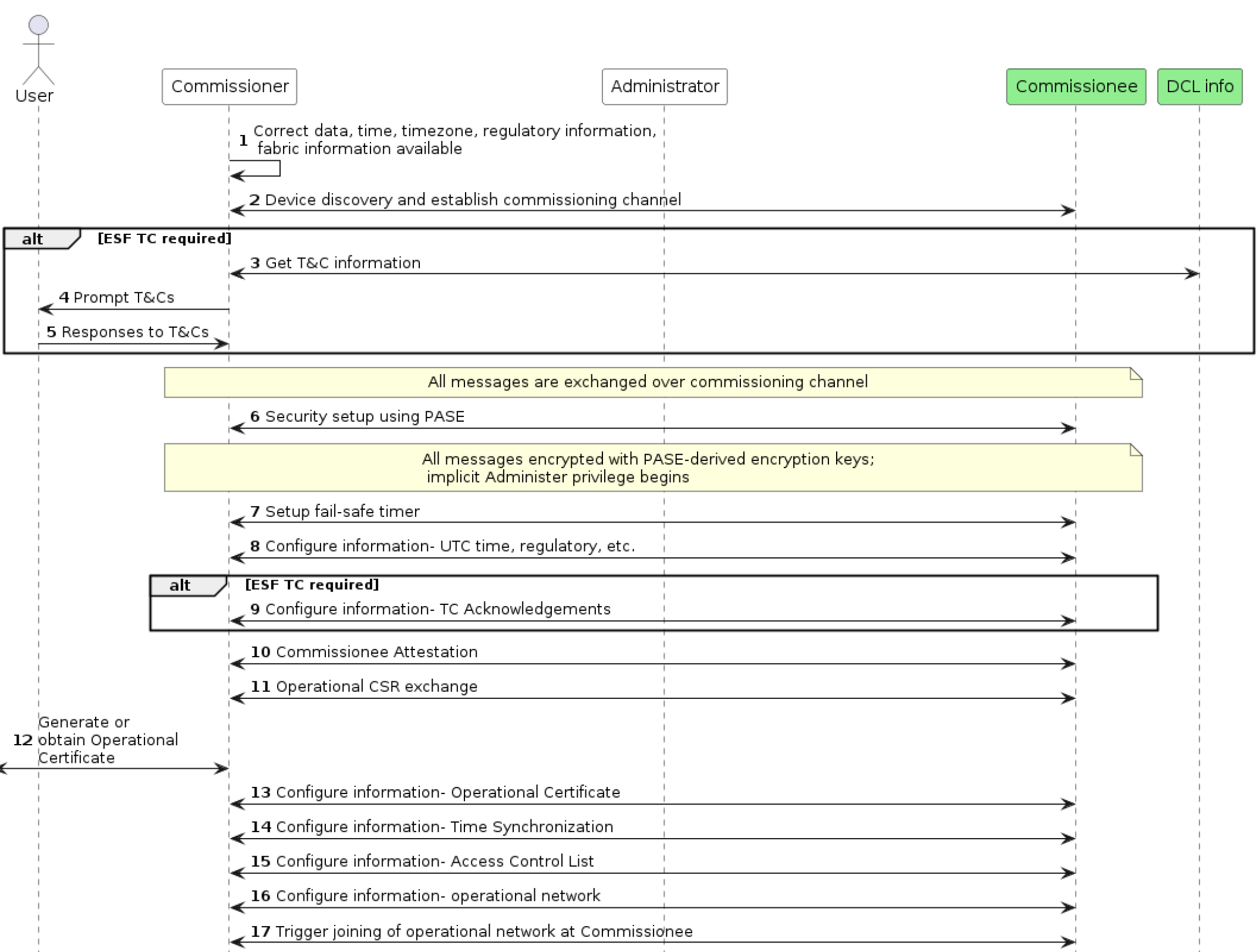
I have skipped step 1, completed step 2 and then skipped 3, 4 and 5. Step 6 is basically done too.
Not a notion what step 7 is all about. Step 8 doesn’t appear to be implemented in matter.js, so I’m going to skip that. I’ll skip step 9 too, as that depends on ESF TC and I don’t yet know what that is.
Step 10 is Attestation. I’m pretty sure I can skip that for now too!
This brings me to step 11. CSR Exchange. Oh yay. More cryptography.
However, I then thought maybe setting the UTC time might be a smaller step worth taking?
Secure Sessions
At this stage, my code needed a little refactoring. Up until now, everything has been done via the Exchange without any security. From now one, I need to have a SecureSession. One that performs the encryption and decryption.
Looking at the specification again, it implies that each Exchange has one session
An Exchange SHALL be bound to exactly one underlying session that will transport all associated
Exchange messages for the life of that Exchange. The underlying session SHALL be one of the following
session types: secure unicast (as established by PASE or CASE), unsecured (as is used for the
initial session establishment phase of a PASE/CASE session), secure group, or MCSP.
I’ve been using the unsecured session. It was now time to have a PASESession or something.
The other thing I realised is that my MessageExchange shouldn’t know or care about the BTPSession. That was actually related to the type of session.
I ended up with something like this
var secureSession = new PaseSecureSession(_btpSession);

var secureExchange = secureSession.CreateExchange();
I still need to pass my PASE keys into the PaseSecureSession, but I figured I’d dive into what I *actually* do next.
With my “secure session”, could I read an Endpoint or Attribute on the device?? I decided to give that a go. Chapters 8 and 10 of the Matter Specification speaks about Interactions and that seems to cover the Data Model, which is what covers Endpoints, Clusters and Attributes.
At this stage, I decided to just sent a Message (without encryping it) to see what would happen.

Did I need to start a new BTP session using a handshake?
Humans to the rescue
At this point, I decided I need some help. Some human help. I found a Discord channel called Matter-Integrators and posted my question on there. User Apollon77 came back really quickly and confirmed that the BLE connection should indeed remain open. He then indicated that there might be an issue in matter.js itself!
I tested against an ESP32 and that kept the BLE connection open after the PASE session was established. Maybe this really was an issue in matter.js?
I went back to the specification to see what I should do next and I found section 4.13
Unicast sessions exist in one of two phases:
- Session Establishment Phase: A series of well-defined unencrypted messages that aim to establish
a shared key.- Application Data Phase: A series of ad-hoc encrypted messages exchanging interaction model
protocol actions, application data, etc.
From my seat, I had completed phase one. PASE was session establishment and I had a shared key. I am clearly in the “Application Data Phase”, though I had no idea what that meant.
Further down, I found this:
The Session Type defines how the Session ID is to be interpreted.
The Unsecured Session SHALL be indicated when both Session Type and Session ID are set to 0. The
Unsecured Session SHALL have no encryption, privacy, or message integrity checking.A Secure Unicast Session SHALL be indicated when Session Type is Unicast Session and Session ID is
NOT 0.
My Message Headers still looked like this:
readClusterMessageFrame.MessageFlags |= MessageFlags.S;
readClusterMessageFrame.SessionID = 0x00;
readClusterMessageFrame.SecurityFlags = 0x00;
With a SessionId of 0x00, it would be considered an Unsecured Session. I changed it, but it didn’t work. The ESP32 just dropped it.

I then realised that it would probably be worth sticking with the encryption. I kept saying I had finished PASE, but I hadn’t confirmed the keys were correct.
I added some logging to matter.js to spit out the encryption and decryption keys.

My .Net code was matching these, thankfully!

I was reading too many bytes for the encryptKey, but that was a quick fix.
Matter.js fixed!
Much quicker than I had hoped, a fix was created for the BLE Issue in matter.js.
I pulled it all down, updated npm packages and compiled it. First run and I got this:
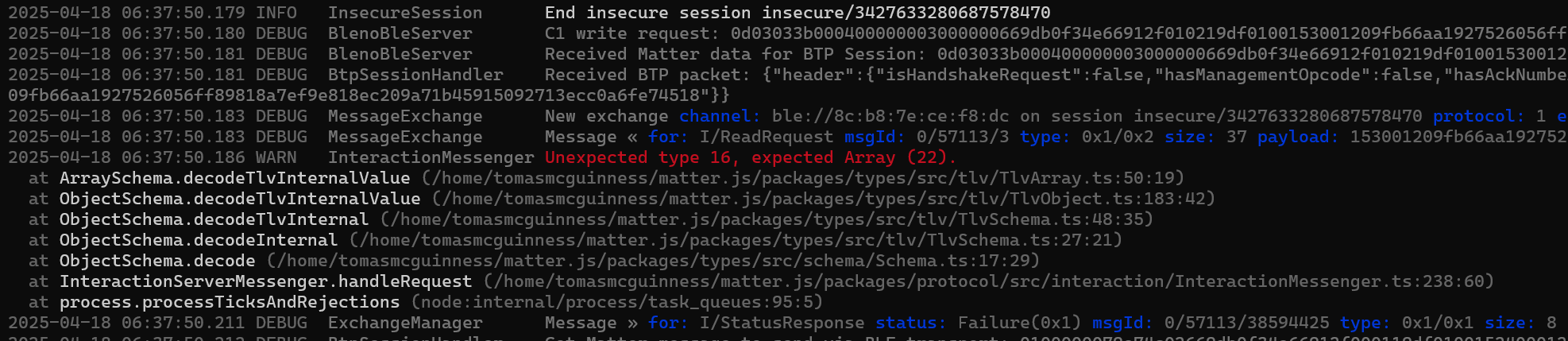
Fantastic. Thanks to https://github.com/Apollon77 for fixing this.
What was interesting at this point was that the JS was reading my TLV, despite the fact it wasn’t encrypted. Perhaps I could kick the message encryption can down the road? Like HTTP, websites can sometimes be accessed without SSL, so maybe matter.js would process my messages all the same?
I updated my TLV code and added more to the MessageFrame payload:
var readCluster = new MatterTLV();
readCluster.AddStructure();

readCluster.AddArray(tagNumber: 0);
readCluster.EndContainer();

readCluster.AddArray(tagNumber: 1);
readCluster.EndContainer();

readCluster.AddArray(tagNumber: 2);
readCluster.EndContainer();

readCluster.AddBool(tagNumber: 3, false);

readCluster.EndContainer();
This appeared to get processed, but a new error was shown.

This field appears in the specification alright!
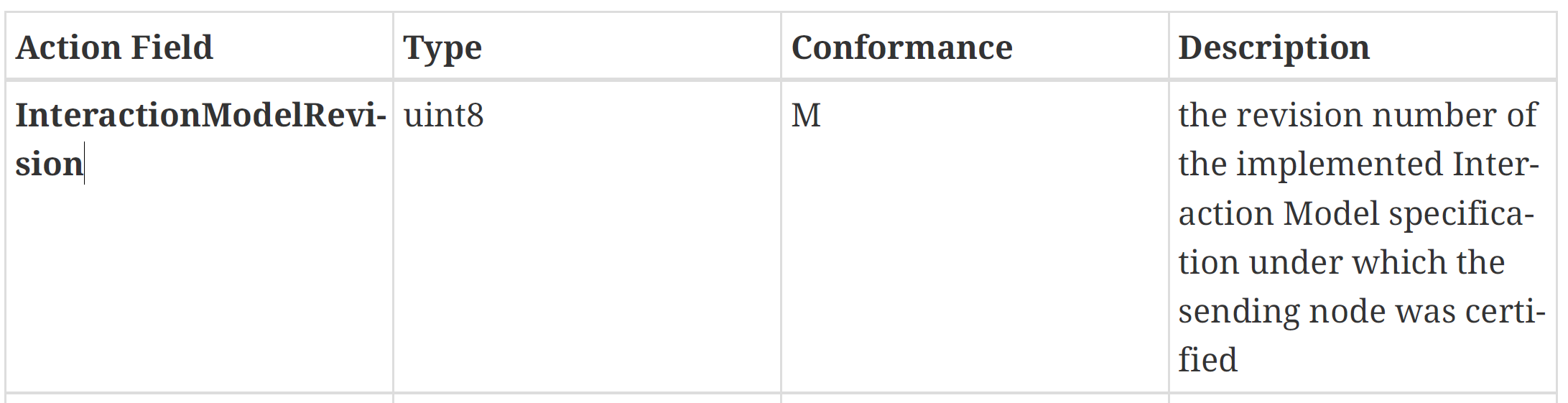
The next question: where the heck does this go??
From matter.js, it appears this value gets tacked onto the end, with a tag number of 255
interactionModelRevision: TlvField(0xff, TlvUInt8),I found that in the Specification!

I tried the same
readCluster.AddByte(255, 1);but matter.js didn’t like that
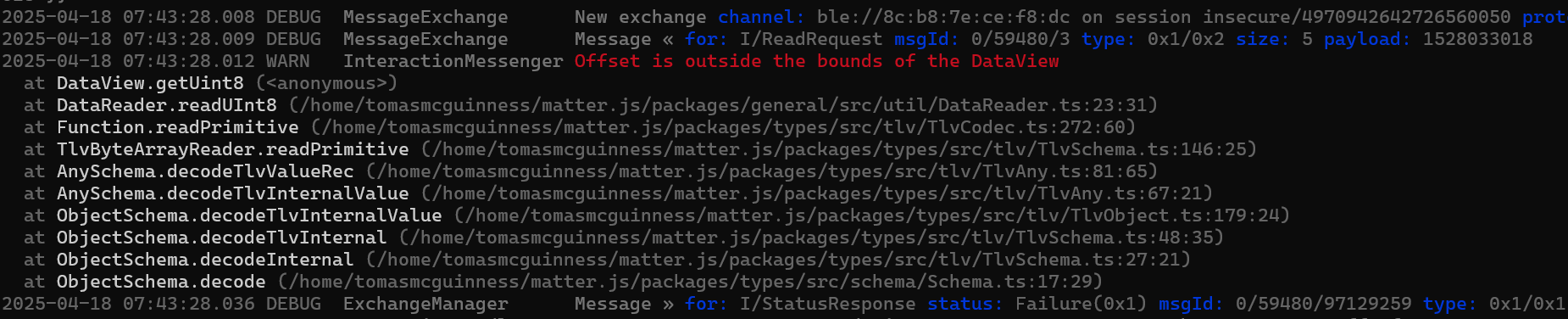
The issue was pretty obvious once I looked. I was using the wrong TagType when adding a uint8. Copy/Paste is not my friend 🙂

The error changed

I guess I should have expected that. Add “1” as the value for InteractionModelRevision was a stab in the dark 🙂
The only thing I could find in the specification that looked like revision history was this:
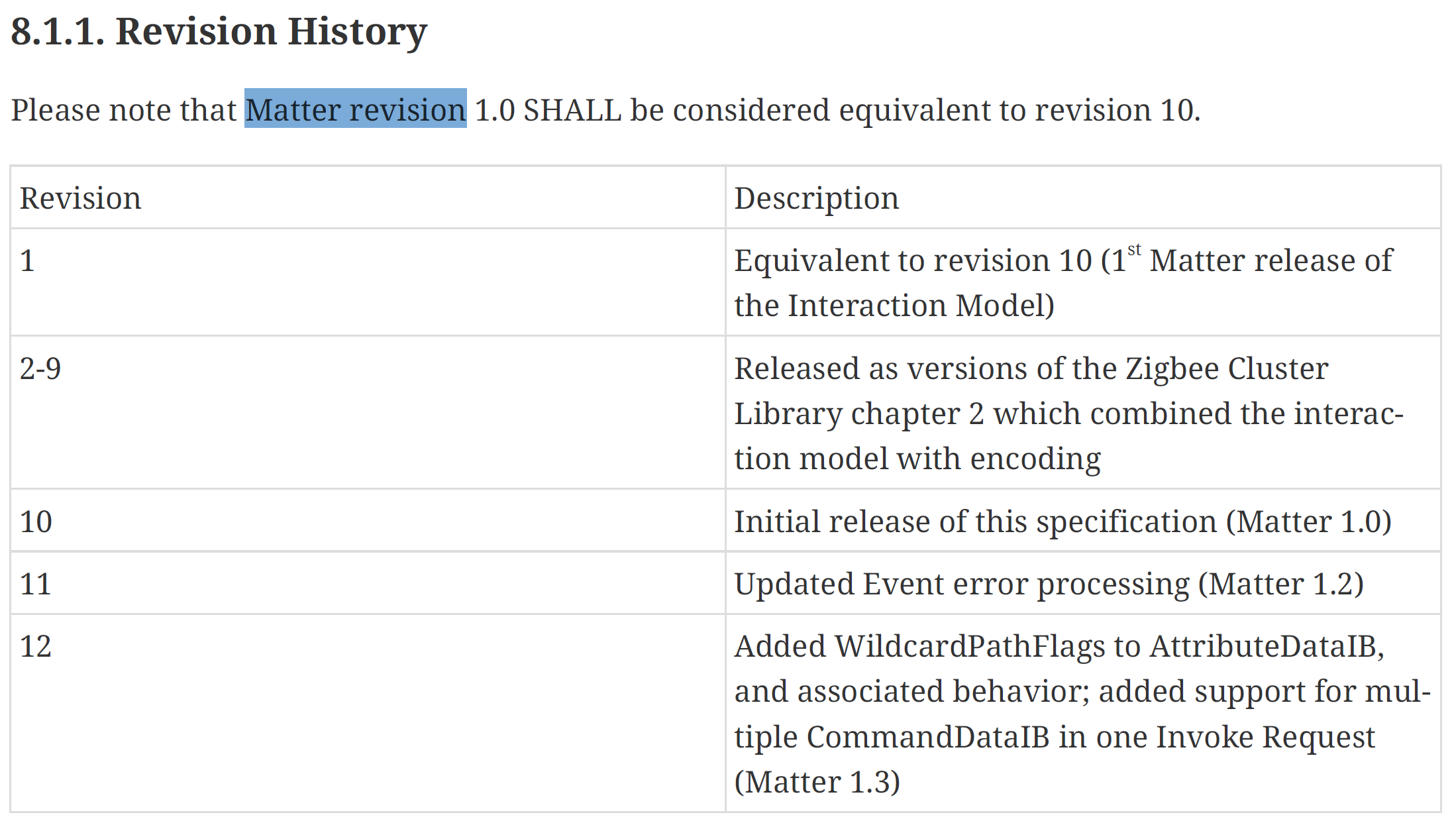
I changed my 1 to a 12, but I got the same error about unexpected type 10. Maybe I wasn’t encoding the value correctly?
I double checked my code and think I spotted my mistake! I was setting the type as 0x2A, which was a *signed* 1 octet integer. This should be 0x24, unsigned!
Hot damn!

What struck me at this point is that matter.js happily read and responded to my message, but it wasn’t encrypted! Perhaps I could avoid encryption for the time being??
From BTP to UDP
At this point, I went on holiday! Whilst on holiday, I realised that I couldn’t use Bluetooth for discovery or commissioning. I ended up building a crude UDP connection handler.
Filling out the ReadRequest
To further explore this, I needed a proper ReadRequest. This meant actually adding an Attribute to the request.
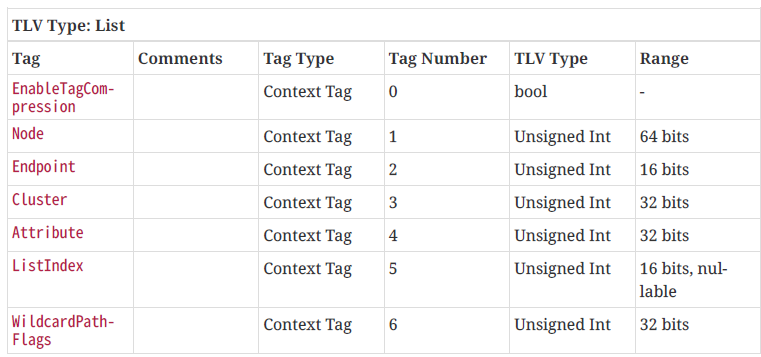
I built up a request, following the guide and sent the request.
var readCluster = new MatterTLV();
readCluster.AddStructure();

readCluster.AddArray(tagNumber: 0);

readCluster.AddList();

readCluster.AddBool(tagNumber: 0, false);
readCluster.AddUInt64(tagNumber: 1, 0x00); // NodeId
readCluster.AddUInt16(tagNumber: 2, 0x00); // Endpoint 0x00
readCluster.AddUInt32(tagNumber: 3, 0x28); // ClusterId 0x28 - basic information
readCluster.AddUInt32(tagNumber: 4, 0x01); // Attribute 0x01 - vendor name
readCluster.AddUInt16(tagNumber: 5, 0x00); // List Index 0x00
readCluster.AddUInt32(tagNumber: 6, 0x00); // Wildcard flags
readCluster.EndContainer(); // Close the list

readCluster.EndContainer(); // Close the array

readCluster.AddArray(tagNumber: 1);
readCluster.EndContainer();

readCluster.AddArray(tagNumber: 2);
readCluster.EndContainer();

readCluster.AddBool(tagNumber: 3, false);

// Add the InteractionModelRevision number.
//
readCluster.AddUInt8(255, 12);

readCluster.EndContainer();
The matter.js device did *not* like it.

“Insecure session in secure context” is the killer. I am assuming that means I haven’t encrypted the message. It seems like I can’t get away from encryption 😢
On the plus side, it has parsed my ReadRequest. You can see the vendorName in the path!
Encrypting the Message
I needed to figure out what to actually encrypt. Chapter 4.8 of the specification had the answer, even it took me quite a few passes to understand it.
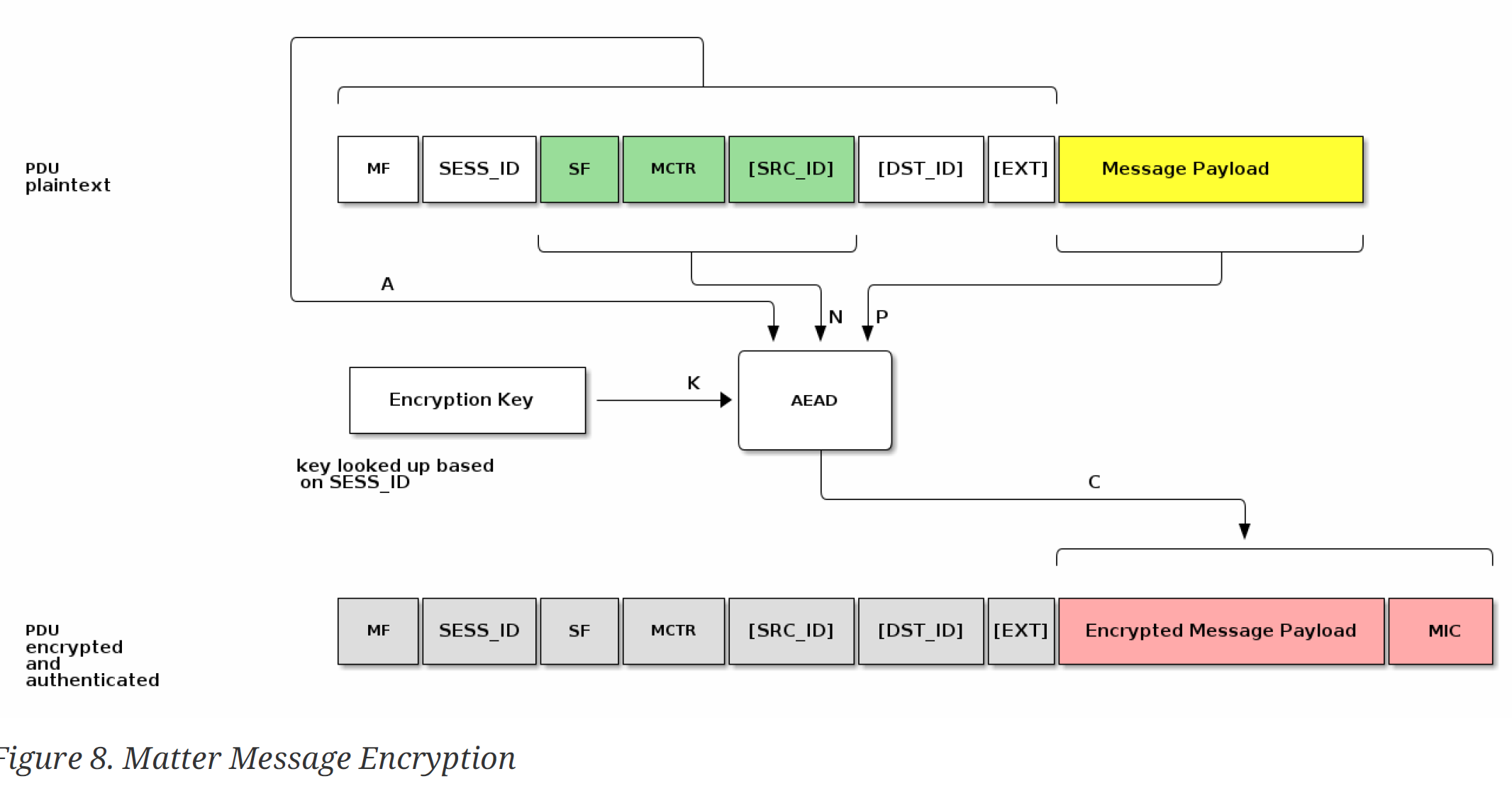
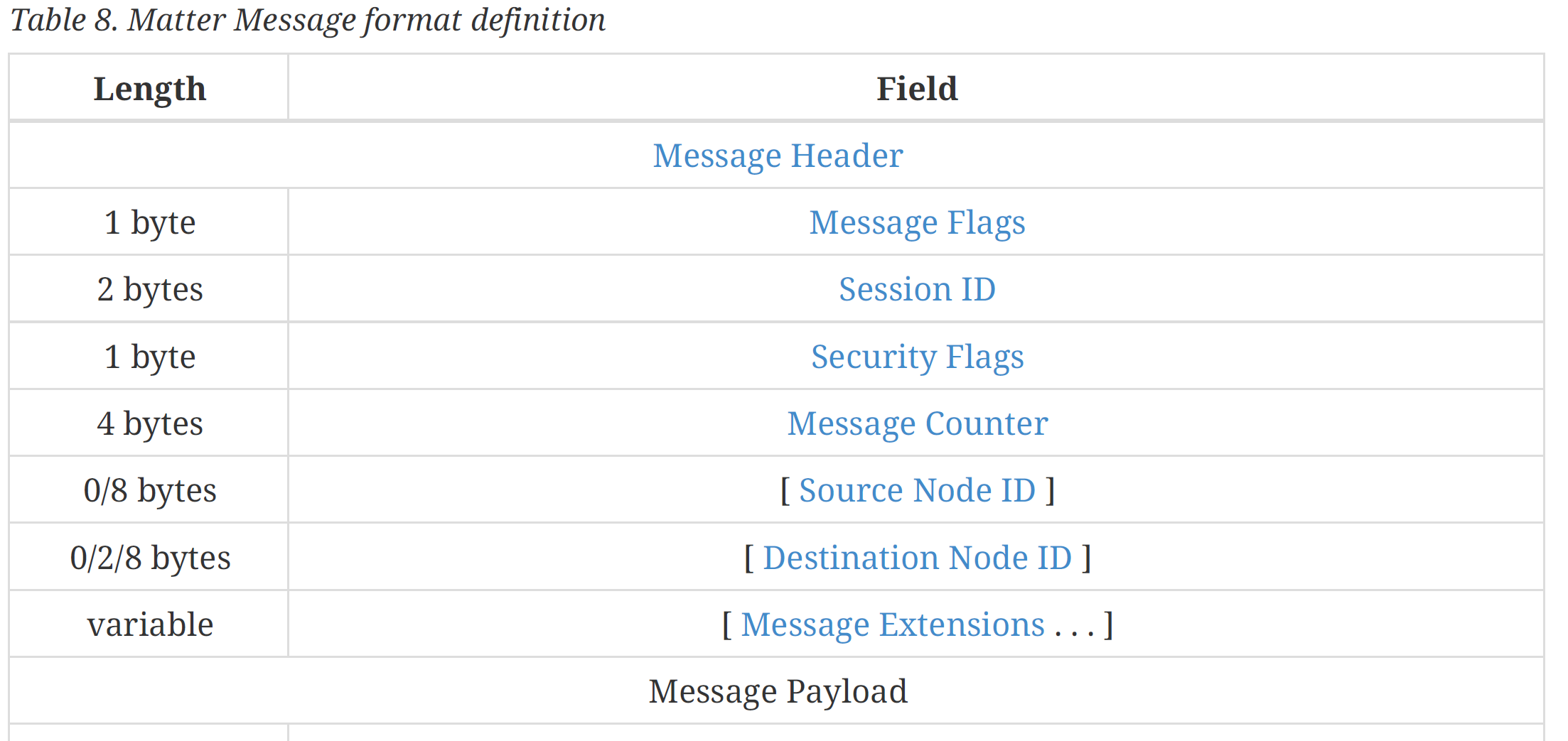
At first glance, this made *zero* sense to me. MF, SF? It was only after a few reads, that I got it. These is the Message Frame, described in Table 8
We take parts of the header to form a nonce, the header to form “A* and then encrypt the payload. Again, this looks really scary and confusing, but turned out to be very direct.
First, I build the nonce.
var memoryStream = new MemoryStream();
var nonceWriter = new BinaryWriter(memoryStream);

nonceWriter.Write((byte)readClusterMessageFrame.SecurityFlags);
nonceWriter.Write(BitConverter.GetBytes(readClusterMessageFrame.MessageCounter));
nonceWriter.Write(BitConverter.GetBytes(readClusterMessageFrame.SourceNodeID));

var nonce = memoryStream.ToArray();
Then I build the additional data
memoryStream = new MemoryStream();
var additionalDataWriter = new BinaryWriter(memoryStream);

additionalDataWriter.Write((byte)readClusterMessageFrame.SecurityFlags);
additionalDataWriter.Write(BitConverter.GetBytes(readClusterMessageFrame.MessageCounter));
additionalDataWriter.Write(BitConverter.GetBytes(readClusterMessageFrame.SourceNodeID));

var additionalData = memoryStream.ToArray();
Then I tried to encrypt the payload
var messageWriter = new MatterMessageWriter();
readClusterMessagePayload.Serialize(messageWriter);
var payload = messageWriter.GetBytes();

byte[] cipherText = new byte[payload.Length];
byte[] tag = new byte[16];

var encryptor = new AesCcm(encryptKey);
encryptor.Encrypt(nonce, payload, cipherText, tag, additionalData);

readClusterMessagePayload.EncryptedPayload = cipherText;
My first go yielded the same error:

The message about this reads:
Received read request from udp://[172.16.47.60]:11000 on session insecure/6169370416672973458: attributes:0x0/RootNode(0x0)/BasicInformation(0x28)/vendorName(0x1), events: isFabricFiltered=false
It seemed I was still using the insecure session.
But I had successfully generated a secure session

What I needed to do was set this session id in my ReadRequest. I had another read of the spec and it seemed I was already reading this value. It came from the PbkdfParamResponse: The responderSessionId!
var PBKDFParamResponse = responseMessageFrame.MessagePayload.Payload;

PBKDFParamResponse.OpenStructure();

var initiatorRandomBytes2 = PBKDFParamResponse.GetOctetString(1);
var responderRandomBytes = PBKDFParamResponse.GetOctetString(2);
var responderSessionId = PBKDFParamResponse.GetUnsignedShort(3);

Console.WriteLine("Responder Session Id: {0}", responderSessionId);
I assigned this session id to my request
readClusterMessageFrame.SessionID = responderSessionId;Running this code again resulted in a very different error:

As before, I started to compare the values. The nonce generated by the matter.js was this;
00030000000000000000000000My nonce was this
00-00-00-00-00-CA-1E-58-2D-AB-9C-E1-4BMiles off 🤦♂️
I had a few mistakes here. First, I didn’t have the right MessageCounter value. I also was setting a NodeId, which wasn’t necessary. After a few tweaks I got the Nonce values to match.
Additional Data was next and again, I was way off. I sorted that, but kept getting the same error.
When is encrypt not encrypt?
I spent quite a bit of time trying various things and reading the Specification again. I was then struck with a thought. Perhaps I was using the wrong keys??
I checked my code and face-palmed (a common occurence). When I got this all working, I was careful to match my encrypt and decrypt keys with those reported by matter.js. My mistake was obvious!! The encrypt key on my C# side *won’t* be the encrypt key on the matter.js side 🤣
I swapped my keys around and still the same problem:

I went back to the specification and looked at the diagram again.

There is something called MIC and that gets appended to the payload. MIC, according to the spec, is Message Integrity Check. It comes out of the encryption process.
From my call to encrypt(), the only thing I wasn’t using was the tag.
encryptor.Encrypt(nonce, parts.Payload, encryptedPayload, tag, additionalData);Worth a punt, I just appened the tag to the payload.
var totalPayload = encryptedPayload.Concat(tag);Ha! That worked! Matter.js seemed to like that message!

The next challenge was now decrypting the ReportData response!
To make this possible, I needed to refactoring my existing code, so I could get access to the encrypted payload. My current code was reading byte[] in the MessageFrame, so that needed to go. It looked like I needed to treat the message as two parts; header and payload.
I reworked the code a little and created a new class called MessageFrameParts. Its job was to carry a MessageFrame as two separate byte arrays. This made it easier to pass the encrypted byte[] into the decryption. This also made the encryption less messy.
Decryption is almost identical to the encryption, with exceptions: Use the _decryptionKey and call Decrypt.
var encryptor = new AesCcm(_decryptionKey);
encryptor.Decrypt(nonce, parts.Payload, decryptedPayload, tag, additionalData);
First pass yielded this error:
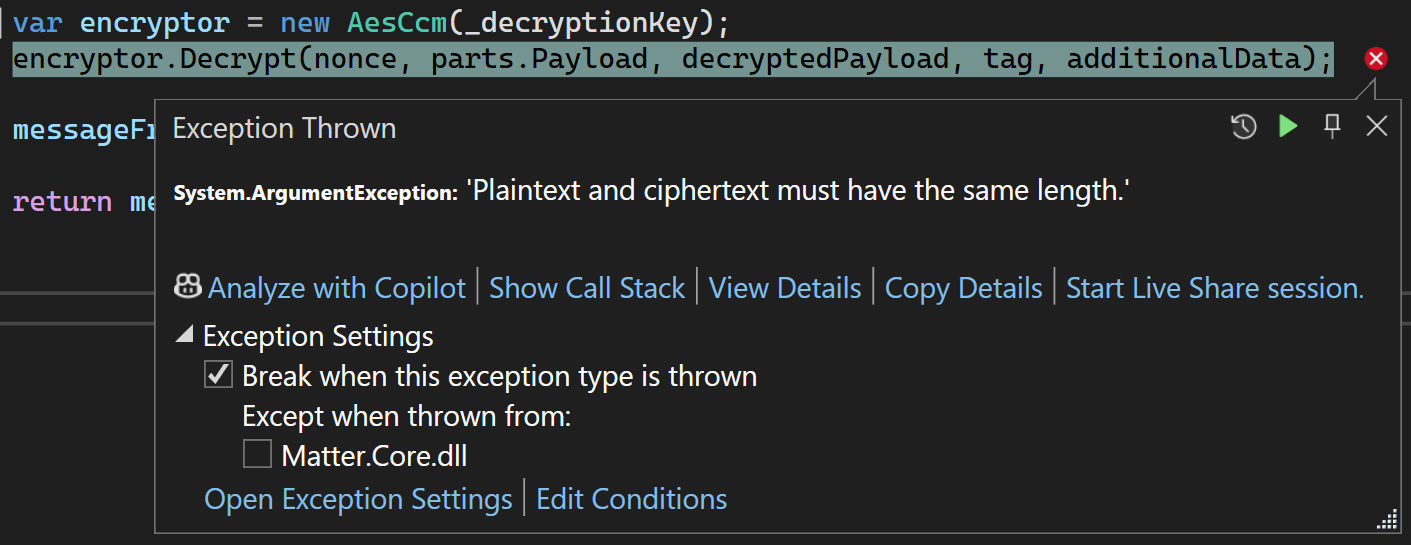
Started at this for a while, before realising the tag and decryptedPayload parameters were reversed!!! The next error was a little more cryptic.
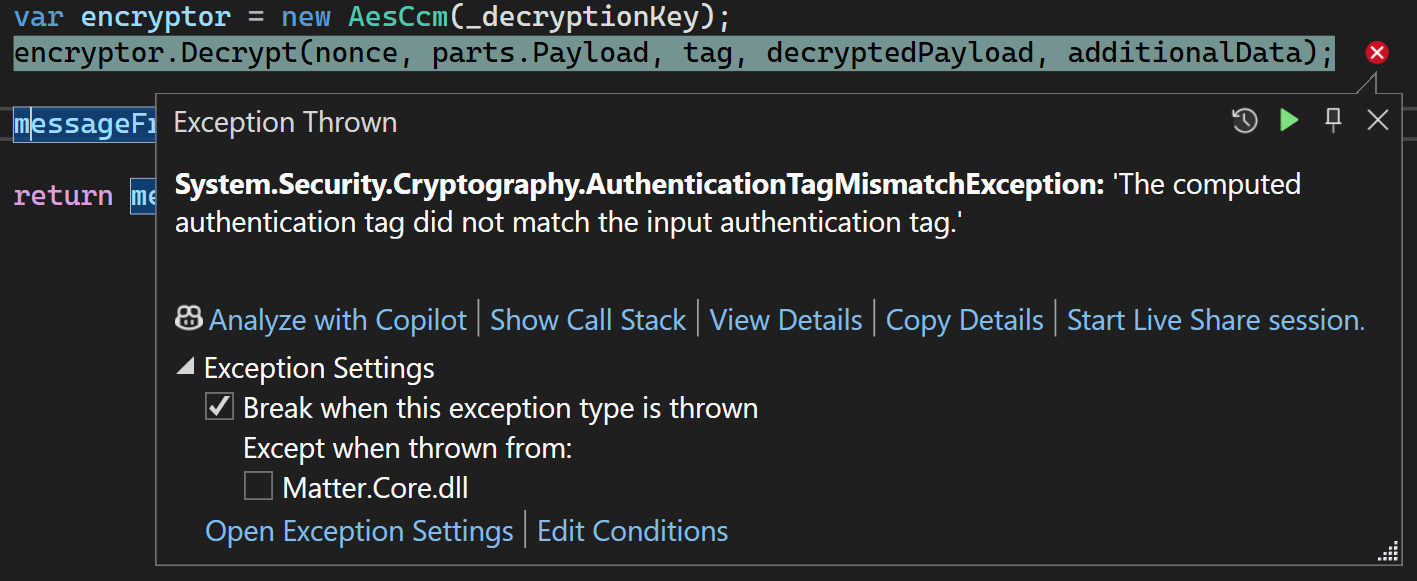
Then I remembered that for encrypt I was appending the tag to the payload. For decryption, maybe I needed to split them apart?
var tag = parts.Payload.AsSpan().Slice(parts.Payload.Length - 16, 16);
var encryptedPayload = parts.Payload.AsSpan().Slice(0, parts.Payload.Length - 16);

var encryptor = new AesCcm(_decryptionKey);
encryptor.Decrypt(nonce, encryptedPayload, tag, decryptedPayload, additionalData);
That seemed to work. At least, C# stopped throwing exceptions.
Reading a ReportData
At this point, I figured it was about time to steal more of the matter.js code 🙂 You see, they have a really nice debugging view of the TLV message. It looks something like this
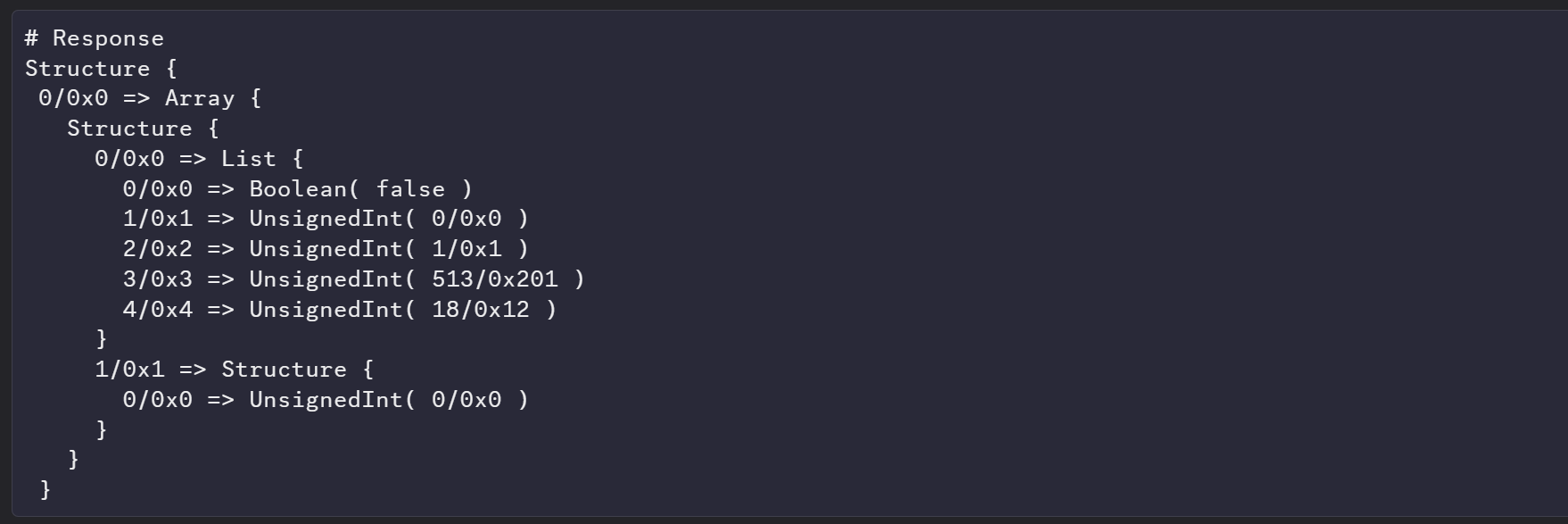
I start building out similar behaviour in my MatterTLV class
Structure {
  1 => Array {
    Structure {
      Structure {
                0 => Unsigned Int (32bit) (1709073771)
        1 => List {
          2 => Unsigned Int (16bit) (9216)
          3 => Unsigned Int (16bit) (9256)
          4 => Unsigned Int (16bit) (6145)
          }
                        Unsigned Int (16bit) (11634)
                        Unsigned Int (16bit) (11877)
                                }
      }
    }
  4 => Boolean (True)
  255 => Unsigned Int (16bit) (6156)
  }
It does start making it easier to read.
I created a simple unit test and copied in the ReportData message payload. This let me iterate much more quickly. I keep adding support for the different tag types and eventually started to see meaningful data, like this:

At this point, I believe that matter-node.js is the vendor-name attribute from the matter-device.

Excellent!
Summary
Another big milestone reached. Successfully encrypting and decrypting MessageFrames over UDP. I got a basic ReadRequest message into the matter-device and got a sensible response. Add to that support for a basic UDP connection and I’ve made some solid progress!
Next on my list is adding a device to a network. Once I do that, the next milestone will be the CASE (Certificate Authentication Session Establishment). This will result in generating a certificate that I can use to communicate with the device in future sessions.
As ever, all the code is up on Github – https://github.com/tomasmcguinness/dotnet-matter
Stay tuned!


Leave a comment