

I am building my own .Net Matter Controller.
I’m writing these posts as I go, figuring the stuff out and blogging how and what I’m doing.
In my previous post, I got as far as generated something called a NOC; A Node Operational Certificate. This was done by getting a CSR from the device and using it to create a cert.
TL;DR
In this post, I worked through more of the requests needed to commission a device. I realised that I needed to generate and send a Certificate Authority certificate. I tried to use matter.js as a guide to creating the certificate, but I didn’t make any progress. Once I found an example in the Specification, I was able to quickly identify my mistakes. I fixed them one by one. Endianness is not my friend. In the end, my AddTrustedRootCertificate request was accepted!
AddNOCRequest
Since I have a NOC, it needs to be sent to the device and that’s done via an AddNOCRequest Command
In matter.js, it looks like this:
const addNocResponse = await operationalCredentialsClusterClient.addNoc(
            {
                nocValue: peerOperationalCert,
                icacValue: new Uint8Array(0),
                ipkValue: this.fabric.identityProtectionKey,
                adminVendorId: this.fabric.rootVendorId,
                caseAdminSubject: this.fabric.rootNodeId,
            },
            { useExtendedFailSafeMessageResponseTimeout: true },
        );
At stage I didn’t have the rootVendorId or the rootNodeId.
The rootNodeId is just a random number.
The VendorId would be something specific, but Matter has a few reserved values:
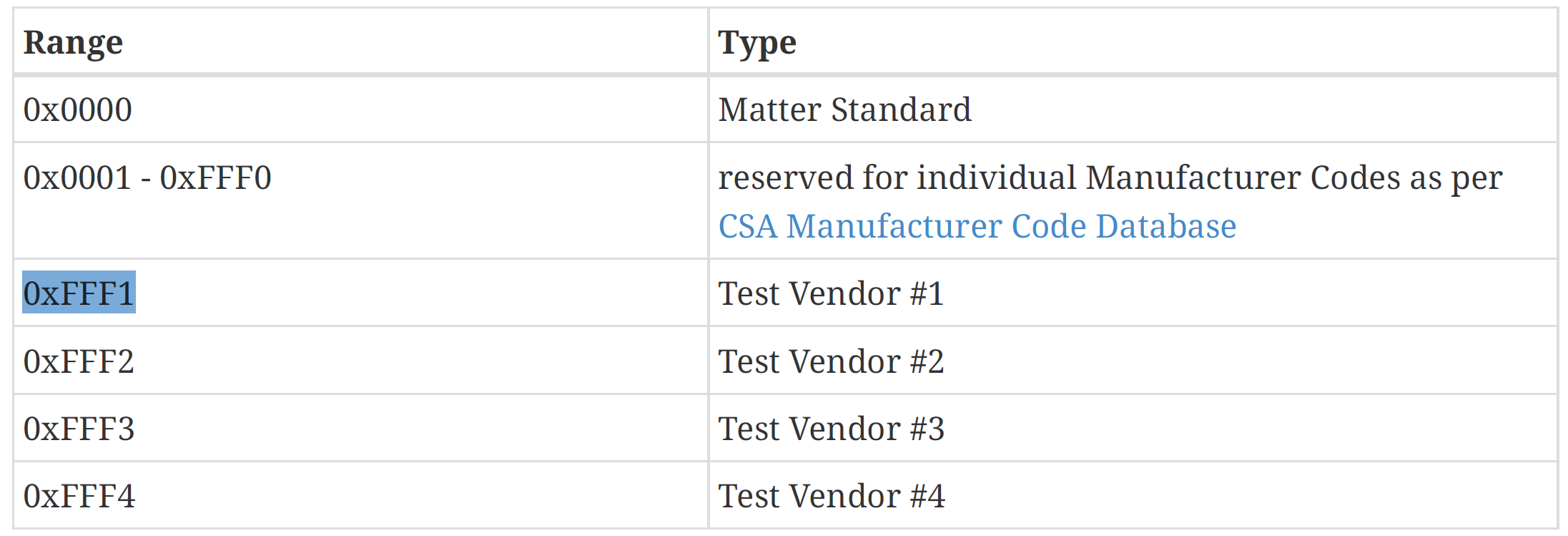
I added those to my Fabric, using Test Vendor #1 as the vendor id.
var random = RandomNumberGenerator.GetBytes(8);
var rootNodeId = BitConverter.ToUInt64(random);

return new Fabric()
{
    RootNodeId = rootNodeId,
    AdminVendorId = 0xFFF1, // Default value from Matter specification
    KeyPair = keyPair,
    RootCertificate = rootCertificate,
    IPK = RandomNumberGenerator.GetBytes(16),
};
The CommandFields payload then got populated
addNocRequest.AddStructure(1); // CommandFields

addNocRequest.Add2OctetString(0, noc.GetEncoded()); // NOCValue
addNocRequest.Add2OctetString(2, _fabric.IPK); // IPKValue
addNocRequest.AddUInt64(3, _fabric.RootNodeId); // CaseAdminSubject
addNocRequest.AddUInt16(4, _fabric.AdminVendorId); // AdminVendorId

addNocRequest.EndContainer(); // Close the CommandFields
Sending this InvokeRequest results in this strange response:
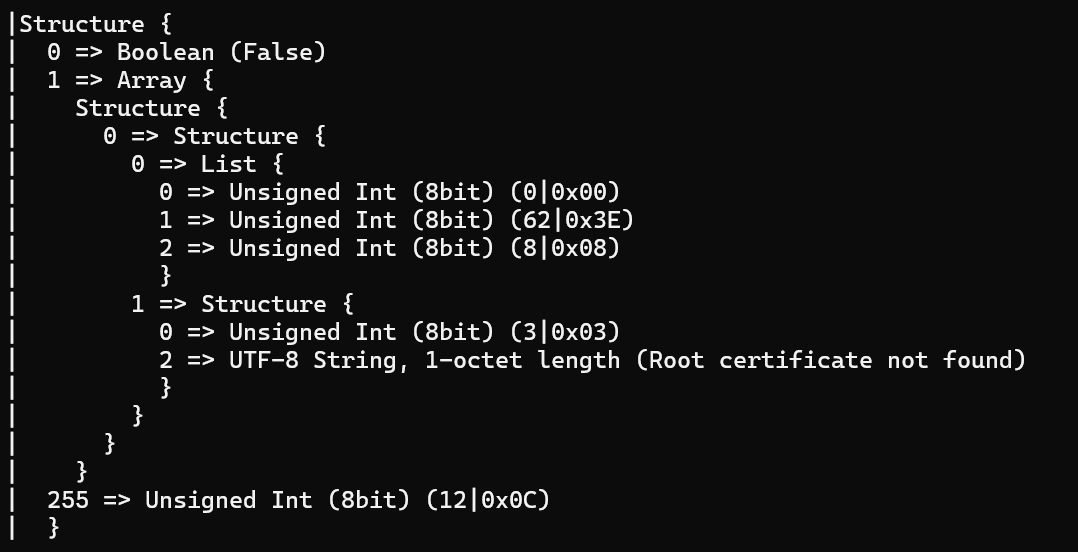
I thought I had successfully added the TrustedRootCertificate….
Better AddTrustedRootCertificateRequest
My InvokeRequest with this command didn’t raise any errors in matter.js, so I assumed it was working. Obviously not.
Reading the specification again

I spotted the reference to “Matter Certificate Encoding”. Looking at that, it seems my cert should be sent as a TLV payload.
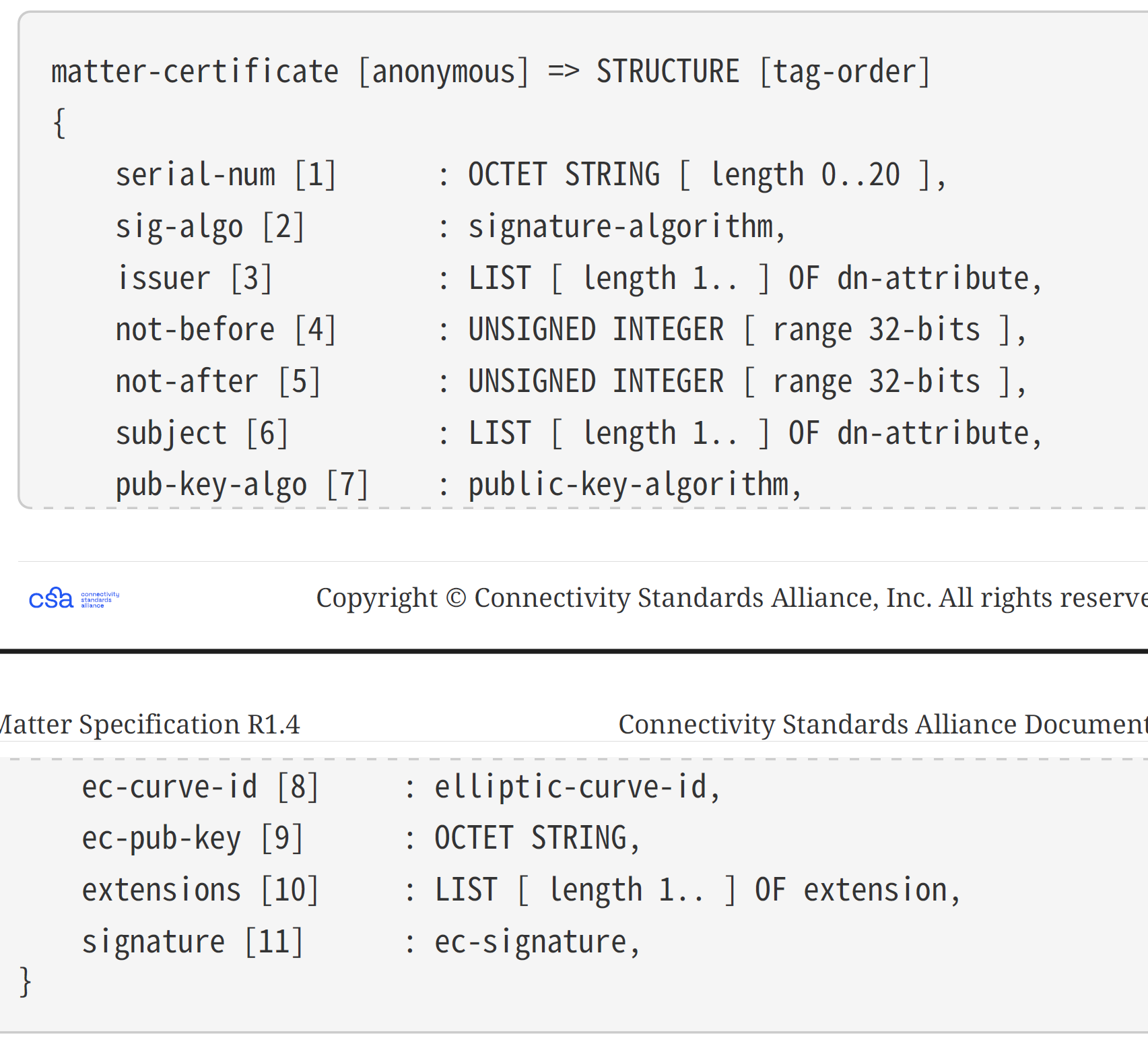
I filled in a few bits to see if that made any difference. I also made a few more tweaks to the TLV class and after going again:
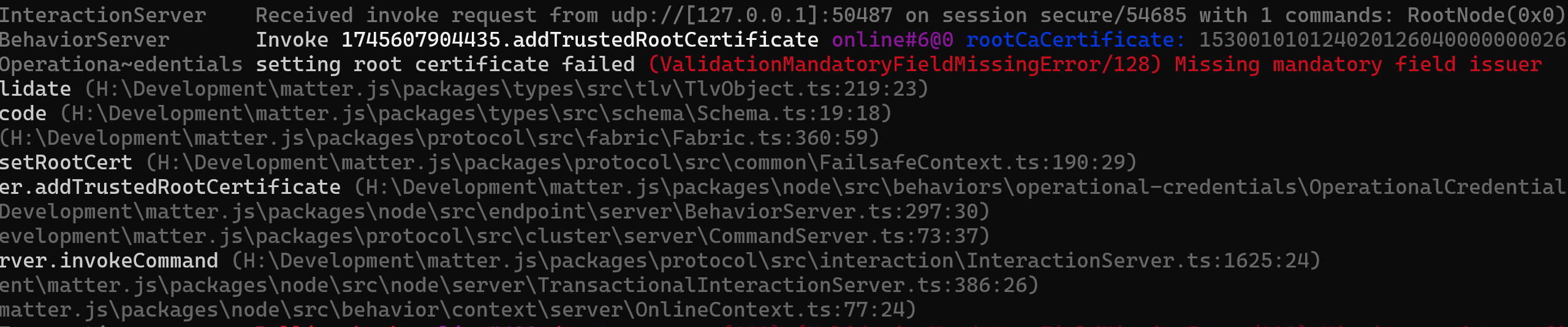
Never thought I’d be happy to see an error! This was a step forward. I knew my encoded root certificate only had a few values, so this aligned with expectations. I set about trying to fill in the rest.
It was around now that I got stuck. The matter.js code just didn’t want to process my AddTrustedRootCertificate command. I added lots of console.log to the JS to try and pinpoint the issue, but after an hour I was no closer.
Whilst waiting for some help on the Discord channel, I decided it was time to use what I’d learned to clean up my MessageExchange and Session classes.
Spotting Mistakes
Whilst refactoring my code, I spotted a mistake parsing the MessagePayload. Two mistakes actually. This is what is should look like:
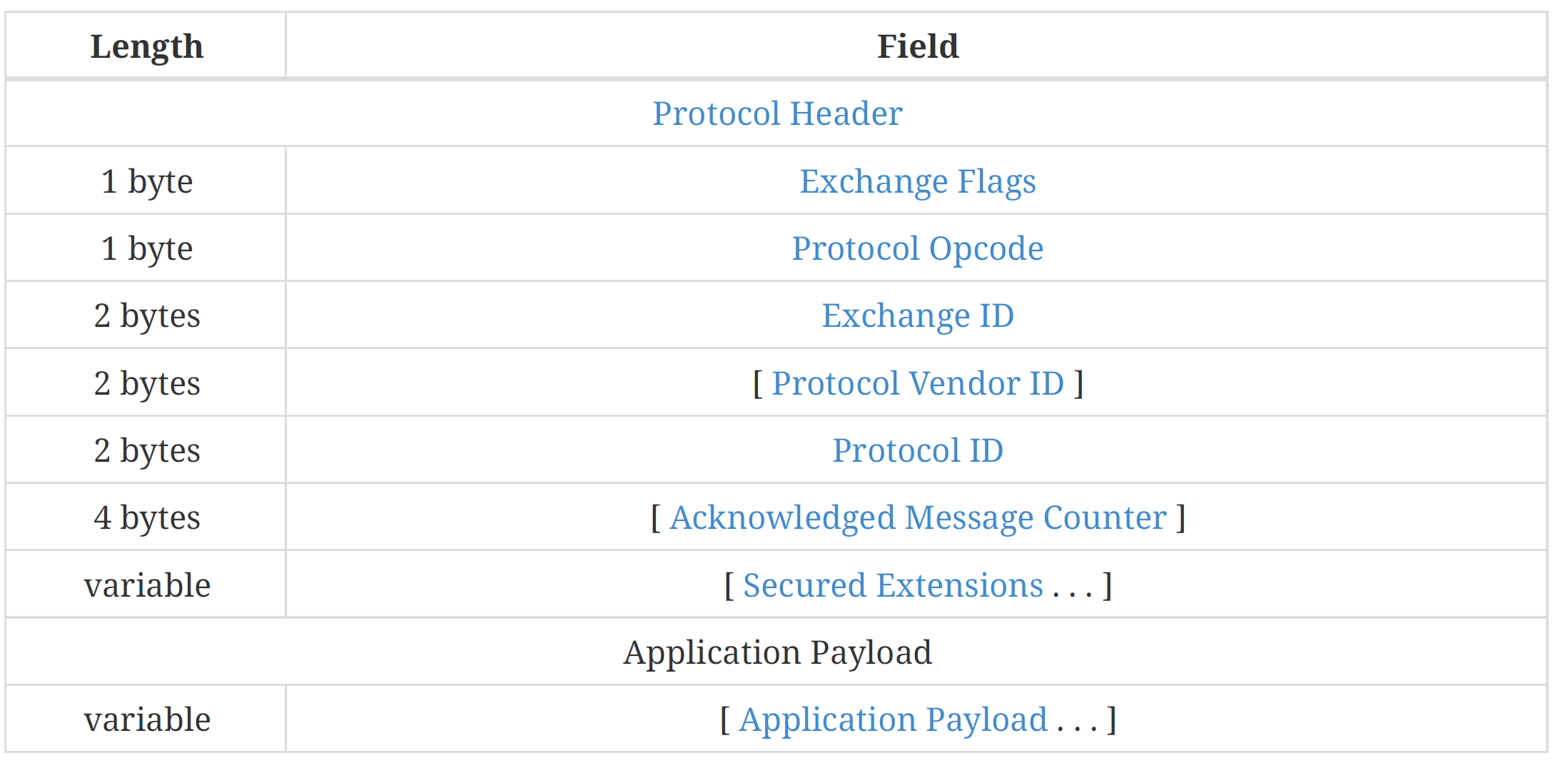
and this is my code
 public MessagePayload(byte[] messagePayload)
 {
     ExchangeFlags = (ExchangeFlags)messagePayload[0];
     ProtocolOpCode = messagePayload[1];
     ProtocolId = BitConverter.ToUInt16(messagePayload, 2);
     ExchangeID = BitConverter.ToUInt16(messagePayload, 4);

     Payload = new MatterTLV(messagePayload.AsSpan<byte>().Slice(6).ToArray());
 }
Firstly, I had ExchangeId and ProtocolId swapped around!!! I clearly wasn’t using these values anywhere, but nevertheless, they were wrong. The other mistake was not accounting for the optional fields, like AcknowledgeMessageCounter.
I also refactored the MessageExchange and added a Thread to handle incoming byte[] from the connection. This allowed me to look for duplicates and Standalone acknowledgements, without passing them to the caller. This was a huge improvement in the structure I think.
The problem explained!
Thanks to @apollon77 on the matter discord, he explained the problem. You see, each time you send an IM message, you need a *new* MessageExchange! I do that like this:
paseExchange = paseSession.CreateExchange();Once I added that code, the matter.js started handling my AddTrustedRootCertificate command. My encoded certificate is still a million miles away from being correct, but at least I know what was wrong! The only time multiple messages can be passed on a single Exchange is when they are chunked. Good to know.
With the command being processed, I began to fix and root certificate TLV encoding, working through the issues as I found them. Things like:

Thankfully, all the encoding was covered in 6.5.2. Matter certificate, even if a lot of didn’t make much sense 🙂
Kept making progress, even though I wasn’t sure if what I added was correct. Eventually got to this one

This field needed something matter.js called a rootKeyIdentifier.

Oh joy, more crypto!
Scarily enough, Visual Studio autocomplete suggested this. How did it know I wanted a SHA256 hash of 20 bytes in lenght??
var rootKeyIdentifier = SHA256.HashData(rootCertificate.GetEncoded()).AsSpan().Slice(0, 20).ToArray();In reality, I needed this
var publicKey = keyPair.Public as ECPublicKeyParameters;
var rootKeyIdentifier = SHA256.HashData(publicKey.Q.GetEncoded()).AsSpan().Slice(0, 20).ToArray();
I then added this to the encoding
encodedRootCertificate.Add1OctetString(4, _fabric.RootKeyIdentifier);
encodedRootCertificate.Add1OctetString(5, _fabric.RootKeyIdentifier);
I added Tag 5 too with the same value as that’s what matter.js does. That is the authority-key-id.
After fixing up the structure of the InvokeRequest (I need to make my AddOctetString compute the right size!) I ended up with this very helpful message:

“Invalid JWK EC Key” – This is progress, but I now needed to understand what the ‘eck this meant!!
It clearly meant something was wrong with my root certificate keys. I looked at the code again and spotted my mistake. I was using the wrong curve. I had secp256k1 and I should be using secp256r1 (k1 vs r1). This is the curve referenced in 2.7. Security.
Changing that lead to a new error!

I then realised that the certificate I was generating didn’t match the values I was encoding 😦 The matter.js code is assembling a certificate based on what I was sending!
A little more complicated…
I started scanning the specification again, and found this Appendix E: Matter-Specific ASN.1 Object Identifiers (OIDs). At this point I realised that my attempts at building a certificate were pretty poor.
In my certificate -> TLV, I was setting values like rcac-id as a string, but I didn’t actually have these values in the *actual* certificate!!! How was that going to work?
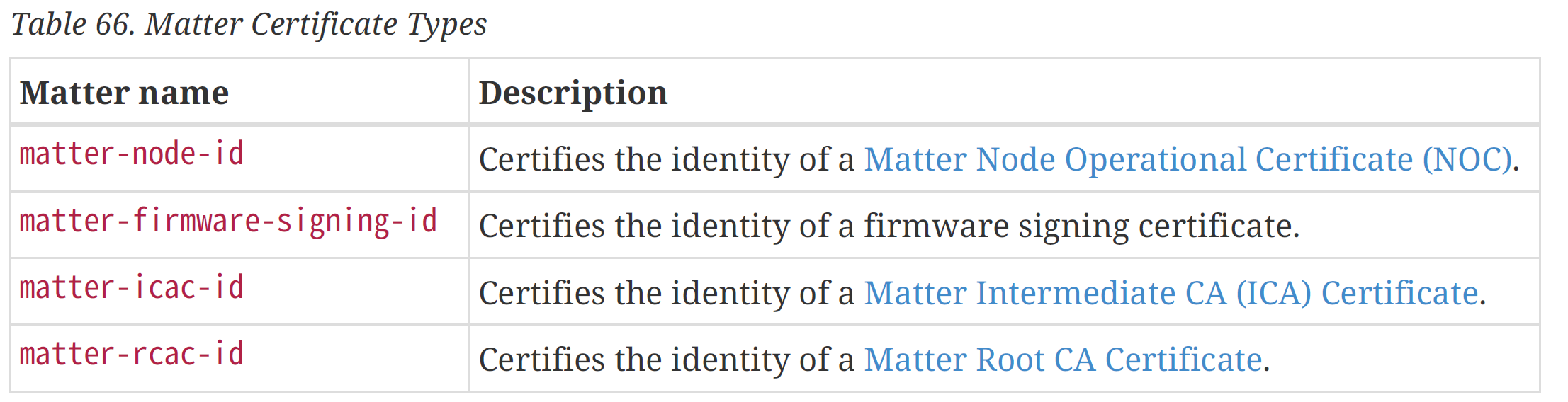
In the appendinx, the rcac-id (for example) has a special ID

I needed to try this again, but I needed help.
As Gru says; Light-Bulb – I wondered if there was tooling out there to generate a certificate. A quick google and I found this guide – https://project-chip.github.io/connectedhomeip-doc/src/tools/chip-cert/README.html – it seems there is a tool called chip-cert will generate certs!
Then I had another thought. The matter.js code I’ve been using must also generate the certificates it needs!
I started matter.js using the “matter-controller” option.
Sure enough

I opened the directory and was presented with these files
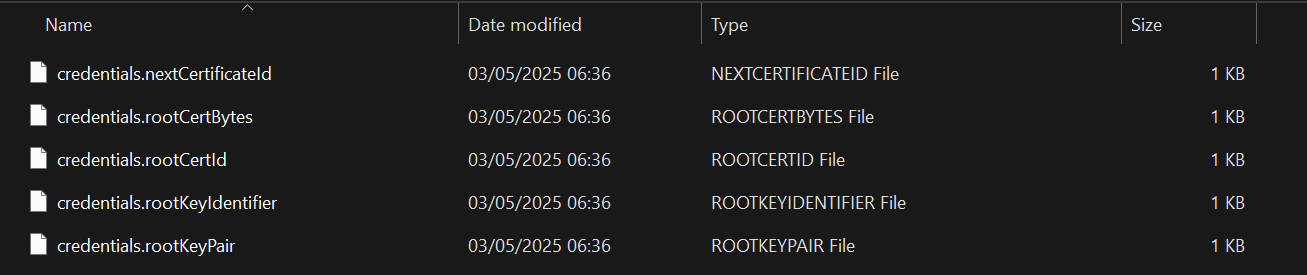
The file credentials.rootCertBytes looked promising…
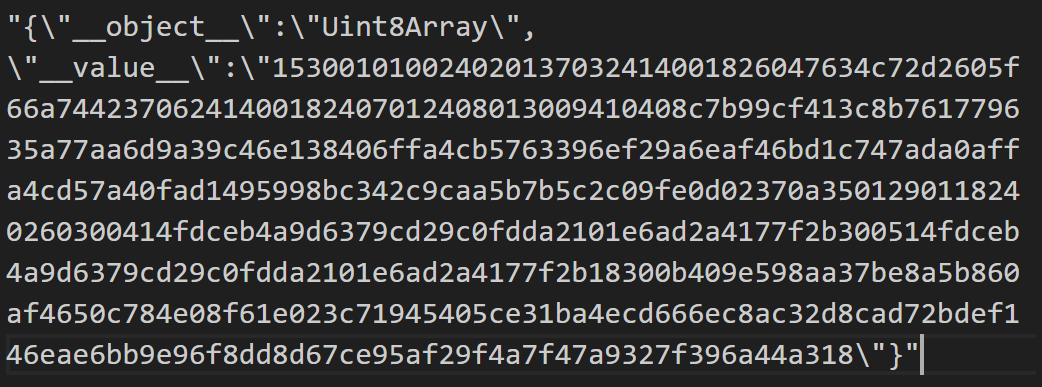
This was JSON, but the array looked like hex and started with a 15 and ended in an 18. Exactly like a TLV encoded structure!
Running that through my TLV debugger yielded
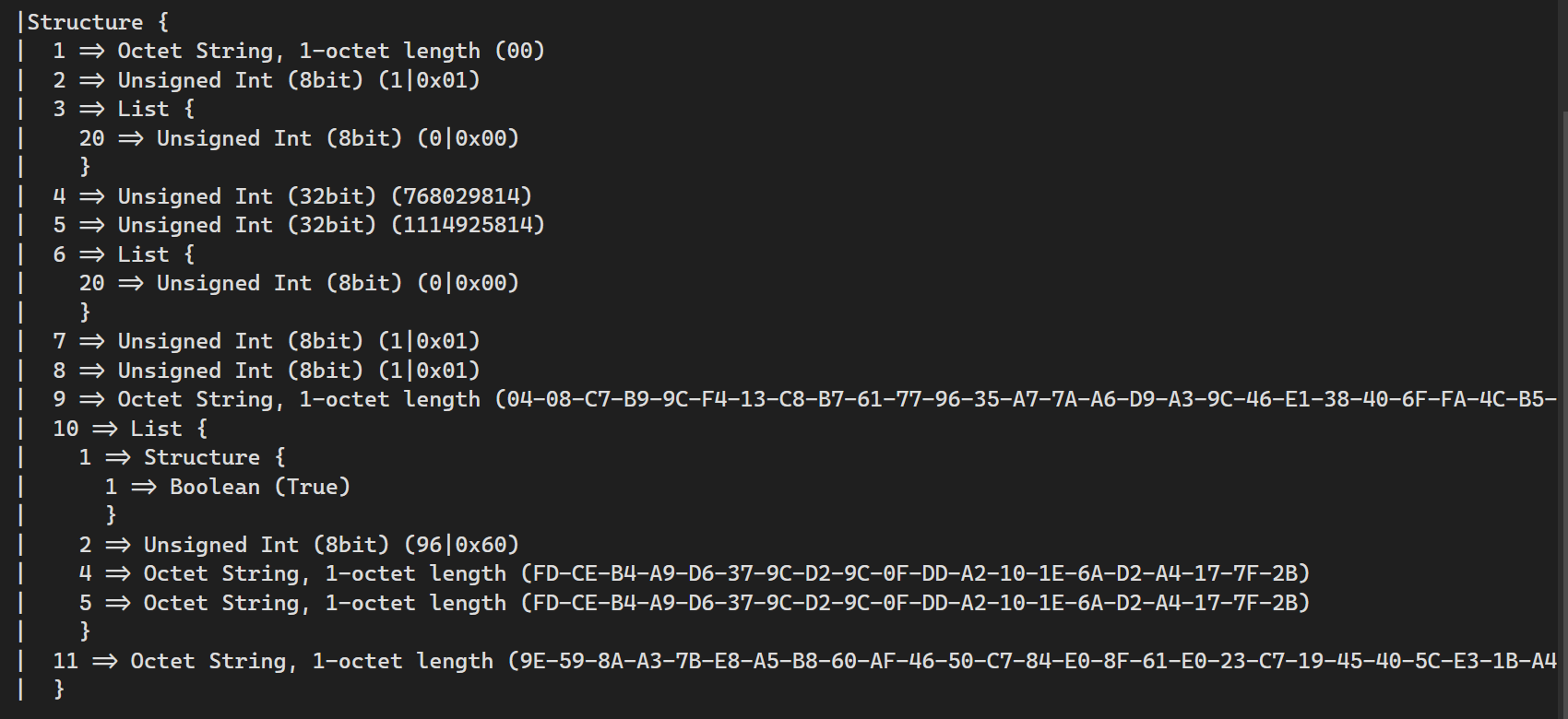
My initial efforts weren’t too bad when compared to this. Of course, matter.js wasn’t happy with my signature. Looking at matter.js, this is how is created the signature. It first created it in Asn1.
const signature = Crypto.sign(this.rootKeyPair, CertificateManager.rootCertToAsn1(unsignedCertificate));The rootCertToAsn1 was doing this:
function genericCertToAsn1(cert: Unsigned<BaseCertificate>) {
    const certBytes = DerCodec.encode(genericBuildAsn1Structure(cert));
    assertCertificateDerSize(certBytes);
    return certBytes;
}
It was creating an Asn1 structure, whatever that was, and then DER encoding it. I knew DER was a way to encode certificates, like PEM.
FML. This was melting my poor brain.
Took a break and came back. Decided to check some of the basics. First, was the signature the right length? Answer, no! Mine was 70 characters, but the one generated by matter.js was only 64.
This meant that the GetSignature() method provided by BouncyCastle wasn’t doing what I expected. I also discovered you could dump the certificate:
  [0]         Version: 3
         SerialNumber: 1
             IssuerDN: 1.3.6.1.4.1.37244.1.4=0000000000000000
           Start Date: 03/05/2024 11:11:35
           Final Date: 03/05/2035 11:11:35
            SubjectDN: 1.3.6.1.4.1.37244.1.4=0000000000000000
           Public Key: Org.BouncyCastle.Crypto.Parameters.ECPublicKeyParameters
  Signature Algorithm: SHA-256withECDSA
            Signature: 3044022004383bb15311612d17aed4e9877049c5
                       50cd0c33945e4dd2941b75eb87fa15e902201731
                       daa651eacc985f2dfb54d319de0b192e9b1577fa
                       a327ee64757a9c50a159
       Extensions:
                       critical(True) BasicConstraints: isCa(True)
                       critical(True) KeyUsage: 0x6
                       critical(True) 2.5.29.14 value = DER Octet String[20]

                       critical(True) 2.5.29.35 value = Sequence
    Tagged [CONTEXT 0] IMPLICIT
        DER Octet String[20]
You can see the signature in the output. This signature should be in the ASN.1 format. I confirmed that X509Certificates use ASN1, so everything in there should be ASN1 by default. DER is used when serializing the certificate, so we don’t need to worry about that now.
I took the string and pasted it into a this: https://lapo.it/asn1js/ – an ASN1 Decoder.
This tool spat this out!

I found another tool – https://asecuritysite.com/ecc/sigs5 which looked more specific to EC (elliptic curve) signatures
This kicked out this:
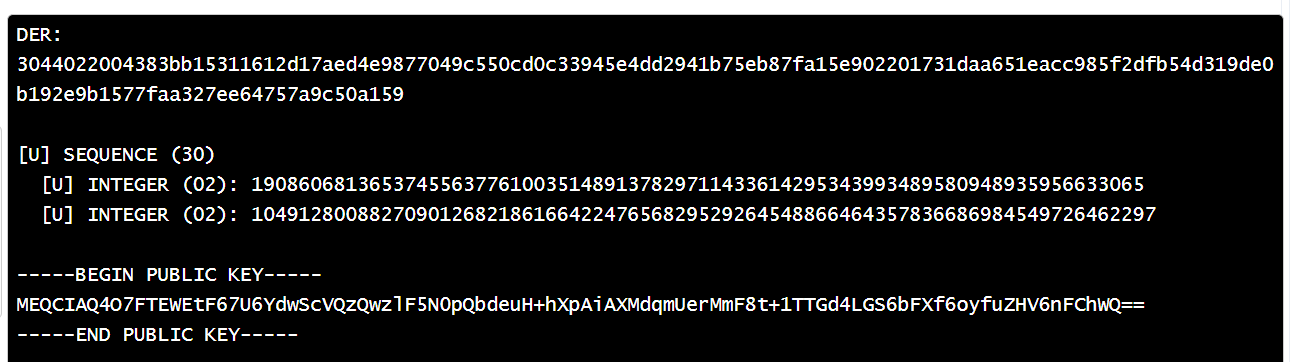
My suspicion at this point was that the Byte[] returned by GetSignature() wasn’t in the required form.
By successfully putting the signature through the decoder, it proved it was DER encoded. This also explained why the Signature byte[] was 70 (2 leading characters and two tag/length bytes for each number). That’s 2 + 2 + 2 + 32 + 32 = 70. I really only needed to send the two numbers. The spec sort of said as much.

I tried to read both of these numbers:
var r = signature.AsSpan().Slice(5, 32).ToArray();
var s = signature.AsSpan().Slice(38, 32).ToArray();
This resulted in a change of error! My signature was no longer malformed!

I looked at my Slice code again and realised this was pretty horrible guesswork. I found that .Net offers a AsnDecoder, so I tried that.
var signature = _fabric.RootCertificate.GetSignature();

AsnDecoder.ReadSequence(signature.AsSpan(), AsnEncodingRules.DER, out var offset, out var length, out _);

var source = signature.AsSpan().Slice(offset, length).ToArray();

var r = AsnDecoder.ReadInteger(source, AsnEncodingRules.DER, out var bytesConsumed);
var s = AsnDecoder.ReadInteger(source.AsSpan().Slice(bytesConsumed), AsnEncodingRules.DER, out bytesConsumed);

var sig = r.ToByteArray(isUnsigned: true).Concat(s.ToByteArray(isUnsigned: true)).ToArray();
Same result, but I think this code was a little closer to reality!
It was around this time that I noticed something. The NotBefore and NotAfter numbers in my matterjs certificate were bigger than mine…
4 => Unsigned Int (32bit) (1073439896)
5 => Unsigned Int (32bit) (249888920)
Compared to matter.js
4 => Unsigned Int (32bit) (768029814)
5 => Unsigned Int (32bit) (1114925814)
Mine also appeared to be the wrong way. The NotAfter (Tag 5) should be larger!!!
The immediate issue was the cast from an int to an uint.
var notBefore = new DateTimeOffset(rootCert.NotBefore).ToUnixTimeMilliseconds();
var notAfter = new ateTimeOffset(rootCert.NotAfter).ToUnixTimeMilliseconds();

encodedRootCertificate.AddUInt32(4, (uint)notBefore); // NotBefore
encodedRootCertificate.AddUInt32(5, (uint)notAfter); // NotAfter
This busted the number completely. I already realised that the time should be in seconds, not milliseconds.
The spec confirmed this:

The values of ToUnitTimeMillseconds() is a long and therefore *massive*! It explains why the cast to uint lost resolution.
There was then another long period of banging my head against my desk.
Then I found this 6.5.15.1. Example of Operational Root CA Certificate (RCAC) – a bloody example!
I loaded the PEM into a certificate and printed it out
  [0]         Version: 3
         SerialNumber: 6479173750095827996
             IssuerDN: 1.3.6.1.4.1.37244.1.4=CACACACA00000001
           Start Date: 15/10/2020 14:23:43
           Final Date: 15/10/2040 14:23:42
            SubjectDN: 1.3.6.1.4.1.37244.1.4=CACACACA00000001
           Public Key: Org.BouncyCastle.Crypto.Parameters.ECPublicKeyParameters
  Signature Algorithm: SHA-256withECDSA
            Signature: 30450220458164466c8f195abc0abb7c6cb5a27a
                       83f41d37f8d53beec520abd2a0da0509022100b8
                       a7c25c042e30cf64dc30fe334e120019664e5150
                       49134f5781238444fc7531
       Extensions:
                       critical(True) BasicConstraints: isCa(True)
                       critical(True) KeyUsage: 0x6
                       critical(False) 2.5.29.14 value = DER Octet String[20]

                       critical(False) 2.5.29.35 value = Sequence
    Tagged [CONTEXT 0] IMPLICIT
        DER Octet String[20]
This matched all the values specified in the example. So far, so good!
I then checked the Matter TLV encoded version
Structure {
  1 => Octet String, 1-octet length (8) (59-EA-A6-32-94-7F-54-1C)
  2 => Unsigned Int (8bit) (1|0x01)
  3 => List {
    20 => Unsigned Int (64bit) (72057597440215754)
    }
  4 => Unsigned Int (32bit) (1602771823)
  5 => Unsigned Int (32bit) (2233923822)
  6 => List {
    20 => Unsigned Int (64bit) (72057597440215754)
    }
  7 => Unsigned Int (8bit) (1|0x01)
  8 => Unsigned Int (8bit) (1|0x01)
  9 => Octet String, 1-octet length (65) (04-13-53-A3-B3-EF-1D-A7-08-C4-90-80-48-01-4E-40-7D-59-90-CE-22-BC-4E-B3-3E-9A-5A-CB-25-A8-56-03-EB-A6-DC-D8-21-36-66-A4-E4-4F-5A-CA-13-EB-76-7F-AF-A7-DC-DD-DC-33-41-1F-82-A3-0B-54-3D-D1-D2-4B-A8)
  10 => List {
    1 => Structure {
      1 => Boolean (True)
      }
    2 => Unsigned Int (8bit) (96|0x60)
    4 => Octet String, 1-octet length (20) (13-AF-81-AB-37-37-4B-2E-D2-A9-64-9B-12-B7-A3-A4-28-7E-15-1D)
    5 => Octet String, 1-octet length (20) (13-AF-81-AB-37-37-4B-2E-D2-A9-64-9B-12-B7-A3-A4-28-7E-15-1D)
    }
  11 => Octet String, 1-octet length (64) (09-05-DA-A0-D2-AB-20-C5-EE-3B-D5-F8-37-1D-F4-83-7A-A2-B5-6C-7C-BB-0A-BC-5A-19-8F-6C-46-64-81-45-31-75-FC-44-84-23-81-57-4F-13-49-50-51-4E-66-19-00-12-4E-33-FE-30-DC-64-CF-30-2E-04-5C-C2-A7-B8)
  }
Two things didn’t match. The NotBefore and NotAfter (4 & 5) and the signature. The subject-key-identifier and authority-key-identifier matched, which was good.
Curiously, the IssuerDN of CACACACA00000001 seemed to be reversed when checking 72057597440215754. Endianness?
At this point, the differences in the TLV wasn’t important. What was concerning was my signature was completely wrong. This was being generated from the loaded certificate, so it should be correct!
My code is generating this signature:
30450220458164466C8F195ABC0ABB7C6CB5A27A83F41D37F8D53BEEC520ABD2A0DA0509022100B8A7C25C042E30CF64DC30FE334E120019664E515049134F5781238444FC7531This matches the Example perfectly!
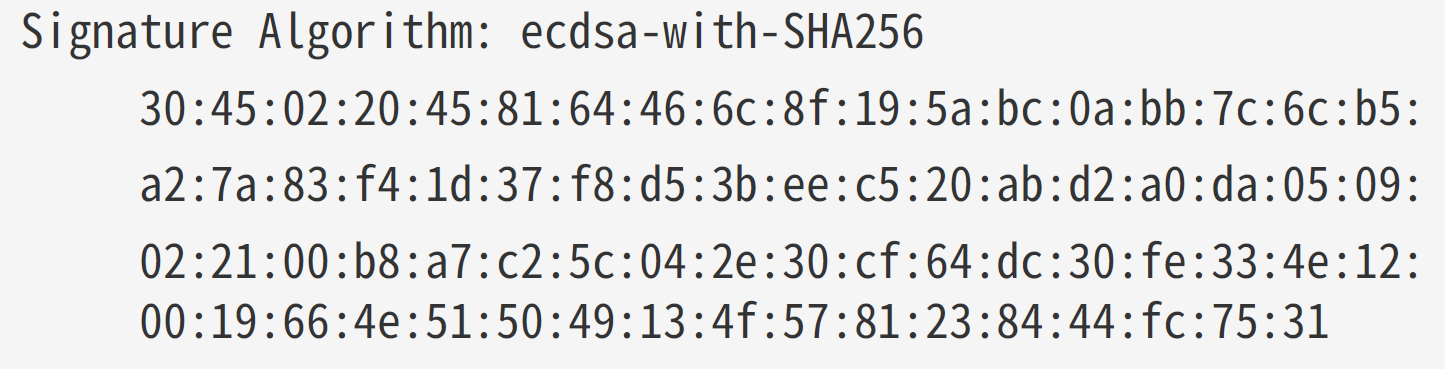
Progress!!!
This means that my attempt to encode this into TLV is utterly rubbish!!
In the example, it should be
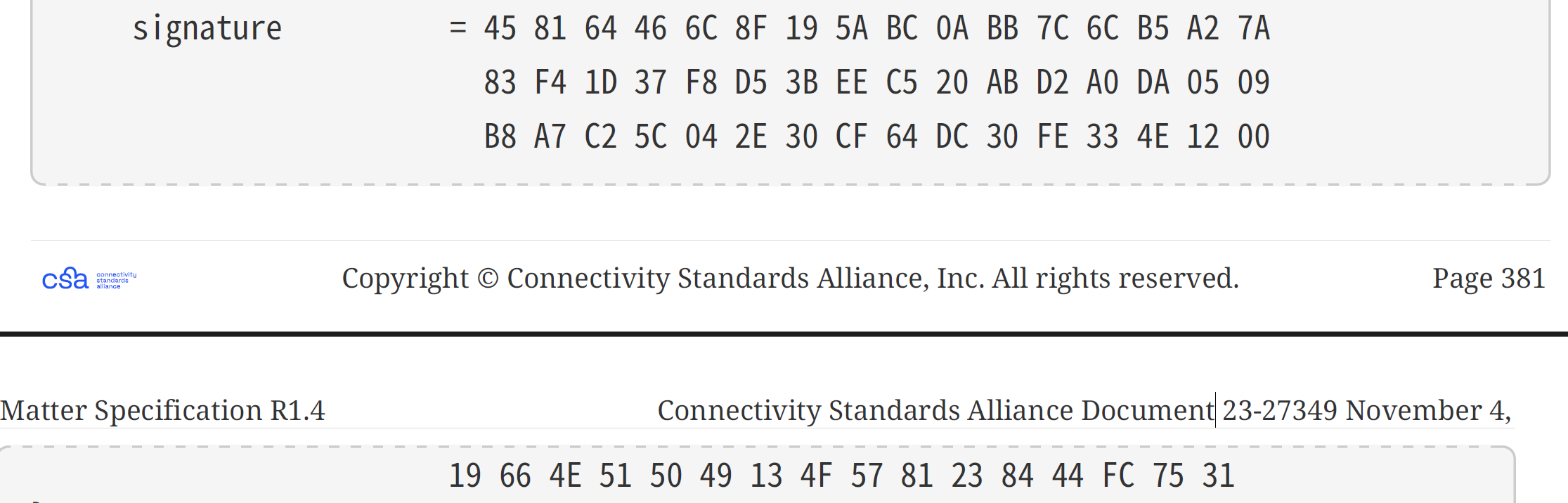
but I’m ending up with this:
09-05-DA-A0-D2-AB-20-C5-EE-3B-D5-F8-37-1D-F4-83-7A-A2-B5-6C-7C-BB-0A-BC-5A-19-8F-6C-46-64-81-45-31-75-FC-44-84-23-81-57-4F-13-49-50-51-4E-66-19-00-12-4E-33-FE-30-DC-64-CF-30-2E-04-5C-C2-A7-B8As I stared at this, I realised what was happening. My bloody bytes were in the wrong order!!
Take the first 32 bytes of my output
09-05-DA-A0-D2-AB-20-C5-EE-3B-D5-F8-37-1D-F4-83-7A-A2-B5-6C-7C-BB-0A-BC-5A-19-8F-6C-46-64-81-45And read it backwards – this is the first 32 bytes of the Example signature. Same for the second block of 32 bytes! Endianness? 🤦🏼♂️
I updated my code and the TLV got even closer!
Structure {
  1 => Octet String, 1-octet length (8) (59-EA-A6-32-94-7F-54-1C)
  2 => Unsigned Int (8bit) (1|0x01)
  3 => List {
    20 => Unsigned Int (64bit) (72057597440215754)
    }
  4 => Unsigned Int (32bit) (1602771823|5F885B6F)
  5 => Unsigned Int (32bit) (2233923822|8526F8EE)
  6 => List {
    20 => Unsigned Int (64bit) (72057597440215754)
    }
  7 => Unsigned Int (8bit) (1|0x01)
  8 => Unsigned Int (8bit) (1|0x01)
  9 => Octet String, 1-octet length (65) (04-13-53-A3-B3-EF-1D-A7-08-C4-90-80-48-01-4E-40-7D-59-90-CE-22-BC-4E-B3-3E-9A-5A-CB-25-A8-56-03-EB-A6-DC-D8-21-36-66-A4-E4-4F-5A-CA-13-EB-76-7F-AF-A7-DC-DD-DC-33-41-1F-82-A3-0B-54-3D-D1-D2-4B-A8)
  10 => List {
    1 => Structure {
      1 => Boolean (True)
      }
    2 => Unsigned Int (8bit) (96|0x60)
    4 => Octet String, 1-octet length (20) (13-AF-81-AB-37-37-4B-2E-D2-A9-64-9B-12-B7-A3-A4-28-7E-15-1D)
    5 => Octet String, 1-octet length (20) (13-AF-81-AB-37-37-4B-2E-D2-A9-64-9B-12-B7-A3-A4-28-7E-15-1D)
    }
  11 => Octet String, 1-octet length (64) (45-81-64-46-6C-8F-19-5A-BC-0A-BB-7C-6C-B5-A2-7A-83-F4-1D-37-F8-D5-3B-EE-C5-20-AB-D2-A0-DA-05-09-B8-A7-C2-5C-04-2E-30-CF-64-DC-30-FE-33-4E-12-00-19-66-4E-51-50-49-13-4F-57-81-23-84-44-FC-75-31)
  }
Getting closer (I think)!
With my signature correct (🤞🏼) I returned to the NotBefore and NotAfter. To help determine is my value was being sent correctly, I updated the matter.js method:
export function matterToJsDate(date: number) {
    const jsDate = date === 0 ? X520.NON_WELL_DEFINED_DATE : new Date((date + EPOCH_OFFSET_S) * 1000);
    console.log(`matterToJsDate: ${date} => ${jsDate.toISOString()}`);
    return jsDate;
}
This would now print the date.
Ah ha!

My values were pants!
Ah Jeez

I’m using Unix Time, which is based off 1970. FFS!
I fixed this with an extension method. It gets the unix time and then basically converts it to 2020:
 public static uint ToEpochTime(this DateTimeOffset dt)
 {
     var epochStart = 946684800; // 2000-01-01T00:00:00Z
     return (uint)(dt.ToUnixTimeSeconds() - epochStart);
 }
The next problem was the value I had for RootCertificateId. The example has 0xCACACACA00000001 as the value. I tried the BitConverter to turn this into a ulong, but it didn’t work.
In the end, I used BouncyCastle’s BigInteger, taking care to set the Endianness!
var rootCertificateIdBytes = "CACACACA00000001".ToByteArray();
var rootCertificateId = new BigInteger(rootCertificateIdBytes, false);
I then tweaked my TLV builder to accept a byte[] when adding numbers:
public MatterTLV AddUInt64(long tagNumber, byte[] value)
{
    if(value.Length != 8)
    {
        throw new Exception("Value must be 8 bytes long");
    }
    _values.Add(0x01 << 5 | 0x7);
    _values.Add((byte)tagNumber);
    _values.AddRange(value);

    return this;
}
This allowed me to then do this:
cert.AddList(3); // Issuer
cert.AddUInt64(20, _fabric.RootCertificateId.ToByteArrayUnsigned());
cert.EndContainer(); // Close List
After all those tweaks, my encoded TLV matched the Example perfectly and matterjs was happy!

Summary
This post took a lot of twists and turns! Whilst I got a certificate working, it’s based off a sample. I will need to actually generate a cert from scratch, but I’m past the AddTrustedRootCertificate hurdle!
With the trusted root certificate now added, the next step will be generating another certificate. Oh Joy. Hopefully all the lessons I’ve learned in this post will help with that! There are also examples of this in the Matter Spec, so I have a something to guide me.
Stay Tuned!


Leave a comment