

I am building my own .Net Matter Controller.
I’m writing these posts as I go, figuring the stuff out and blogging how and what I’m doing.
In my previous post, I got the Example Matter CA certificate successfully installed on a matter.js example device.
TL;DR
In this post, I work through the creation of a Node Operational Certificate. I discover that I really need a working Certificate Generation code, since I’m processing a CSR (Certificate Request). I spent a lot of time comparing ASN.1 encodings before success. Once I have my own Trusted CA working, I work on the NOC until I get that working too!!
No NOC for you!
At this point, my addNoc command was being rejected by matter.js.

After adding the AdminSubject I got this error:

Basically, I’m my NOC is too large in TLV format. The Matter specification (6.1.3) states that no NOC cert should be longer than 400.

I hate PKI.
Oh, FFS. I wasn’t encoding the NOC. I was just sending the certificate’s raw bytes.
I was back to the same cryptic MatterFabricInvalidAdminSubjectError. I delved into the matter.js code and realised that this value was being sent in the AddNoc request as 0. It represents a NodeId, so I changed it to 2 (1 being the root node). This yielded a change in error.

This error meant I was missing something else in the TLV. As it was calling setOperationalCert, I concluded that my AddNocRequest TLV was okay, so this was back to the encoded cert….
I looked back at the example and say this in the NOC Example
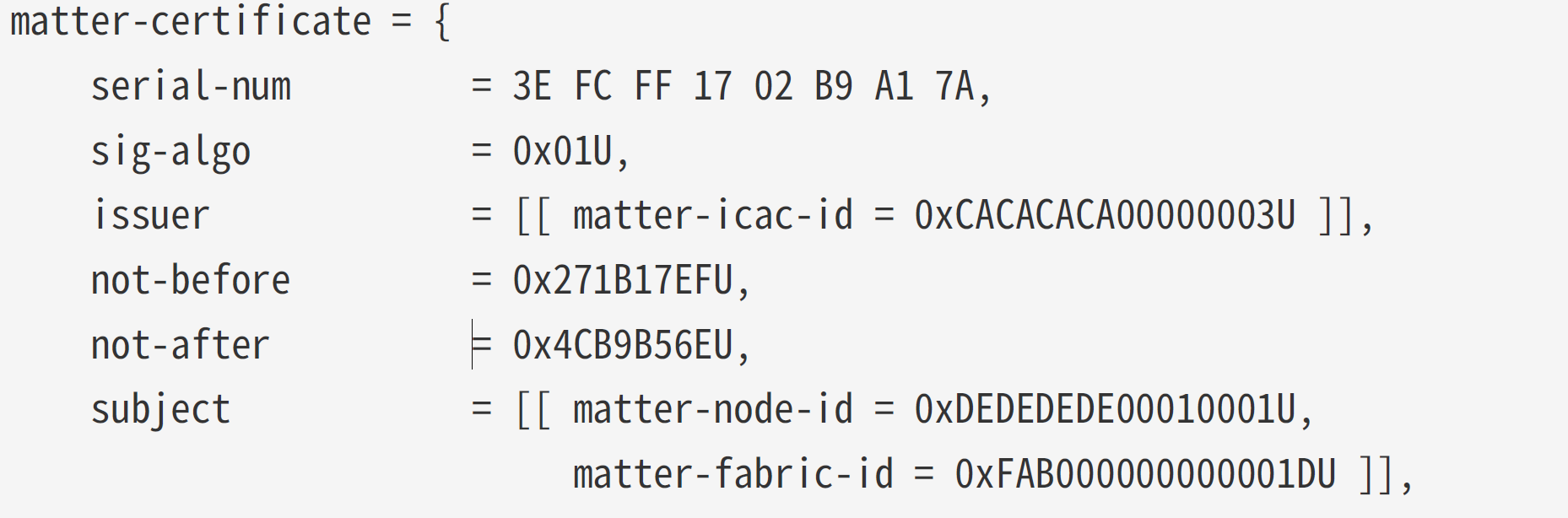
The subject appears to contain the node-id and fabric-id.
I added these values to the Subject in the certificate and encoded them like this:
encodedNocCertificate.AddList(6); // Subject
encodedNocCertificate.AddUTF8String(17, "2"); // NodeId
encodedNocCertificate.AddUTF8String(21, "TestFabric"); // FabricId
encodedNocCertificate.EndContainer(); // Close List
Table 62 in the specification gives the link between OID for the certificate and the Tag number for TLV.
Different error!

I looked through my encoding and the only place I could see a “12” was my UTF8 nodeId and FabricId.
Turned out, they are UTF8String values in the certificate, but Unsigned Integers in TLV! I changed the FabricId to a value of 1 and tried again, using my AddUInt8(). I also found and fixed an error with my UTF8 string encoding, so that was good.

I quickly changed this over and got presented with another new error.
Isn’t development fun!

After realising I was using adding the values from the wrong encoding instance (!), I made more progress. Well, I progressed to a different error at any rate!

I was using empty byte[] for the subject-key-id and admin-key-ids, so this wasn’t really unexpected.
encodedNocCertificate.Add1OctetString(4, new byte[20]); // subject-key-id
encodedNocCertificate.Add1OctetString(5, new byte[20]); // authority-key-id
I set it as it wanted, using the RootKeyIdentifier, like I did with the RootCertitifcate. Then I got this familiar chestnut:

Getting this right
At this stage I was still using the public and private from the Root Certificate Examples. I really needed to get my own certificate generation working. I returned to the Root CA Certificate. If I couldn’t get that to work, I had no hope generating a NOC.
I restored my code and generated the root certificate, saving it as a CER. I think opened it and compared it side by side with the example certificate.
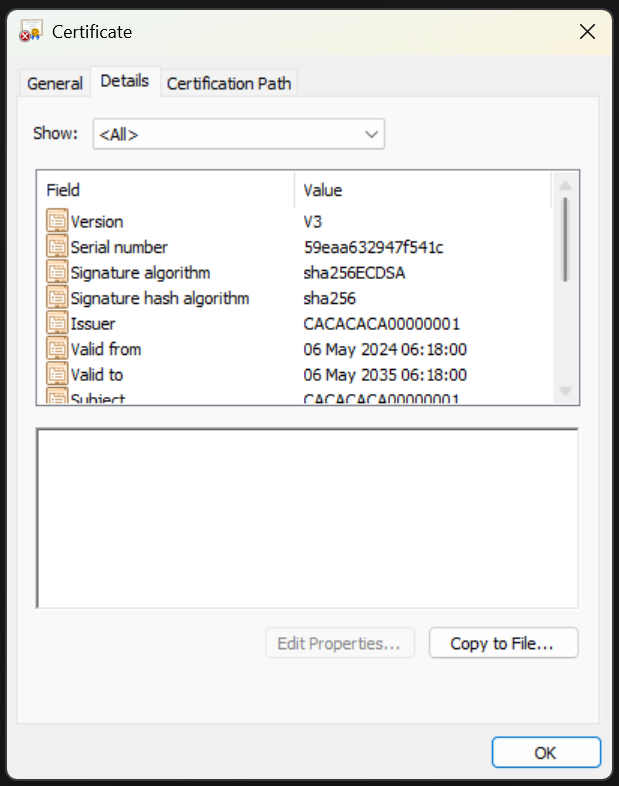
The cert values seem to match up, aside from the SubjectKeyIdentifier and AuthorityKeyIdentifier.
After more mulling and reading of code, it began to dawn on me that I maybe the problem was the mechanism. What happens is that an X509Certificate, like I have, is turned into a TLV representation. This is sent to matter.js, which then turns this back into a certificate. The signature of that is then checked.
Except, I’m getting the signature for the *entire* X509 that I’m creating. I decided to compare the x509 in the Example with my X509. If I’m using the same values, the encoded certificate should be roughly the same, keys aside.
I used this to dump both of the certificates as DER Encoded byte[]
BitConverter.ToString(myRootCertificate.GetEncoded()).Replace("-", "");
BitConverter.ToString(exampleRootCertificate.GetEncoded()).Replace("-", "");
The byte[] from my certificate was much longer! I put it into an ASN1 decoder: https://lapo.it/asn1js
The Example rendered this:
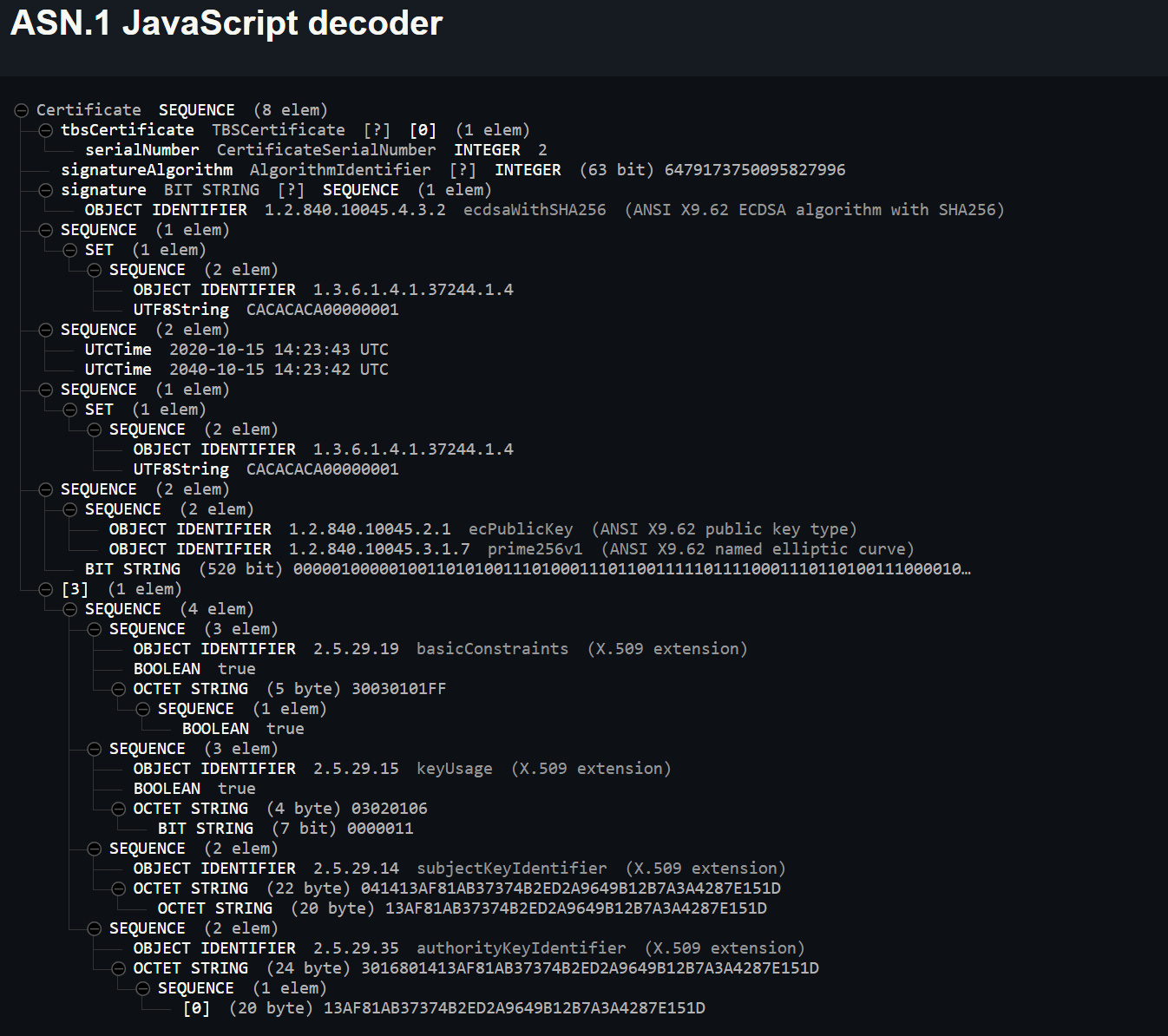
You can see the CACACACA000000001 and the 13AF…151D SubjectKeyIdentifier and AuthorityKeyIdentifier values.
Then my Root Certificate rendered this:
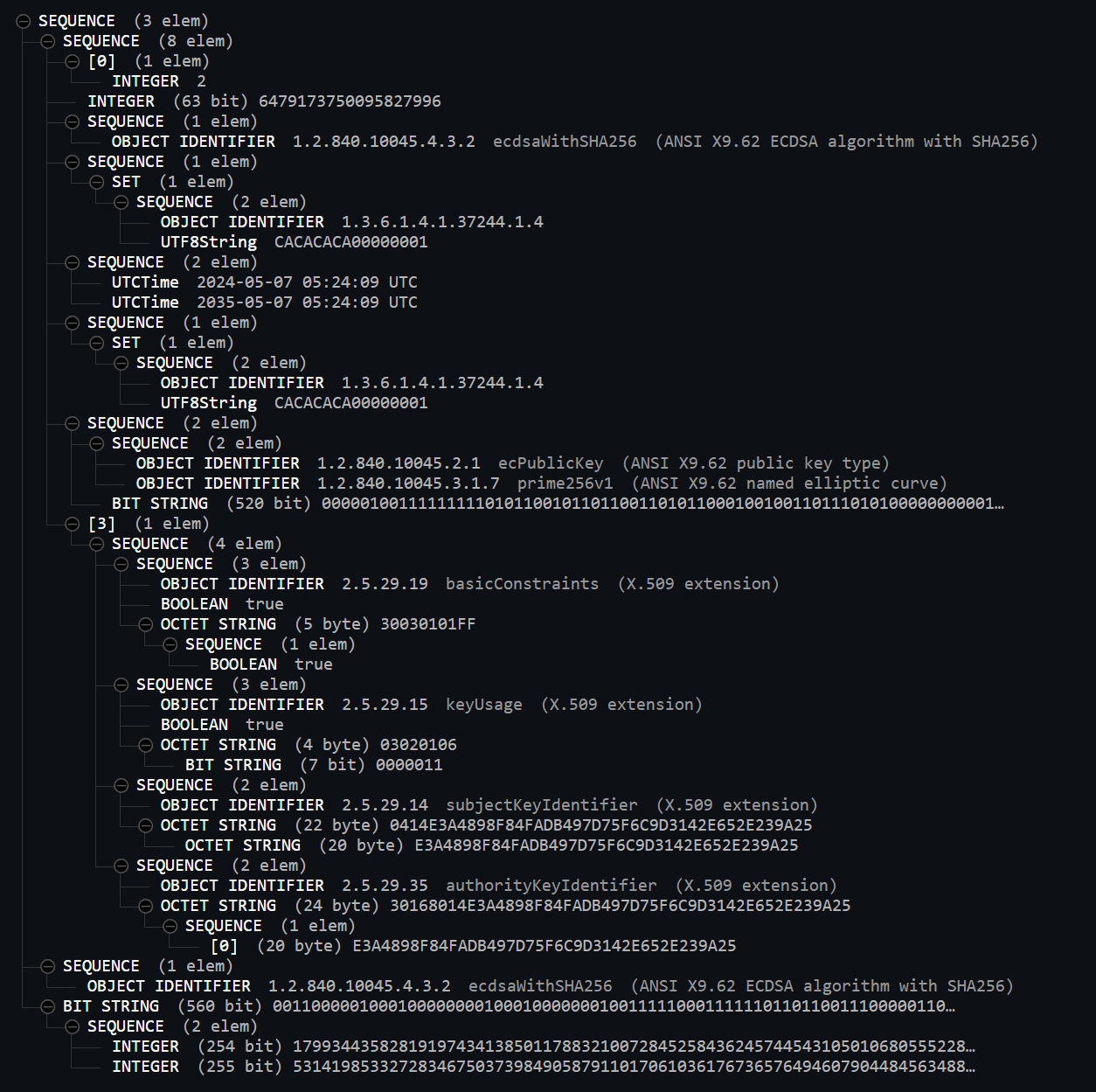
Aside from the expected differences (subjectKeyIdentifier for example) the main block in the middle was different! This had an identifier of ecPublicKey (ASNI X9.62 public key type)
My publicKey seemed to contain much more information than the Example publicKey.
I checked the certs side by side again and spotted it!

The Public key parameters on my cert was a byte[], whereas it’s a simple string on the Example.
I was able to correct this by using a different parameter when creating my keypair
var ecParam = new DerObjectIdentifier("1.2.840.10045.3.1.7");
var secureRandom = new SecureRandom();
var keyParams = new ECKeyGenerationParameters(ecParam, secureRandom);
This yielded a better match

At this point, the ASN.1 decoded values looked almost identical. Of course, mine included the Signature too.
Ran my code again and success!!!!

Repeating for the NOC
With my own Root Certificate Authority working, I returned my attention to the Node Operational Certificate.
I followed a similar process, comparing the ASN.1 encodings of the Example NOC with my own. After updating the code with the same tweaks, I compared CER files.

In my NOC code, unlike the trusted CA, I was attempting to read more from the cert itself, rather than copy/paste. Authority Key Identifier was one area I tried.
 var authorityKeyIdentifier = _fabric.RootCertificate.GetExtension(X509Extensions.AuthorityKeyIdentifier).Value;
 certGenerator.AddExtension(X509Extensions.AuthorityKeyIdentifier, false, authorityKeyIdentifier);
I used my copy paste method and resolved that issue.
I then spotted this stupid mistake

I was Encoding the wrong bloody signature🤦🏼♂️
And then, like magic, I got this

I would have shouted except my kids are asleep!!!
Next Steps
In the commissioning flow, I’ve just completed the Operational Certificate step.
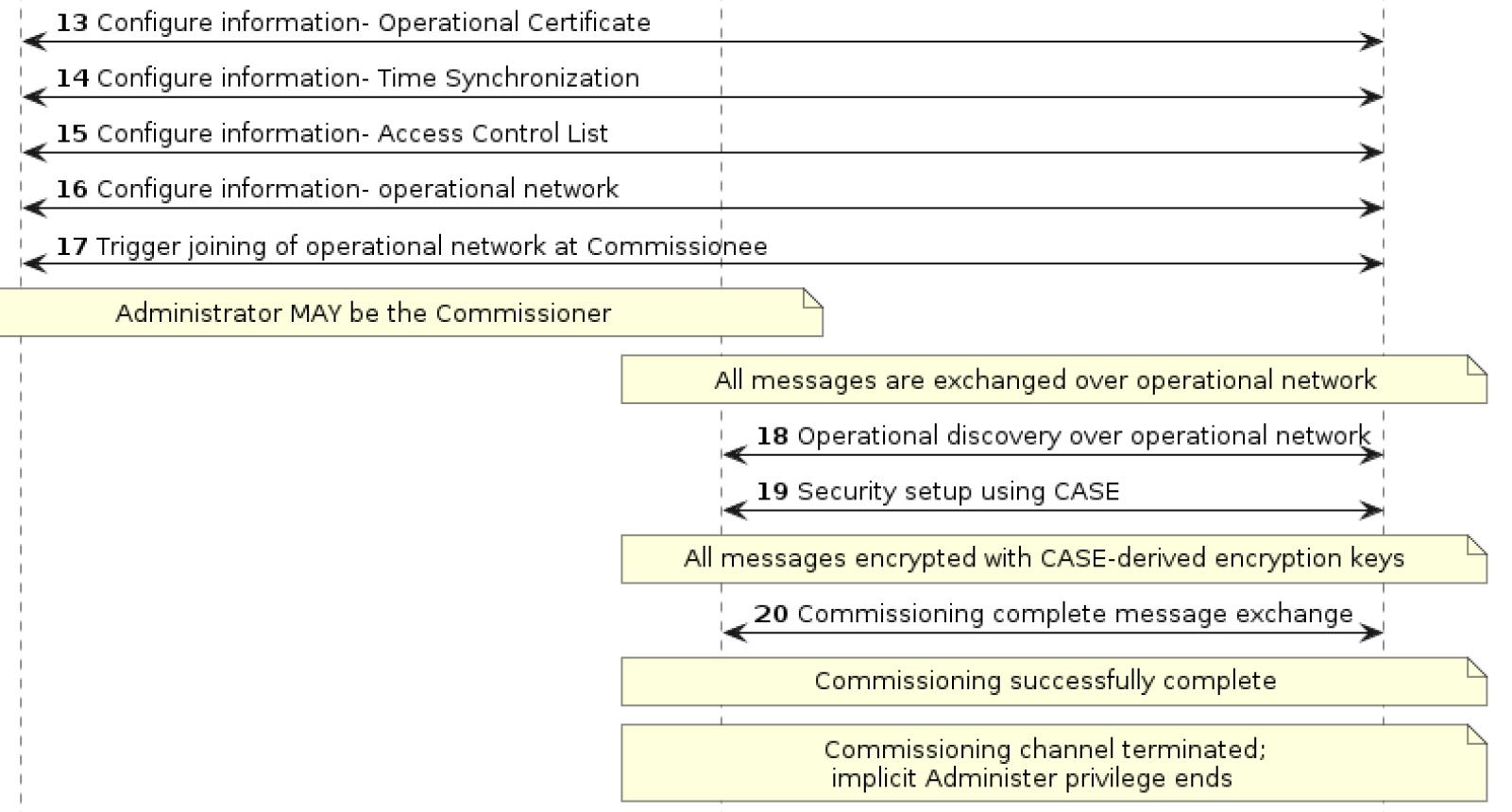
I’m going to skip Access Control List because matter.js does. I don’t need to do any networking stuff since my matter.js code is running locally. If this was an ESP32 I’d need to do a WiFi or Thread Step.
This basically means the next step is performing the CASE – Certificate Authenticated Session Establishment.
Once that’s done, I can then mark commissioning as complete.
Stay tuned!


Leave a comment