

I am building my own .Net Matter Controller.
I’m writing these posts as I go, figuring the stuff out and blogging how and what I’m doing.
In my previous post, I completed the very basic commissioning of a device!
TL;DR
In this post, I fix a few quirks in my Core code around NodeIds. I then successfully send On and Off commands to a matter.js example device.
Controlling the device!
After all those hours of work to get to this point, I can finally do what I set out to do. Turn on a light 🤣
As with adding a Trusted Certificate and adding a NOC (Node Operational Certificate), we access every aspect of a Matter device via clusters and attributes. This is the flow for everything; lights, switches, washing machines.
Devices are made up of multiple clusters, grouped together.
Take a dimmable bulb for example. This will have an OnOff cluster and a LevelControl cluster. Put the two of them together and you have a bulb you can turn on and off and also adjust its level. It’s a clever approach.
Matter goes one step further and defines Device Types. These are specified groups of clusters. The Matter Device Library document holds all the information on this. If you open that and jump to section 4.2, you’ll find the Dimmable Light.

This indicates that that this device builds on another (On/Off Light) and is scoped to an Endpoint. An endpoint is a way of isolating different clusters. It then goes on to define the clusters that make up a Dimmable Light.

The keys ones are, as I said, On/Off and Level Control.
To get more information on the On/Off Cluster, we need to open the Matter Cluster Specification and go to section 1.5. On/Off Cluster. Let’s look at commands for now:
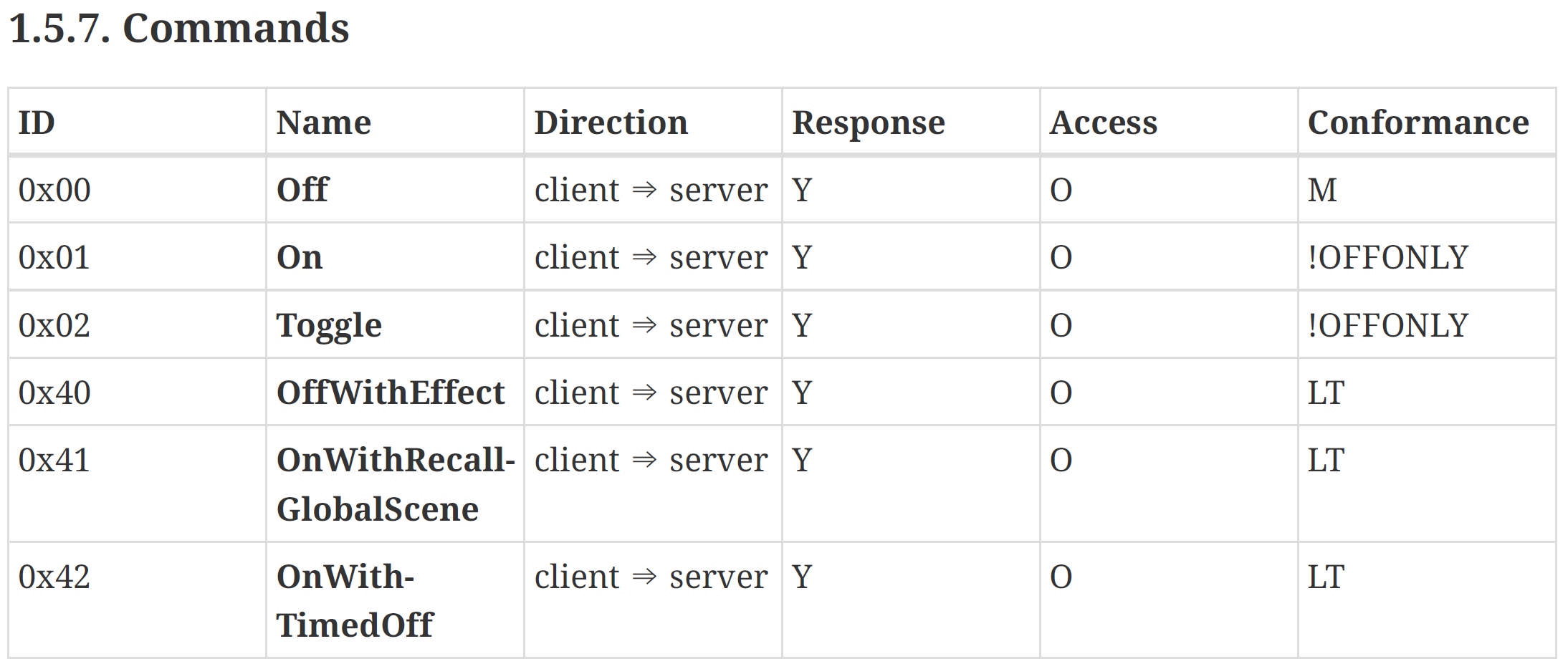
So to turn on the light, I send an On command (0x01) to the On/Off cluster (0x0006). I’m going to assume this cluster is on Endpoint 1 at this time. Of course, the right way to determine this is to query the device and get a list of all endpoints and clusters. That’s a job for another day.
Sending the command
Just like the other Interaction Manager commands, I just configure it.
onCommandPayload.AddUInt16(tagNumber: 0, 0x01); // Endpoint 0x01
onCommandPayload.AddUInt32(tagNumber: 1, 0x06); // ClusterId 0x06 - OnOff
onCommandPayload.AddUInt16(tagNumber: 2, 0x01); // 1.5.7 Command On
There are no CommandFields to worry about.
This, of course, didn’t work!!

There was still something wrong with my encryption/decryption. After some digging, I found the issue was in the generation of the nonce values. Part of the nonce value is the SourceNodeId or the DestinationNodeIde (depending on the direction of the message).
I discovered that the messages being sent to me didn’t actually include the SourceNodeId value. After some reading, I established that this value isn’t always sent. This is because it isn’t always needed. If we are operating in a CASE session, the already *know* the two nodes involved. No point in sending the IDs over and over again and wasting bandwidth.
I modified my CaseSecureSession to accept the two node Ids.
public CaseSecureSession(IConnection connection,
                         ulong sourceNodeId,
                         ulong destinationNodeId,
                         ushort sessionId,
                         byte[] encryptionKey,
                         byte[] decryptionKey)
Now, when I’m decoding the message in the session, I can substitute the missing SourceNodeId value with the destinationNodeId value in the session. Confusing, I know.
I could now use the nodeIds from the session accordingly. A quick retry and

The next obvious thing to do, was turn it off.
Light thinks it travels faster than anything but it is wrong. No matter how fast light travels, it finds the darkness has always got there first, and is waiting for it. Terry Pratchett, Reaper Man
This required sending an OffCommand. Looking back at the Commands table, we can see the command id is 0x00

That looks like this. Same endpoint and same cluster, just a different command.
offCommandPayload.AddUInt16(tagNumber: 0, 0x01); // Endpoint 0x01
offCommandPayload.AddUInt32(tagNumber: 1, 0x06); // ClusterId 0x06 - OnOff
offCommandPayload.AddUInt16(tagNumber: 2, 0x00); // 1.5.7 Command Off
And…

Next Steps
At this point, I’ve almost enough working of my Core code working.
There are a few things missing. Firstly, I still need to store the Fabric information (certificates etc), so I can recreate the fabric when I restart the console app. Secondly, I need to store the IDs of the nodes I’m adding. Lastly, I need to restore the CASE sessions with these nodes on relaunch.
Still quite a bit to do (and still lots of quirks in my Exchange and Message handling), but I’m getting there!
As ever, all the code is up at https://github.com/tomasmcguinness/dotnet-matter. It’s saved under the tag v0.1 to match my progress so far.
Stay tuned!


Leave a comment