
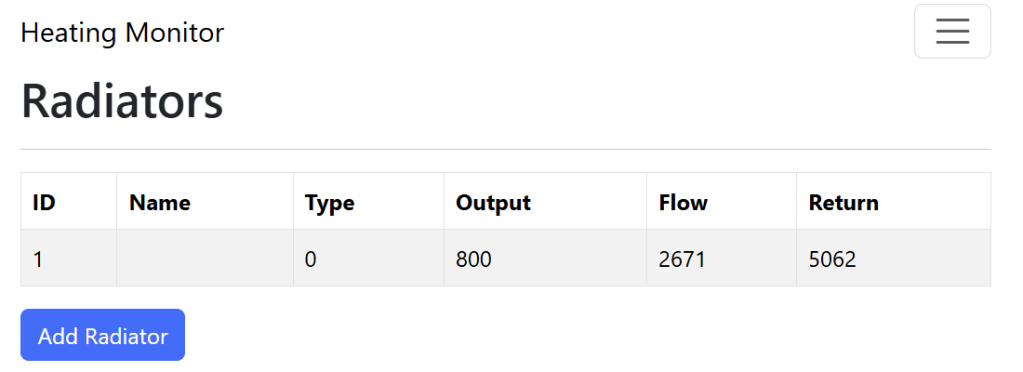
In this post, I look at actually reading the temperatures after adding my Dual Temp Sensor node. I have enough code written to support Radiators that I now need their temperatures!
This post follows on from these previous posts I’ve written about my Heating Monitor
- Building a new heating monitor using Matter and ESP32
- Matter Heating Monitor – showing commissioned Nodes
- Matter Heating Monitor – Deleting Nodes
- Matter Heating Monitor – Showing Device Types
- Matter Heating Monitor – Supporting Setup Code
What to read?
On my sensor board, there are two connectors (Probe 1 and Probe 2), which support NTC Thermistors. These are represented in Matter as two Temperature Sensor endpoints.

A Temperature Sensor is made up of a Temperature Measurement cluster. I’m only interested in one attribute of that Cluster, the Measured Value (0x0000)

Just like the other attributes (see my previous posts), I could simply send a read_command to get their value. However, since my temperature sensor value would be changing every few seconds, this wouldn’t really work.
Subscriptions
Thankfully, Matter has the solution to this in the form of Subscriptions! They allow one node to subscribe to another node and get updates when things change.
I decided to perform the subscription during the processing of the DeviceTypeList attribute. If the device type indicated it was a Temperature Sensor, I would subscribe to the Attribute.
My first attempt looked like this. I added simple callbacks, subscribe_done and subscribe_failed, to give me some logging.
if(device_type_id == 770) // 0x0302 Temperature Sensor
{
  uint16_t min_interval = 0;
  uint16_t max_interval = 15;

  auto *cmd = chip::Platform::New<esp_matter::controller::subscribe_command>(
    node_id,
    path.mEndpointId,
    path.mClusterId,
    TemperatureMeasurement::Attributes::MeasuredValue::Id,
    esp_matter::controller::SUBSCRIBE_ATTRIBUTE,
    min_interval,
    max_interval,
    true,
    attribute_data_cb,
    nullptr,
    subscribe_done,
    subscribe_failed,
    true);

  esp_err_t err = cmd->send_command();
}
To check I was receiving a value, I updated the existing attribute_data_cb with some logging
else if (path.mClusterId == TemperatureMeasurement::Id &&
         path.mAttributeId == TemperatureMeasurement::Attributes::MeasuredValue::Id)
{
    ESP_LOGI(TAG, "Processing TemperatureMeasurement->MeasuredValue attribute");
}
I commissioned the node and immediately spotted a problem. The code was running in a strange loop! It was constantly receiving updates from the Descriptor cluster.

I ended up with dozens of DeviceTypes being added to my node. I quickly realised my mistake. I was subscribing to the wrong cluster 🤦🏼♂️
path.mEndpointId,
path.mClusterId, // THIS CLUSTER IS THE DESCRIPTOR!
TemperatureMeasurement::Attributes::MeasuredValue::Id,
esp_matter::controller::SUBSCRIBE_ATTRIBUTE,
min_interval
I corrected it to use the right cluster, TemperatureMeasurement::Id
path.mEndpointId,
TemperatureMeasurement::Id, // The correct cluster
TemperatureMeasurement::Attributes::MeasuredValue::Id,
esp_matter::controller::SUBSCRIBE_ATTRIBUTE,
min_interval,
After commissioning the node again (I need a better way!), I got updates!

I plugged in my Sophisticated Calibration Device (a resistor connected to two wires) and I got another update!

Displaying the values
With subscriptions now working, the next step was showing these values on the UI. I had created a Radiators page and wired up the load and save, just like my nodes.

I wanted to show the temperatures on this page. This gave me two tasks:
- The ability to associate a radiator with two Temperature Measurements (for Flow and Return)
- The ability to push changes in temperature onto the UI.
Which temperature goes where?
My dual temperature sensor returned two temperature values. Endpoint 1 was Probe 1 and Endpoint 2 was Probe 2.
Each radiator needed two temperatures; Flow and Return. These are the two pipes that come into a radiator. Once brings the hot water, one returns the colder water.
This gave me a mapping, something like this
| Flow Temperature | Node 0x0001, Endpoint 0x0001 |
| Return Temperature | Node 0x0001, Endpoint 0x0002 |
Of course, I could associate the radiator with a Node and assume Endpoint 1 and Endpoint 2 were temperature sensors. However, this is pretty rigid and makes a lot of assumptions. If anyone else wanted to use my Heating Monitor with their own sensors, I needed to be more flexible. They might even have *two* completely separate devices.
No, what I needed here was simplicity. No assumptions necessary. I added four new variables to my radiator
typedef struct radiator
{
    uint8_t radiator_id;
    uint8_t name_len;
    char *name;
    uint8_t type;
    uint16_t outputAtDelta50;
    struct radiator *next;

    uint64_t flow_temp_nodeId;
    uint16_t flow_temp_endpointId;
    uint64_t return_temp_nodeId;
    uint16_t return_temp_endpointId;

} radiator;
I updated both the load and save methods to persist these values too.
Listing the sensors
I implemented an /api/sensors API to return a list of the Temperature Measurements available.
This was simply a look that found all Endpoints with a DeviceType of 770 and added a JSON node.
if (device_type_id == 770)
{
  cJSON *jSensor = cJSON_CreateObject();
  cJSON_AddNumberToObject(jSensor, "nodeId", node->node_id);
  cJSON_AddNumberToObject(jSensor, "endpointId", endpoint.endpoint_id);
  cJSON_AddItemToArray(root, jSensor);
}
In my AddRadiator.tsx React page, I fetched these sensors and listed them in the UI.

This let me select the sensor representing each end of the radiator.
Pairing the results
The last part was using this mapping when an updated attribute value was received (via subscription). Again, this was just a simple loop
while (radiator)
{
    if (radiator->flow_temp_nodeId == remote_node_id ||
        radiator->return_temp_nodeId == remote_node_id)
    {
        ESP_LOGI(TAG, "Node is assigned to radiator %u", radiator->radiator_id);

        if (radiator->flow_temp_endpointId == path.mEndpointId)
        {
            ESP_LOGI(TAG, "Reading Flow Temperature value");
        }
        else if (radiator->return_temp_endpointId == path.mEndpointId)
        {
            ESP_LOGI(TAG, "Reading Return Temperature value");
        }

        break;
    }

    radiator = radiator->next;
}
This just checked the incoming nodeId and endpointId values against my radiators.

That worked!
Real time connection to the UI
I now had the ability to assign the incoming temperature measurements to a particular radiator. Next, I needed a way to send data to the UI.
Since the temperature would be changing, I choose Websockets for this. I had experience with these from an old project.
First, I needed to enable them in the config
CONFIG_HTTPD_WS_SUPPORT=yThen define a URI
static const httpd_uri_t ws_uri= {
    .uri = "/ws",
    .method = HTTP_GET,
    .handler = ws_get_handler,
    .user_ctx = NULL,
    .is_websocket = true
};
The ws_get_handler method has two jobs
static esp_err_t ws_get_handler(httpd_req_t *req)
{
    if (req->method == HTTP_GET)
    {
        ESP_LOGI(TAG, "Handshake done, the new connection was opened");
        return ESP_OK;
    }

    ws_socket = httpd_req_to_sockfd(req);

    httpd_ws_frame_t ws_pkt;
    memset(&ws_pkt, 0, sizeof(httpd_ws_frame_t));
    ws_pkt.type = HTTPD_WS_TYPE_TEXT;
    esp_err_t ret = httpd_ws_recv_frame(req, &ws_pkt, 0);

    << TRUNCATED >>

    return ret;
}
First, it ignores the initial GET request. This is the request from browser, which results in the Switch Protocols response. Second, it grabs the ws_socket and stores it. This is required so we can send messages. Finally, it executes a read of the incoming data, otherwise it gets annoyed.
On the ReactJS side, I opted for react-use-websocket, an NPM package that promised to make websockets easy to use.
To open the web socket, I added this. Note that onOpen, I send a message. This is to ensure my socket is grabbed by the ws_get_handler
const socketUrl = 'ws://192.168.1.104/ws';

const {
    sendJsonMessage,
    lastJsonMessage,
} = useWebSocket(socketUrl, {
    onOpen: () => {
                      sendJsonMessage({ radiators: true });
                      console.log('Websocker opened');
                  },
    shouldReconnect: (_) => true,
   share: true
});
I then added a useEffect to listen for changes to lastJsonMessage
useEffect(() => {
    console.log("Web socket data has changed...." + lastJsonMessage);
}, [lastJsonMessage]);
Sending the value
With my web socket connection working, I returned to attribute_data_cb as this is what would send the value.
To get the value from the subscription updates, I needed to decode the payload.
int16_t temperature;
chip::app::DataModel::Decode(*data, temperature);
I then constructed a JSON payload to hold the update, indicating if it was a flow or return temperature.
cJSON *root = cJSON_CreateObject();cJSON_AddNumberToObject(root, "radiatorId", radiator->radiator_id);

if (radiator->flow_temp_endpointId == path.mEndpointId)
{
    ESP_LOGI(TAG, "Reading Flow Temperature value");
    cJSON_AddNumberToObject(root, "flowTemp", temperature);
}
else if (radiator->return_temp_endpointId == path.mEndpointId)
{
    ESP_LOGI(TAG, "Reading Return Temperature value");
    cJSON_AddNumberToObject(root, "returnTemp", temperature);
}

char *payload = cJSON_PrintUnformatted(root);
I then dispatched the JSON via the web socket
httpd_queue_work(server, ws_async_send, payload);After some tinkering, I got some values flowing through to my browser. Note the values are large, as the Matter standard requires temperatures to be represented like this (5314 is 53.14)

Reading the value
With some values flowing, I updated the lastJsonMessage effect to process the value
const updatedRadiatorList = [...radiatorList];
const radiator = updatedRadiatorList.find(a => a.radiatorId === (lastJsonMessage as any).radiatorId);

if(lastJsonMessage.hasOwnProperty("flowTemp")) {
    radiator.flowTemp = (lastJsonMessage as any).flowTemp;
} else {
    radiator.returnTemp = (lastJsonMessage as any).returnTemp;
}
And then rendered the two properties on the table!

All I needed was a little formatting to tidy this up.
Reliability??
After getting this all set up, I was dismayed to find the whole thing seemed pretty unreliable!
On both sides, the ESP32 and the nRF54, I would see constant logs about dropped messages and failed sessions.

I guessed this was because I was constantly restarting my devices, which is something that wouldn’t happen in real life.
Another thing I found was that the subscriptions didn’t seem to persist when I restarted either device. I ended up adding a new function, subscribe_all_temperature_measurements, which is called in main(). This just runs through the nodes and subscribes to any temperature measurements.
Summary
Took a while to get all the moving parts into position, but I’m happy with the end result. My code needs a lot of cleaning up and improvement, but it works.
As ever, the code for this is up at https://github.com/tomasmcguinness/matter-esp32-heating-monitor. The code so far will be under tag 0.0.5.
Did you like reading this post?
If you found this blog post useful and want to say thanks, you’re welcome to buy me a coffee. Better yet, why not subscribe to my Patreon so I can continue making tinkering and sharing.
Be sure to check out my YouTube Channel too – https://youtube.com/tomasmcguinness
Thanks, Tom!


Leave a comment