

I ran into an issue this morning whilst trying to commission a Matter over Thread device using the esp-matter SDK running on an ESP32-P4.
I had already performed the initial commissioning of the device using the chip-tool and it was advertising itself. I confirmed this using the Discover tool. It had an IP address beginning fd43:2a42:8b75. The fd prefix indicates this address is a Unique Local Address and it’s like the classic 192.168.x.x. Routable internally, but not externally.

However, when I opened a new commissioning window and tried to commission from my P4, the process was timing out. The P4 was able to find the IP address from the Thread device’s DNS-SD record (like above) but couldn’t open a PASE session. Commissioning via a Raspberry Pi or my iPhone was possible, so I knew it wasn’t the Thread issue or device issue.
After a lot of debugging, it turns it that my P4 simply didn’t have a route to the Thread device. It had the IP Address but didn’t know how to direct the packets.
Router Advertisments
There is a mechanism in IPv6 where routers can advertise themselves using an RS/RA protocol. When my P4 started up, it only got a link local address.
I (7131) main: Waiting for IPv6 addresses...I (8611) main: Got IPv6: fe80:0000:0000:0000:32ed:a0ff:feea:4647I (8611) main: === IPv6 Network State ===I (8611) main: Interface en1:I (8611) main: addr[0]: FE80::32ED:A0FF:FEEA:4647I (8611) main: Interface lo0:I (8611) main: addr[0]: ::1I (8621) main: ==========================
I felt like this might be preventing my packets getting through to the Thread device. My P4 should be getting a property IP address too, via DNS. After more digging around the documentation, I found two settings were required:
CONFIG_LWIP_IPV6_AUTOCONFIG=yCONFIG_LWIP_IPV6_RDNSS_MAX_DNS_SERVERS=2
With these settings in place, the next time I started the P4, I got a property address
I (11631) esp_netif_handlers: eth ip: 192.168.1.181, mask: 255.255.255.0, gw: 192.168.1.1I (11631) main: Got IP: 192.168.1.181I (11631) main: SNTP startedI (15611) main: Got IPv6: 2a02:8012:125a:0000:32ed:a0ff:feea:4647I (15611) main: === IPv6 Network State ===I (15611) main: Interface en1:I (15611) main: addr[0]: FE80::32ED:A0FF:FEEA:4647I (15611) main: addr[1]: 2A02:8012:125A:0:32ED:A0FF:FEEA:4647I (15621) main: Interface lo0:I (15621) main: addr[0]: ::1I (15631) main: ==========================
I thought this would do it, but no joy! Commissioning still didn’t work
No Route to the Device
After a lot of debugging and help from Claude, I began to zero in on the problem – it didn’t have a route for the fd43:2a42:8b75 prefix. Since my device was Thread, it should use a Border Router to go from IP to Thread and back.
I added a debug endpoint to my webserver, which would return all the IPv6 information I could find. This revealed that my Open Thread Border Router wasn’t listed as a router. In fact, of the *several* routers I knew were available, I could only see three. Without knowing about my Border Router, the P4 had no hope!!
    "default_routers": [
        {
            "addr": "FE80::76AC:B9FF:FEEA:4096",
            "lifetime_s": 1551,
            "iface": "en1"
        },
        {
            "addr": "FE80::85F:44A0:C89D:C9AF",
            "lifetime_s": 0,
            "iface": "en1"
        },
        {
            "addr": "FE80::99:EC11:D6F7:C88B",
            "lifetime_s": 0,
            "iface": "en1"
        }
    ],
More digging and I dimade some adjustments to the parameters, increasing the max number of routers!
CONFIG_LWIP_IPV6_ND6_NUM_NEIGHBORS=10CONFIG_LWIP_IPV6_ND6_NUM_ROUTERS=10CONFIG_LWIP_IPV6_ND6_NUM_PREFIXES=10
This now showed *all* my Apple devices, but my Open Thread Border Router still wasn’t listed.
RIO – Route Information Options
More debugging and I leaned that I needed to enable RIO or Route Information Options – this is a mechanism for IPv6 and something required for Open Thread.
CONFIG_LWIP_IPV6_ND6_ROUTE_INFO_OPTION_SUPPORT=y# The three options can be disabled if LwIP supports RIOCONFIG_LWIP_HOOK_IP6_ROUTE_DEFAULT=nCONFIG_LWIP_HOOK_ND6_GET_GW_DEFAULT=nCONFIG_ENABLE_ROUTE_HOOK=n
I switched it on, but still my Thread Router didn’t appear in the list! Everything looked like it was not setup.
Using Wireshark, I could see that the Router Advertisements were being broadcast to the multicast group ff02::1

Inside this payload, I could see the RIO details indicating the fd43:2a42:8b75 prefix!
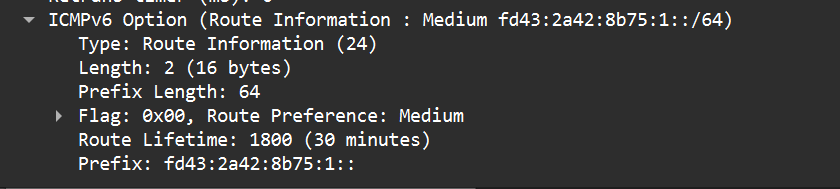
On checking my Windows machine, I could see that it knew how to reach the prefix, so the RA messages were working.

For some reason, my P4 was unaware of the one router it needed to know about! 🤬
Not Listening
With Claude’s help, I add logging in the LwIP stack code in esp-idf and discovered that the P4 wasn’t getting these RA packets at all. Then it hit me. I wasn’t listening for them! RA packets are multicast, meaning they are sent to all parts of the network, but you have to be actually listening for them.
I added some code to the P4 to join the ff02::1 multicast group.
static esp_err_t join_all_nodes_cb(void *ctx){ struct netif *lwip_netif = (struct netif *)ctx; ip6_addr_t allnodes; IP6_ADDR(&allnodes, PP_HTONL(0xff020000), PP_HTONL(0x00000000), PP_HTONL(0x00000000), PP_HTONL(0x00000001)); ip6_addr_assign_zone(&allnodes, IP6_MULTICAST, lwip_netif); err_t err = mld6_joingroup_netif(lwip_netif, &allnodes); return (err == ERR_OK) ? ESP_OK : ESP_FAIL;}
Then I called this new function in the existing got_ip6_event_handler
static void got_ip6_event_handler(void *arg, esp_event_base_t event_base, int32_t event_id, void *event_data){ ip_event_got_ip6_t *event = (ip_event_got_ip6_t *)event_data; ESP_LOGI(TAG, "Got IPv6: " IPV6STR, IPV62STR(event->ip6_info.ip)); struct netif *lwip_netif = (struct netif *)esp_netif_get_netif_impl(event->esp_netif); if (lwip_netif != NULL) { esp_err_t err = esp_netif_tcpip_exec(join_all_nodes_cb, lwip_netif); ESP_LOGW(TAG, "mld6_joingroup ff02::1 -> %s", esp_err_to_name(err)); } log_ipv6_state(); xEventGroupSetBits(s_net_event_group, IPV6_READY_BIT);}
Eureka!
With this in place, my P4 started to process the RA messages and the Open Thread Border Router appeared in my router list!
{ "addr": "FE80::E65F:1FF:FE60:4E57", "lifetime_s": 0, "iface": "en1"},
I then commissioned the device without any issue!

Summary
This was a really strange bug. In the year or two I’ve been playing with Matter Controllers, I haven’t had any problems commissioning On-Network Thread devices. This might be an underlying bug in the esp-idf, but I suspect it’s simply a configuration item I haven’t turn on (because I can’t find it!)
I’m going to raise an issue with espressif and see if there is a cleaner solution.
That said, the issue is fixed and I learned a lot of IPv6, so that’s an up-side!
If you want to learn more about my Home Energy Monitor, be sure to check out this page.
Did you enjoy this post?
If you found this blog post useful and want to say thanks, you’re welcome to buy me a coffee.
Be sure to check out my YouTube Channel too – https://youtube.com/tomasmcguinness
Thanks,
Tom!

Leave a Reply