
I’m trying to build my own .Net Matter Controller.
In my first post, I looked at how I was able to discover a Matter device using Bluetooth LE. The next step in Commissioning is to connect to the device and start sending it instructions. Using Bluetooth is not the only way to perform commissioning, but it’s the common use case.
For Matter, this involves using Bluetooth Transport Protocol (section 4.19 Matter Specification 1.4).
Bluetooth Transport Protocol (BTP)
This describes itself as a TCP like layer that sits atop the Bluetooth GATT communication. I’m going to try and build this as I go, starting with the Handshake. The handshake establishes a session, so let’s get that working first. This involves sending a handshake request and getting a handshake response
In order to actually send and receive the BTP packets, we use the Bluetooth “GATT”. GATT is an acronym for Generic Attribute Profile. https://learn.adafruit.com/introduction-to-bluetooth-low-energy/gatt
GATT is a generic way to discover, read and write values to a Bluetooth device. Something called a “Characteristic” holds a value. BTP leverages specific characterises in order to write packets and to get responses. These are outline in Table 34

We will write out BTP packets to C1 and we’ll use C2 to read the results.
Let’s write code to connect to the BLE Device and read the available characteristics. We should get 2 at the very minimum.
var device = await BluetoothLEDevice.FromBluetoothAddressAsync(args.BluetoothAddress);

Console.WriteLine("Matter device has named {0}", device.Name);

var gattDeviceServicesResult = await device.GetGattServicesAsync();

var gattDeviceService = device.GetGattService(Guid.Parse("0000FFF6-0000-1000-8000-00805F9B34FB"));

var gattCharacteristicsResult = await gattDeviceService.GetCharacteristicsAsync();

foreach (var gattCharacteristic in gattCharacteristicsResult.Characteristics)
{
    Console.WriteLine("Found characteristic {0}", gattCharacteristic.Uuid);
}
Using the BluetoothAddress of the device we found, we need to get a reference to the device. We then request all the services before asking for the Matter service (remember the 0xFFF6). We must call GetGettServicesAsync() first or the second call will fail. Once we have the service, we ask it for all its characteristics.
Hello, World!
Matter device advertisment received from 243529664307841 [Random] with a disriminator of 3840
Matter device discovered with the specified discriminator of 3840
Matter device has named Bluetooth dd:7d:2b:22:22:81
Found characteristic 18ee2ef5-263d-4559-959f-4f9c429f9d11
Found characteristic 18ee2ef5-263d-4559-959f-4f9c429f9d12
Commissioning successful
The result is exactly what I hoped for.
I now need to construct the BTP Handshake. I will write it to C1 and then I should get the result by reading C2.
For simplicity, I’m using a byte[] and I’m settings the values individually.
var handshakePayload = new byte[9];
handshakePayload[0] = 0x65;
handshakePayload[1] = 0x6C;
handshakePayload[2] = 0x04;
handshakePayload[3] = 0x00;
handshakePayload[4] = 0x00;
handshakePayload[3] = 0x00;
handshakePayload[6] = 0x00;
handshakePayload[6] = 0x00;
handshakePayload[6] = 244;

IBuffer writer = handshakePayload.AsBuffer();

var writeCharacteristic = gattCharacteristicsResult.Characteristics[0];

var writeResult = await writeCharacteristic.WriteValueAsync(writer);
This value is written successfully, so I then try and read the result.
var readCharacteristic = gattCharacteristicsResult.Characteristics[1];

var readResult = await readCharacteristic.ReadValueAsync();
This is reported as successful, when I check the size of the data returned it’s zero. So I took a look at the output from the ESP32-C6. It wasn’t happy!

I took another read of the specification and I should be using indications, rather than reading the value. An Indication is a way to subscribe to changes in a characteristic.
This took a lot of faffing around, but as ever, the answer is in the Specification
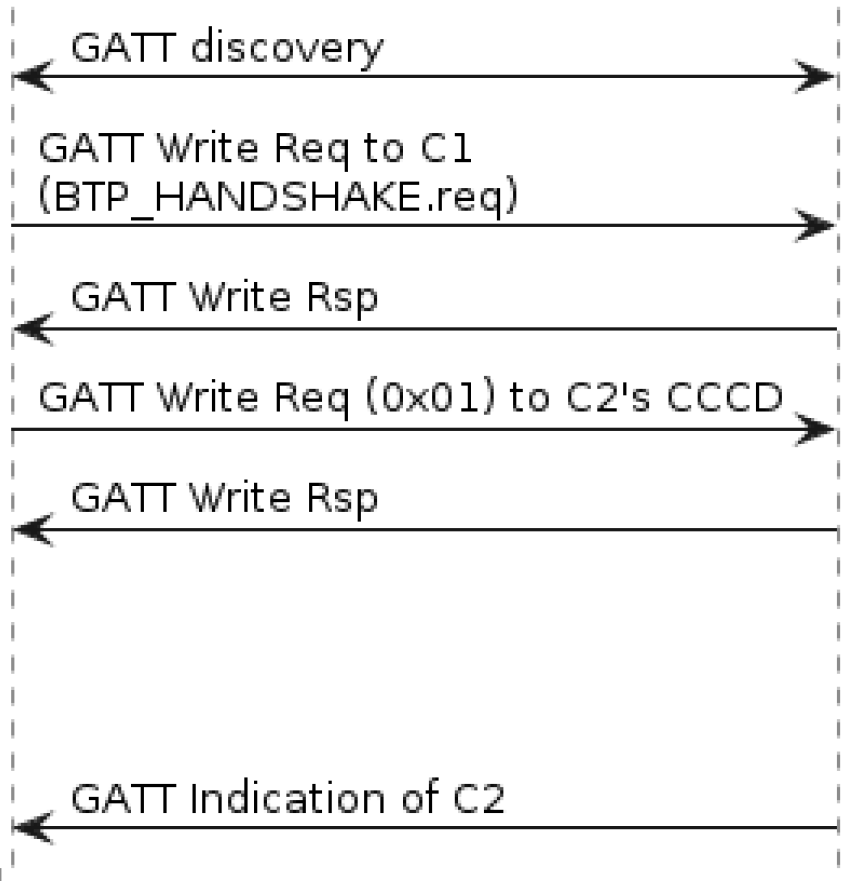
Once I write to the characteristic, I then configure the Indication
 _readCharacteristic.ValueChanged += ReadCharacteristic_ValueChanged;

 await _readCharacteristic.WriteClientCharacteristicConfigurationDescriptorAsync(GattClientCharacteristicConfigurationDescriptorValue.Indicate);
I get a Byte[] in the ReadCharacteristic_ValueChanged delegate and when I inspect it, I get the expected bytes!
Control Flags: 65
Management Opcode: 6C
Version: 4
The receipt of version 4 means we have established a BTP session!
Next Steps
I now have a communication channel between my code and the discovered Matter device.
The BTP code I’ve written will need to evolve to include sequence numbers and other elements, but it’s a start.
The next step in the commissioning flow is to establish a PASE session. This has something to do with the shared passcode we get from the Matter setup code. I’ll explore that in the next post!
All code can be found at https://github.com/tomasmcguinness/dotnet-matter


Leave a reply to Building a .Net Matter Controller – Commissioning Flow – PASE – @tomasmcguinness Cancel reply