
If you read this blog or watch my YouTube channel, you’ll know that I recently built a Tiny Dishwasher. One that emulates a Matter Smart Appliance.
I started that little project to learn more about the Matter smart home protocol. More specifically, the Energy Management parts of the Matter protocol. I’m intrigued about this aspect of Matter, but there are no real examples of this available. So, like any good programmer, I decided to make my own.
The Plan
My plan had a few moving parts
- Add an Energy Management endpoint to my Tiny Dishwasher.
- Figure out how to populate the Forecast when a program is started
- Display the forecast on something.
- Respond to a request to pause execution, delaying the start of the program.
Adding an Energy Management endpoint
The Device Energy Management cluster contains all the attributes and commands we need to provide this feature to the Tiny Dishwasher. I started by adding one in its own endpoint.
esp_matter::cluster::device_energy_management::config_t device_energy_management_config;

endpoint_t *device_energy_management_endpoint = esp_matter::cluster::device_energy_management::create(node, &device_energy_management_config, ENDPOINT_FLAG_NONE, NULL);

ABORT_APP_ON_FAILURE(device_energy_management_endpoint != nullptr ESP_LOGE(TAG, "Failed to create device energy management endpoint"));
Next, we need a delegate. This is just like the OperationalState and DishwasherMode clusters that are already present. I started with an empty definition.
namespace Clusters
{
  namespace DeviceEnergyManagement
  {
    class DeviceEnergyManagementDelegate : public DeviceEnergyManagement::Delegate
    }
  }
}
I then instantiate it and pass it to the configuration of the cluster.
static DeviceEnergyManagementDelegate device_energy_management_delegate;

device_energy_management::config_t device_energy_management_config;
device_energy_management_config.delegate = &device_energy_management_delegate;
Compilation then started to fail with lots of errors because I needed to implement all the methods of the delegate.

To populate the implementation of this delegate, I just looked to some of the samples
/connectedhomeip/examples/energy-management-app/energy-management-common/device-energy-management/include/DeviceEnergyManagementDelegateImpl.hI put enough in to get it to compile, using hard coded values where necessary. Like this:
int64_t DeviceEnergyManagementDelegate::GetAbsMinPower()
{
    return 0;
}

int64_t DeviceEnergyManagementDelegate::GetAbsMaxPower()
{
    return 1000;
}

OptOutStateEnum DeviceEnergyManagementDelegate::GetOptOutState()
{
    return OptOutStateEnum::kNoOptOut;
}
When I flashed my code onto my ESP32, it just started to crash.
Fortunately, this was down to my setup of the new endpoint. I was trying to create a cluster, rather than an endpoint! A quick correction and the Tiny Dishwasher was up and running.
esp_matter::endpoint::device_energy_management::create(node, &device_energy_management_config, ENDPOINT_FLAG_NONE, NULL);Using the matter.js shell, I queried the new endpoint and got some results.
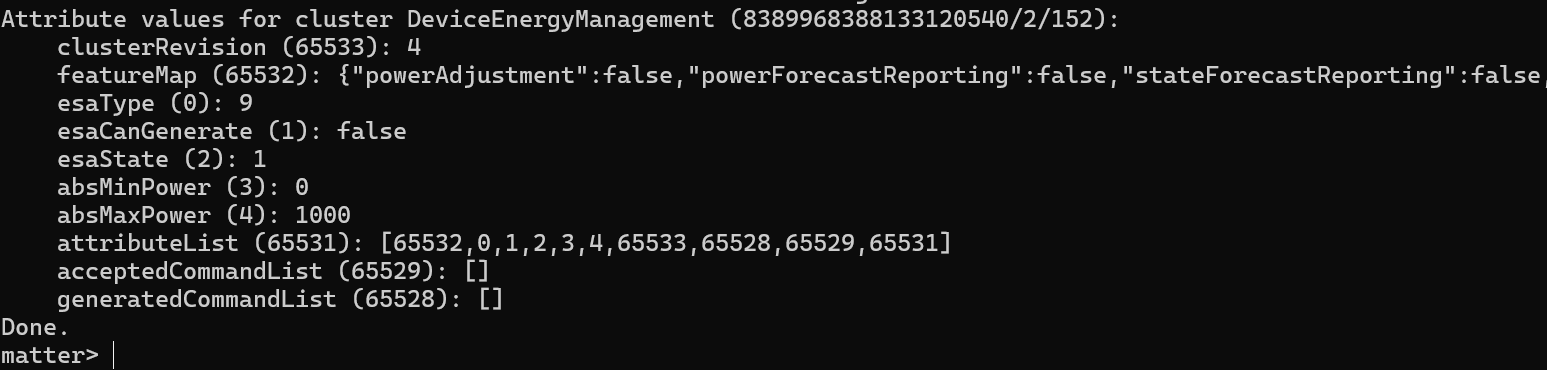
My delegate was working as expected!
Forecasting Energy Use
The energy forecast of a device is basically a time series, with a start and end time. It’s made up of slots, each with a duration, that tell you what the possible energy consumption will be. It can give a range too, useful for slightly variable things, like heating water. It goes further than just energy. It can indicate if a particular slot can be paused and for how long. In the case of the tiny dishwasher, this would be helpful where we could pause the rinse cycle, for example. Whereas pausing the heating of water would be silly (as the water would go cold!)
In other appliances, like EV chargers, they are more amenable to pausing and resuming.
To define a forecast, we use this type
DeviceEnergyManagement::Structs::ForecastStruct::TypeI then set up a simple forecast, that gets set when the DishwasherManager::StartProgram() is called.
uint32_t matterEpoch = 0;

CHIP_ERROR err = System::Clock::GetClock_MatterEpochS(matterEpoch);

if (err != CHIP_NO_ERROR)
{
    ChipLogError(Support, "ConfigureForecast could not get time");
    return;
}

forecast.startTime = matterEpoch + 60;
forecast.earliestStartTime = MakeOptional(DataModel::MakeNullable(matterEpoch));
forecast.endTime = matterEpoch + 60 + mTimeRemaining;

device_energy_management_delegate.SetForecast(forecast);
I took some of this code from one of the connectedhomeip examples. It basically gets the current time and then sets the time on the forecast, before calling a method on the delegate to store it.
Unfortunately, when I tried this with the mattejs shell, I got an error:
ERROR: Attribute 8389968388133120540/2/152/6 not supported.Cluster 0x06 (the Forecast) is reported as not being supported. This means that the esp-matter endpoint method isn’t adding the attribute to the cluster. I checked the specification for starters

I needed to read this block of nonsense: [!PA].a,(STA|PAU|FA|CON),O as I felt it relevant! Thankfully, the spec gave some more clarity:
The conformance rules specified above can be described as:
• At least one of the features SHALL be supported.
• At most one of the 'SFR' and 'PFR' features SHALL be supported.
• If one or more of the 'STA', 'PAU', 'FA', or 'CON' features are supported, then either the 'PFR' or the 'SFR' feature SHALL also be supported.
• If PA is supported, SFR SHALL NOT be supported
I took a look at the esp-matter code too.
if (config->feature_flags & feature::power_forecast_reporting::get_id()) {
    if ((!(config->feature_flags & feature::power_adjustment::get_id()) ||
        (config->feature_flags & feature::start_time_adjustment::get_id()) ||
        (config->feature_flags & feature::pausable::get_id()) ||
        (config->feature_flags & feature::forecast_adjustment::get_id()) ||
        (config->feature_flags & feature::constraint_based_adjustment::get_id()))) {
            feature::power_forecast_reporting::add(cluster);
    }
}
By the looks of this, I just needed to add support for STA (Start Time Adjustment) to make it work.
That didn’t work.
Then it clicked. Perhaps the matterjs shell didn’t support the attribute 🤣
I confirmed with the chip-tool and whilst it didn’t complain, it didn’t return an actual value either

The most likely issue: GetClock_MatterEpochS()
To help me more forward, I just ditched that in favour of a hard-coded value.
uint32_t matterEpoch = 1753198404;After a lot of messing around, I got something!
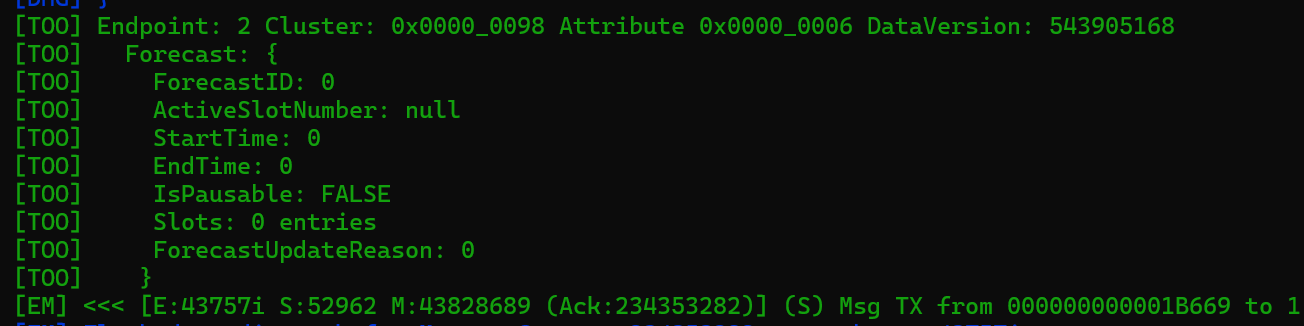
Whilst I had a forecast structure, it was all zero or null. I was expecting the StartTime to be 1753198464
It took me a while to debug this, but eventually I understood. The problem was the down to the instance of the delegate I was using. I had started defining the delegate in the app_main.cpp using this line (you’ll see this above)
static DeviceEnergyManagementDelegate device_energy_management_delegate;This approach meant that the delegate wasn’t accessible to the DishwasherManager, which is where I wanted to create the forecast.
I moved that line into the app_priv.h file and everything compiled, but my code didn’t behave. The only explanation I had was multiple instances, so I just added a basic constructor to my DeviceEnergyManagementDelegate
DeviceEnergyManagementDelegate() {     // Constructor
   ESP_LOGI("TEST","HELLO?");
}
Sure enough!

One instance of the delegate for each import of the app_priv.h file

My C++ skills are non existent, but after a little googling, I had my answer.
I changed the app_priv.h declaration to be an extern
extern chip::app::Clusters::DeviceEnergyManagement::DeviceEnergyManagementDelegate device_energy_management_delegate;and defined the instance in the app_driver.cpp file. This ensure that only one instance of the variable is created. With that change made, my fortunes improved. The matter.js shell returned it
{
    "forecastId": 0,
    "activeSlotNumber": 0,
    "startTime": 1753198464,
    "endTime": 1753198494,
    "earliestStartTime": 1753198404,
    "isPausable": true,
    "slots": [
        {
            "minDuration": 1082417152,
            "maxDuration": 1082417152,
            "defaultDuration": 0,
            "elapsedSlotTime": 536875008,
            "remainingSlotTime": 8,
            "maxPauseDuration": 2,
            "manufacturerEsaState": 16517,
            "minPower": "4758817228110154896",
            "maxPower": "4648258954525448848",
            "nominalEnergy": "12897465435",
            "minDurationAdjustment": 1
        }
    ],
    "forecastUpdateReason": 0
}
I successfully populated the forecast and was even bold enough to add a slot!
Displaying the forecast
With my forecast basically there, it was time to move to the next step, rendering it.
I had started working on this part of my project already, so I was a little ahead of the curve. I had created a NextJS application to provide a UI that allowed me to add and view nodes. Nothing fancy, but enough to help me get to grips with the MatterJS API.
As I set about wiring up some Javascript to subscribe to the forecast, things started to go wrong. Instead of returning the forecast I had configured, I started getting this:

Once I removed the slots, it resumed working

Memory pressure?
Anyway, I decided to carry on. With my trimmed down forecast, my server started logging the new forecast. It didn’t have any slots, but it was a forecast!

After a lot of messing around, I got the times appearing.
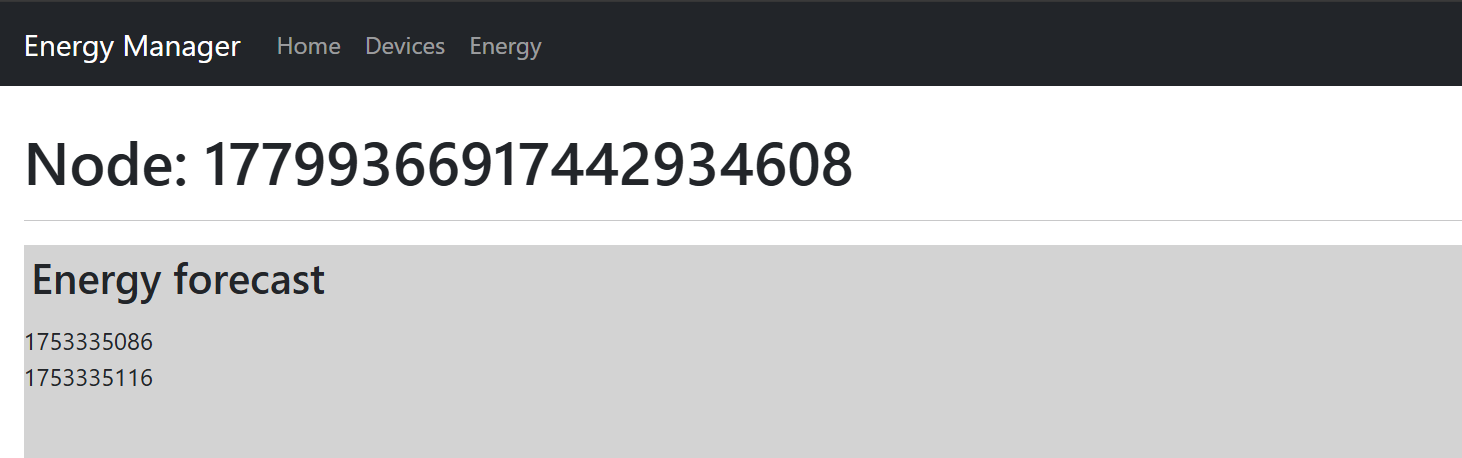
The times are great, but the real power of the forecast comes from the slots.
Fixing the Forecast
I found that if I didn’t include any slots in the forecast, it was returned without issue 100% of the time. This, I didn’t really understand. To see if I could get more information, I turned to the logging, but enabling CHIP Logging. As soon as I requested the Forecast, this was logged

Did I have too much data to return?? A forecast with one slot didn’t seem all that useful.
What was annoying me the most was that it *did* work. So, I returned to that state, setting up the Forecast within the Delegate itself.
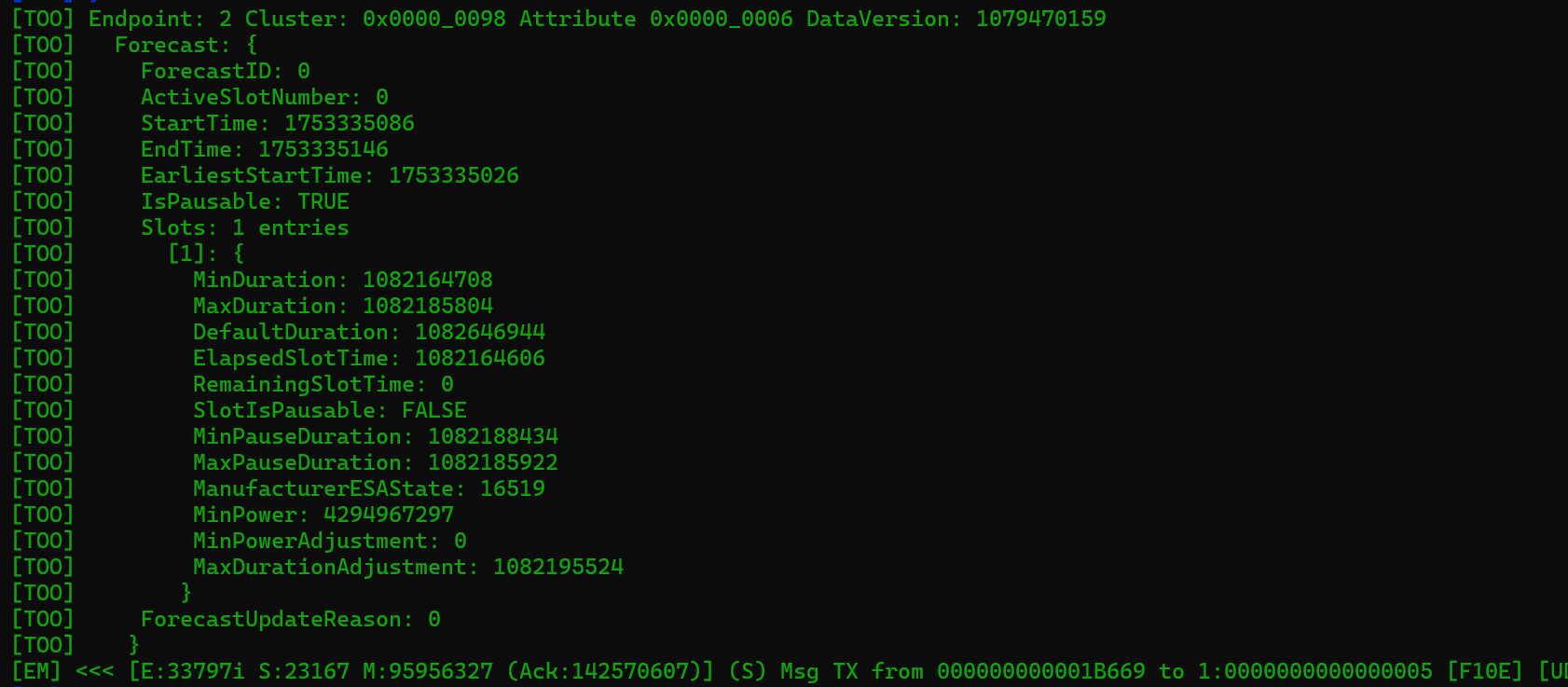
As if my magic, chip-tool started to get the proper result. There was clearly a PEBKAC. I must be doing some daft with a reference or a pointer or something. Anyway. No point in dwelling, I had a slot. To get my HTML working, I added a few more slots to mirror my dishwasher program. That would give me some better to try and render.
It was at this point that I also noticed a discrepancy in the slots. This is my code
slots[0].minDuration = 10;
slots[0].maxDuration = 20;
slots[0].defaultDuration = 15;
slots[0].elapsedSlotTime = 0;
slots[0].remainingSlotTime = 0;

slots[0].slotIsPausable.SetValue(true);
slots[0].minPauseDuration.SetValue(10);
slots[0].maxPauseDuration.SetValue(60);

slots[0].nominalPower.SetValue(2500000);
slots[0].minPower.SetValue(1200000);
slots[0].maxPower.SetValue(7600000);
slots[0].nominalEnergy.SetValue(2000);
and this is the JSON displayed by the matter.js shell
{
    "forecastId": 0,
    "activeSlotNumber": 0,
    "startTime": 1753335086,
    "endTime": 1753335146,
    "earliestStartTime": 1753335026,
    "isPausable": true,
    "slots": [
        {
            "minDuration": 1082164708,
            "maxDuration": 1082185804,
            "defaultDuration": 1082646944,
            "elapsedSlotTime": 1082164606,
            "remainingSlotTime": 0,
            "slotIsPausable": false,
            "minPauseDuration": 1082188434,
            "maxPauseDuration": 1082185922,
            "manufacturerEsaState": 16519,
            "minPower": "4294967297",
            "minPowerAdjustment": 0,
            "maxDurationAdjustment": 1082195524
        }
    ],
    "forecastUpdateReason": 0
}
First off, the numbers are rubbish. I’m sending a minDuration of 10s and this is giving me 12,000 years. Not quite Deep Thought territory, but longer than my dishwasher would physically last. Or society as we know it at any rate.
I cross referenced this with the specification and found what I thought was the issue. The fields being returned as marked as Mandatory, supports State Forecast Adjustment or Supports Forecast Adjustment.
Did my Device Power Management Cluster have the wrong Features enabled? I was convinced I had configured it correctly and matter.js agreed with me when I queried the node.

It could also be because the data is rubbish and optional values aren’t being sent?
I decided to try the same thing with the Forecast. Define it on the Delegate itself, rather than creating it inside the constructor.
private:
                                        DeviceEnergyManagement::Structs::ForecastStruct::Type sForecast;
DeviceEnergyManagement::Structs::SlotStruct::Type sSlots[10];
I gave it a size of 10 as that’s the maximum that is allowed in the specification. Once I made that change, BINGO!

I really need to do a C++ course to understand what is going on!
I added the nominalPower value and wired it into my UI

I added another two slots and chucked a border around them.

That’s enough for now!
Delaying the Start!
The last item on my list from above is the ability to change the start of the program.
Notice I said change and not delay. This is because you can move the start time forwards or backwards, depending. Let’s look at the Forecast attribute again

You can see the StartTime and EndTime, but there is also an EarliestStartTime and LatestEndTime.
These gives us the bounds of the forecast. The user might set the appliance to start in an hour’s time, but wouldn’t mind if it started immediately. With the EndTime, the user might need their car charged by a fixed time. We can’t end later than that.
In the case of my Tiny Dishwasher, imagine a scenario where the user turns it on after dinner. The Energy Manager knows that cheaper electricity is available at midnight, so it asks the dishwasher to delay its start.
I added a new API to my web app and wired in a call to the startTimeAdjustRequest
await deviceEnergyManagement.startTimeAdjustRequest({
    requestedStartTime: 1000,
    cause: DeviceEnergyManagement.AdjustmentCause.LocalOptimization
});
A start time of 1000 is obviously not a good value, but I just want to see if the command arrives.
Sure enough, the command did arrive and was immediately rejected 🤣

This is right too. As I have the Start Time Adjustment (STA) feature enabled, the specification states that I must populate the earliest start time and latest end time values

I add those value
sForecast.startTime = currentTime + 60;
sForecast.earliestStartTime = MakeOptional(DataModel::MakeNullable(currentTime));
sForecast.latestEndTime = MakeOptional(currentTime + 240);
sForecast.endTime = currentTime + 120;
This basically indicates the operation will start in one minute but can start now. It will end two minutes (having a one-minute duration) but can end in 4 minutes time.
This moved things along. Seems using a ridiculous adjustment time was a silly idea.

I tweaked the requestedStartTime in my JavaScript and ….

Success! My delegate handler was called with the new time.
Next Steps
I have just scratched the surface of the Device Power Management cluster.
I will continue to build out support for the slots inside the Tiny Dishwasher. I want align the various Programs with different forecasts. For example, I would expect Quick to be shorter and use more power than Eco. I need to get a handle on C++ and understand this RESOURCE_EXHAUSED crap too.
From my web application, I want to improve the rendering of the slots, so I can visualise the forecasts.
My tiny dishwasher code is here: https://github.com/tomasmcguinness/matter-esp32-tiny-dishwasher
The energy manager is here: https://github.com/tomasmcguinness/matter-js-energy-manager
Stay Tuned!
UPDATE!
I managed to resolve the RESOURCE_EXHAUSTED issue and I can now reliably update the Forecast attribute. The blog post is linked below!


Leave a reply to Matter – Fixing the RESOURCE_EXHAUSTED error in the energy forecast – @tomasmcguinness Cancel reply